You've finished a track, and you can already picture its video: a performer walking through a rain-soaked city, streetlights changing with the chorus, the final scene fading with the last note. What you don't have is a camera crew, a location budget, or weeks to coordinate a shoot.
An AI music video can turn that concept into generated footage. But getting attractive scenes isn't the same as making a finished video. You still need a production plan that connects the song, the shots, the timing, and the permissions behind every recognizable voice or face.
Table of Contents
- What an AI Music Video Actually Is
- Four Ways AI Music Videos Are Made
- How the Visuals Stay Locked to the Music
- Where AI Music Videos Get Used
- Pros and Cons of AI-Made Music Videos
- Disclosure and Ownership Checks Before You Publish
- Choosing an AI Music Video Tool for Your Project
What an AI Music Video Actually Is
An AI music video uses generative AI to produce most or all of its visuals, then presents those visuals in time with a song. Instead of filming every scene, you give a model instructions and inputs from which it generates imagery and motion.
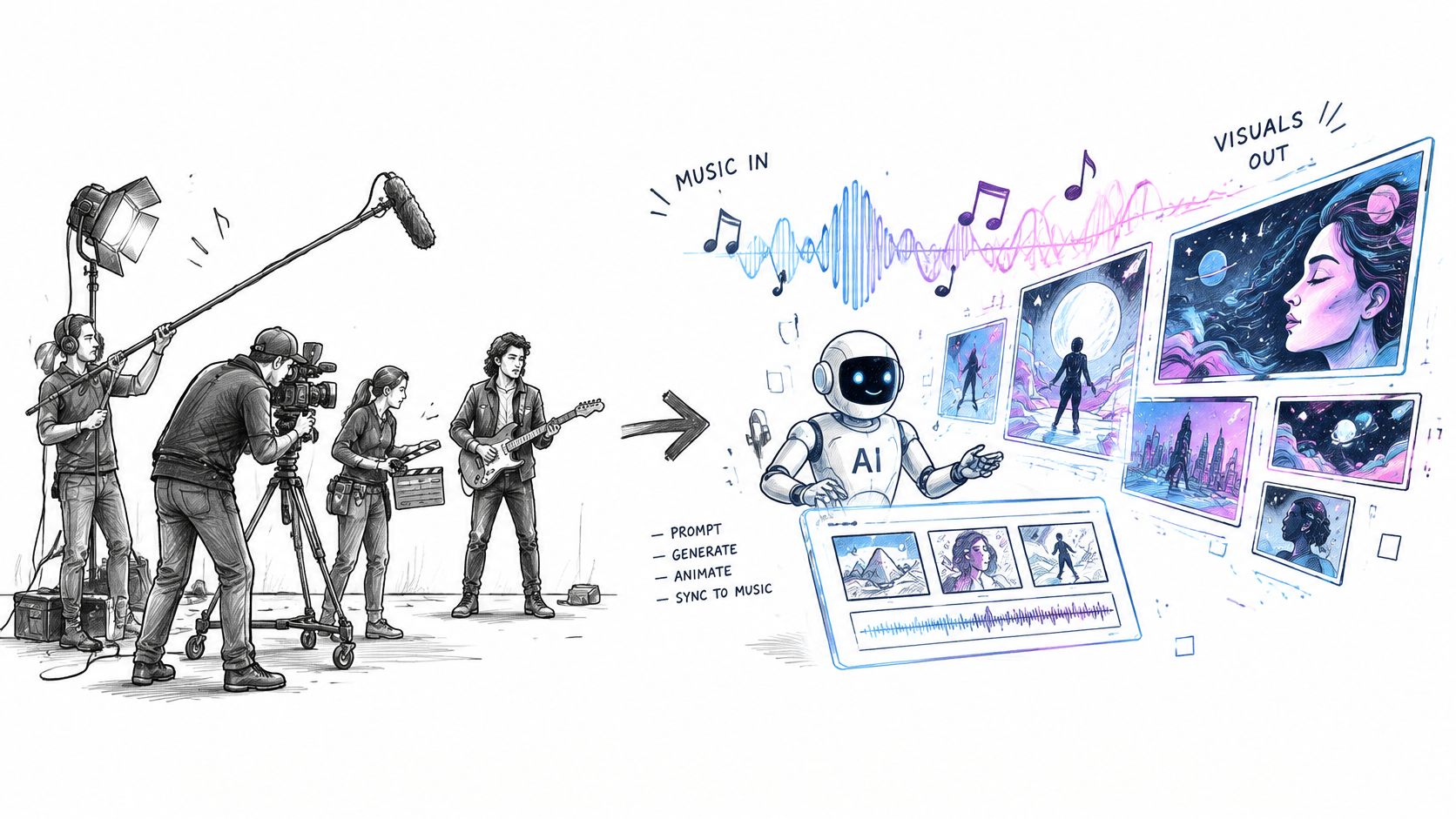
Think of the software as a virtual film crew. Your prompt supplies the director's brief, reference images guide the art department, and the model generates footage. An editor, whether human-operated or partly automated, still has to shape that footage around the music.
What counts as AI production
The term covers a spectrum:
- Fully generated visuals: Your rain-soaked city, performer, and camera movements are generated rather than filmed.
- Mixed footage: You film the singer and insert generated cityscapes between performance shots.
- AI-enhanced performance: You keep the original footage but use AI to transform backgrounds or add effects.
Typical inputs include an audio file, lyrics or a text prompt, and an optional character reference image. The output might be a full-song video or a short promotional excerpt. You still choose the concept, approve the cut points, and decide what's ready to publish.
The commercial context is substantial: a 2024 CISAC study projected that fully AI-generated audiovisual outputs would reach approximately €48 billion annually by 2028. That's a forecast for a broad audiovisual category, not a measured market total for music videos alone.
An AI music video is a production method, not a genre of music.
Four Ways AI Music Videos Are Made
An academic discussion of music visualization traces the first known music-visual slideshow to Joseph Stern and Edward Mark's late-nineteenth-century presentation of A Little Lost Child and reports a fully AI-generated music-video upload to YouTube on November 24, 2023. The important change is from arranging existing images to generating the visual presentation itself, although that reported milestone shouldn't be treated as an uncontested first.
Your best production route depends on what you already have and what should lead the creative decisions.
Four AI music video approaches compared
| Approach | Starting input | What the AI generates | Best fit |
|---|---|---|---|
| Prompt-to-video | Written prompt or script | Scenes, motion, and voice where supported | Concept-led clips and fast drafts |
| Music-to-video | Finished audio track | Visuals organized around beats, mood, and song sections | Artists whose song should drive the visuals |
| Lyric or visualizer | Track plus lyrics | Animated text and abstract motion | Lyric videos and audio teasers on a small budget |
| Hybrid edit | Filmed footage plus AI clips | Inserted scenes, b-roll, and effects | Artists who already film and want extra scenes |
Choose by your starting material
Prompt-to-video begins with a visual idea. Prepare a scene brief describing the subject, setting, action, lighting, and camera movement. It suits a concept such as a deserted nightclub slowly filling with flowers, but a compelling prompt doesn't automatically produce musically timed shots.
Music-to-video begins with the finished recording. Prepare the final audio mix and identify the sections that deserve distinct treatment. Check whether the tool analyzes the audio or places generated footage beneath it, because those are different capabilities.
Lyric videos and visualizers prioritize words or abstract movement rather than elaborate storytelling. Prepare corrected lyrics and line timing, then add text in an editor so spelling stays under your control. This is a practical low-complexity route, although elaborate typography can still demand careful work.
Hybrid editing preserves material you've filmed. Prepare selects from the performance and a list of missing shots, such as an impossible exterior or a dream sequence. The challenge is matching generated inserts to the footage's lighting, color, and camera language.
Choose music-to-video when the song should determine the visual structure. Choose prompt-to-video when the central attraction is a visual concept, and hybrid editing when the live performance deserves to remain the anchor.
How the Visuals Stay Locked to the Music
A cut can land on a beat and still feel wrong. Temporal synchronization concerns when something happens; semantic alignment concerns whether the image belongs with the music's mood and meaning.
Treat these as separate review tasks. Your imaginary film crew needs both an editor who understands rhythm and a director who understands the song.
Build timing into the production
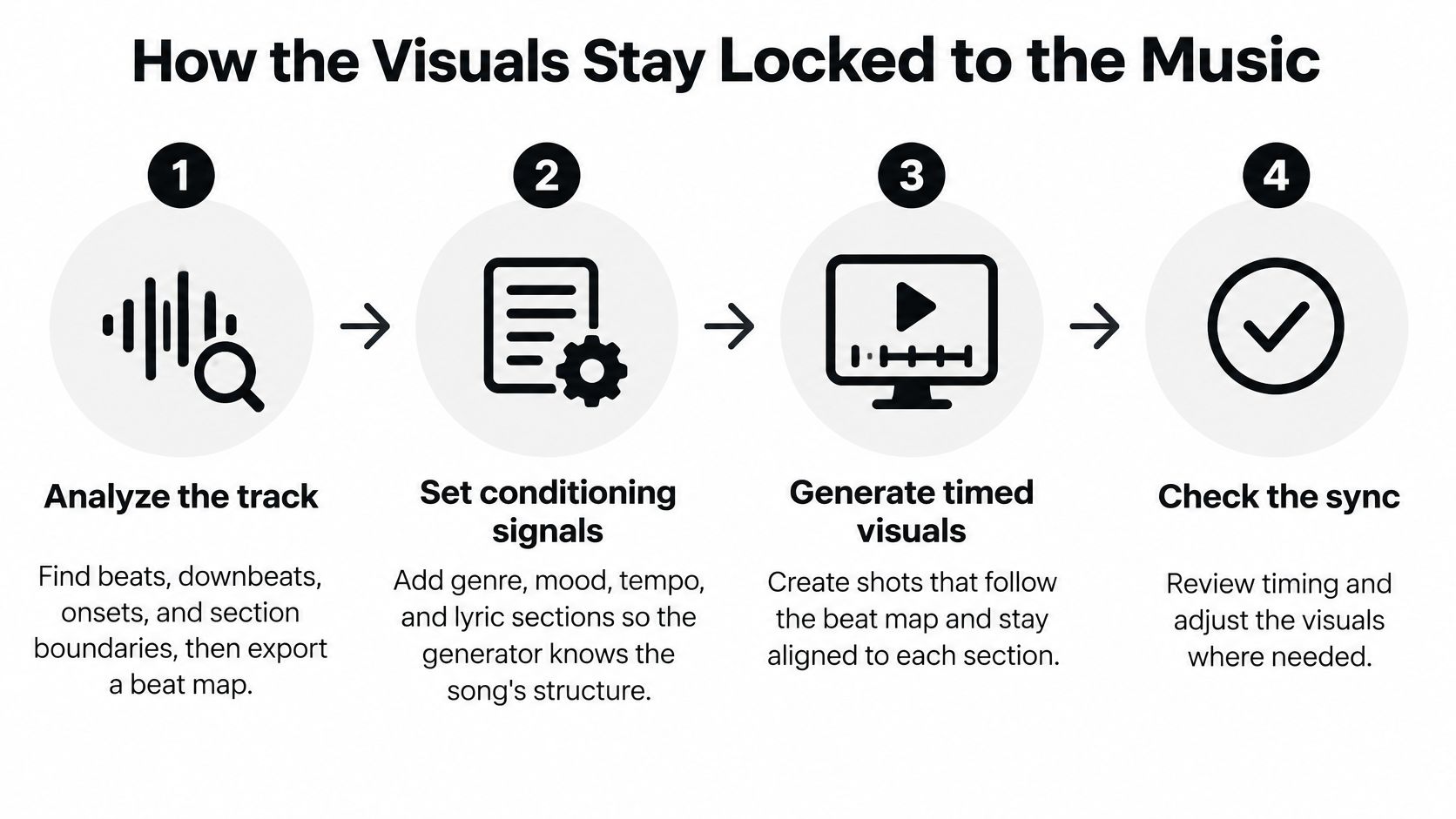
Analyze the track. Identify beats, downbeats, musical onsets, and section boundaries in your audio editor or workstation. Export markers or a beat map so you're not rebuilding the timing by ear during every revision.
Set the conditioning signals. Supply genre, mood, tempo, and lyric sections wherever the tool supports them. Describe an intimate verse differently from an explosive chorus, even if both feature the same location.
Plan meaningful scene boundaries. Place important transitions at events such as the chorus entrance, a drum fill, or a sudden silence. You don't need a cut on every beat, because relentless cutting can flatten the song's larger shape.
Generate by energy level. Group quiet shots separately from dynamic performance or action shots. For the rain-soaked city example, a still close-up might fit the verse while a moving street-level shot supports the chorus.
Assemble and inspect the timeline. Keep the approved recording fixed while trimming the visuals around it. Watch each transition for early or late motion, and check whether the intended visual peak still meets the musical accent.
Score the scene's meaning. Ask whether its movement, color, subject, and emotional tone support that passage. A technically polished celebration scene may be unsuitable beneath a lyric about isolation.
Keep a repeatable test set. Save representative excerpts with different tempos, genres, and shot requirements. Use the same material when comparing tools or revised prompts, rather than judging each generator on an unrelated showcase.
What synchronization findings actually tell you
Adobe Research's V2M-Zero system reported 21–52% improvements in temporal synchronization and 28% better beat alignment on dance videos relative to its strongest prior baselines. Its task was generating music for video, not creating video from a song, so these findings aren't a performance promise for music-video tools.
The useful production principle is separating control over meaning from control over timing. Explicit instructions about mood won't replace a timeline, and a beat grid won't decide which image expresses a lyric.
An ACM publication on audiovisual generation evaluation identifies audio fidelity, audio diversity, semantic alignment, and temporal synchronization as evaluation dimensions while noting limitations in standardized benchmarks. For your own checks, use a scene log with separate fields for visual quality, musical fit, and timing corrections.
Where AI Music Videos Get Used
For an artist's full-song video, the recording is the backbone. The visuals need to sustain interest across changing sections without losing the performer's identity or abandoning the central idea halfway through.
A product ad has a different job. The viewer needs to understand the product and the message, while the music may remain in the background. A beautiful sequence that hides the product is a poor advertising edit, even if it would work in an artist's video.
Typical AI music video formats and what they reward
| Use case | Typical length | What drives results | Common platforms |
|---|---|---|---|
| Artist music video | Full song | Beat-synced cuts and consistent characters | YouTube, Instagram, music platform visuals |
| UGC-style product ad | Brief product demonstration | Immediate hook and a natural script | TikTok, Instagram Reels, Meta ads |
| YouTube or TikTok Short | Selected musical excerpt | Vertical framing, purposeful pacing, and readable captions | YouTube Shorts, TikTok |
| Faceless music channel | Complete track or curated excerpt | Sustainable publishing and a repeatable visual style | YouTube, TikTok |
These are planning categories, not platform duration limits. Set the actual running time around the song, campaign brief, and current upload requirements.
Match the format to the viewing situation
For artist releases, plan recurring visual motifs. A red umbrella appearing in different locations can make separate generated scenes feel connected without requiring a complicated plot. Preserve enough visual contrast that the chorus feels like an arrival rather than another interchangeable shot.
For UGC-style advertising, write the spoken message before generating the supporting imagery. Keep product details accurate, especially packaging, labels, and anything a buyer might interpret as evidence of how the product works. Don't use a synthetic presenter to imply a genuine customer experience that didn't happen.
For short-form music promotion, select an excerpt that makes sense without the rest of the song. Compose for vertical framing from the start instead of assuming a wide shot can survive a crop. Check captions with the sound muted, then listen again to confirm the music hasn't become an afterthought.
For faceless channels, define a reusable visual language: palette, typography, transitions, and recurring subjects. Jaminel Technology described Revid on Trustpilot as “the best faceless content tool for YouTubers,” but that's an individual opinion, not evidence that any upload strategy will succeed.
Format test: Decide what the viewer should understand or feel before choosing how to generate the footage.
Pros and Cons of AI-Made Music Videos
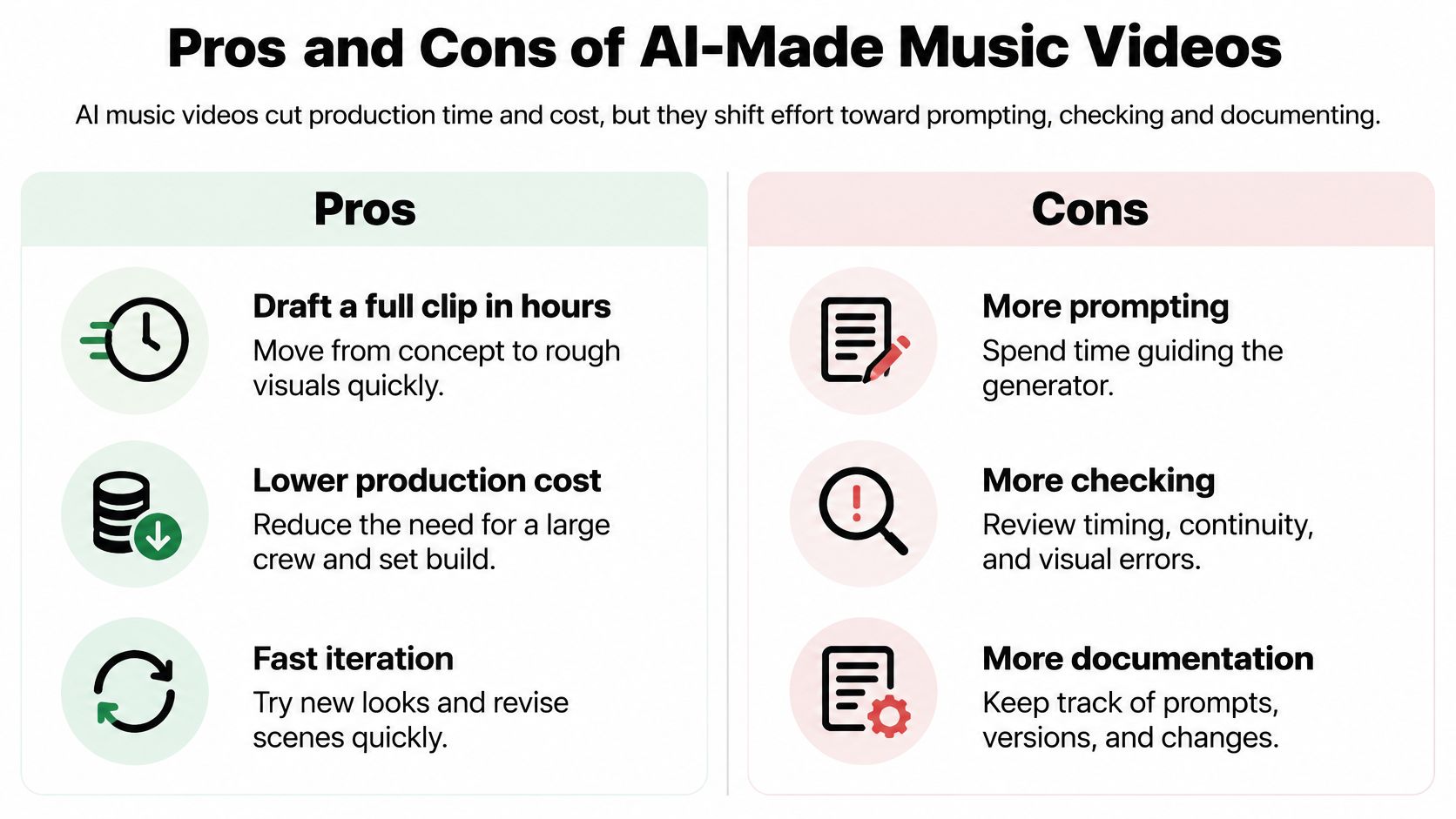
AI can reduce filming and set-building work, but you'll spend more effort directing generations, checking output, and documenting what went into the finished video. Whether that exchange saves money depends on how much unusable footage you generate and how demanding the brief is.
Use the comparison below as a planning aid, not a guaranteed production schedule.
Benefits and their practical limits
- Fewer physical production requirements: Generate an imaginary rooftop without booking a location, but don't assume you'll get exact architectural control.
- Easier concept exploration: Test watercolor and graphic-novel treatments for the same song before committing, while accounting for discarded generations.
- Reusable campaign material: Build alternative opening shots from an approved concept, then inspect each version rather than assuming the new render preserves every detail.
- Access to impossible scenes: Create a street folding into the sky, provided the surreal effect serves the song rather than distracting from it.
Problems that still need a person
- Character drift: A performer's jacket, facial features, or hairstyle may change between scenes.
- Unreliable details: Hands, instrument strings, signage, and small objects can look plausible at first glance but fail under inspection.
- Awkward performance: A digital singer may move their mouth during a non-vocal passage or handle a guitar unnaturally.
- Audience mismatch: A visibly synthetic treatment may undermine a song whose appeal depends on intimacy and a believable performance.
- More production administration: A visually usable shot may still need a replacement because its source material or permissions aren't clear.
A moving example can help you judge what you'd accept in your own edit.
Review generated footage at normal playback speed and frame by frame where necessary. Give special attention to the opening, chorus entrances, close-ups, and ending, because mistakes in those moments can distract from the whole concept.
Use AI for exploration and iteration. Keep human approval for the final cut.
Disclosure and Ownership Checks Before You Publish
Disclosure and permission are different questions. Telling viewers that a singer is synthetic doesn't give you permission to imitate someone's voice, and a commercial tool subscription doesn't clear a reference photograph.
Review the components separately. A video can combine human-written lyrics, generated music, stylized backgrounds, and a realistic digital performer, with a different decision attached to each.
Disclosure and permission by video component
| Component | Example | Disclosure trigger | Permission needed |
|---|---|---|---|
| Written lyrics and script | Human-written lyrics and captions | Ordinary script and caption assistance doesn't require an AI label | Normal rights in the lyrics |
| AI-generated instrumental | Music from a generator | Check the platform's current synthetic-music rule | Confirm the music tool's commercial terms |
| Cloned or synthetic vocal | Voice resembling a real singer | Realistic synthetic audio that could mislead viewers | Consent for use of the identifiable voice |
| Realistic digital performer | Photoreal person or scene | Realistic altered or synthetic content | Likeness permission if a person is recognizable |
| Stylized animation | Cartoon or abstract visuals | Generally outside realistic-content triggers | Rights to use reference images and other source material |
Check what viewers could mistake for reality
YouTube's synthetic-content guidance requires disclosure for meaningfully altered or synthetic content viewers could mistake for a real person, place, scene, or event, while excluding ordinary production assistance such as scripts and captions. Don't interpret that distinction as a blanket exemption for music: check the current upload guidance for generated audio as well as imagery.
TikTok similarly distinguishes realistic synthetic audio and imagery from workflow assistance. Review its current upload controls directly, rather than assuming a disclosure entered on another platform carries over.
A useful comparison is an illustrated moon singing above a cartoon city versus a photorealistic performer who appears to be a known artist. The first is plainly stylized; the second creates questions about identity and authenticity. Neither example removes the need to clear the underlying music and source assets.
A label explains how something was made. It doesn't authorize what was used.
Keep the release record with the edit
Create a production folder alongside the final export. For each component, record its origin, intended use, permission status, and disclosure decision, so these checks don't become a last-minute upload task.
Before publishing:
- Confirm disclosure triggers: Inspect the audio, performer, locations, and events separately.
- Record permissions: Retain relevant music licenses, voice consents, likeness releases, and reference-image licenses.
- Preserve the production trail: Save prompts, source files, selected generations, and the edit timeline.
- Inspect each destination: Complete YouTube and TikTok's applicable upload disclosures and review campaign requirements for paid placements.
Transparent labeling is a more defensible release practice than trying to hide central AI involvement. Platforms can apply their own labels, and viewers shouldn't have to discover an imitation after treating it as authentic.
Choosing an AI Music Video Tool for Your Project
An AI music video tool fits best when you need creative exploration, repeatable short-form production, or visuals you couldn't practically film. It's a less comfortable fit when every frame must reproduce a fixed performer, precise product geometry, or tightly specified brand footage.
Choose the workflow before the subscription. Start with music-to-video when the recording should lead, prompt-to-video when the concept leads, or a hybrid edit when you already have strong filmed material.
Separate the ownership questions
The AI music reference guide discusses U.S. Copyright Office guidance that protects human creativity and requires applicants to disclose more-than-minimal AI-generated material while identifying their human-authored contribution. Paying for access to a generator isn't the same as securing copyright protection for everything it produces.
Evaluate these questions independently:
- Tool output rights: What does the service agreement let you do with exported material?
- Copyright protection: Which contributions are yours, such as lyrics, shot selection, choreography, editing, or compositing?
- Commercial permission: Have you cleared the music, samples, identifiable people, voices, and other protected material?
- Monetization eligibility: Does the finished upload meet the destination platform's current requirements?
Keep the applicable tool terms with the project, not just a receipt. A license to use output, protection against copying, and eligibility to earn platform revenue aren't interchangeable promises.
Test the production rather than the showcase
Revid lets users enter a prompt and generate a script, visuals, and voice together, and its Music to Video feature offers a song-led route. Those starting points serve different jobs: a narrated promotional clip doesn't need the same controls as an artist's performance-led video.
Expect to revise prompts, reject shots, and adjust the edit. A polished demonstration shows what's possible, but your own track reveals whether the tool handles the pacing, subject, and continuity you need.
We're the Revid team's review site, so our buyer guides should be read with that relationship in mind. Use our public-review collection to inspect original creator feedback, including limitations, rather than treating enthusiastic testimonials as a forecast.
This week, test a passage that includes a meaningful musical transition. Keep the audio fixed, write a shot brief, log the timing corrections and rejected scenes, and complete the component-level permissions check before deciding whether the workflow is worth paying for.
Revid Reviews collects public feedback from Trustpilot, X, and Product Hunt, with links to the originals, alongside buyer guides about costs, credits, alternatives, and limitations. Visit Revid Reviews to compare those accounts with the results of your own AI music video test before subscribing.