86% of U.S. digital-video buyers were already using or planning to use generative AI for video-ad creative in 2025, according to the Interactive Advertising Bureau's advertiser survey. That measures adoption and intent, not better advertising results. The useful question isn't whether AI can make an ad, but whether it helps you find a message worth putting money behind.
Treat AI video ads as a rapid testing system, not a guaranteed performance boost. You can draft alternative openings, assemble scenes and adapt an approved concept without rebuilding the entire production. Every shortcut still needs a corresponding check for product accuracy, audience trust and business results.
Table of Contents
- How AI Video Ads Are Produced Stage by Stage
- Formats and Lengths That Fit Each Placement
- Building Variants for Different Audiences
- Disclosure and Trust When Ads Use AI
- Tools for Each Step of an AI Video Ad Workflow
- Test AI Video Ads Before You Scale Them
How AI Video Ads Are Produced Stage by Stage
AI video advertising is already part of mainstream production: Streaming Media's coverage of the IAB report describes the widespread adoption among U.S. buyers. An AI video ad is a video in which generative tools produce some or most of the script, scenes, voice, captions or edits, while people direct and approve the result.
That doesn't mean typing a sentence and accepting whatever appears. A practical starting point is an existing offer, approved product assets and a clear creative direction. AI then helps turn that foundation into drafts and variations.
The production flow separates generation from approval and measurement.
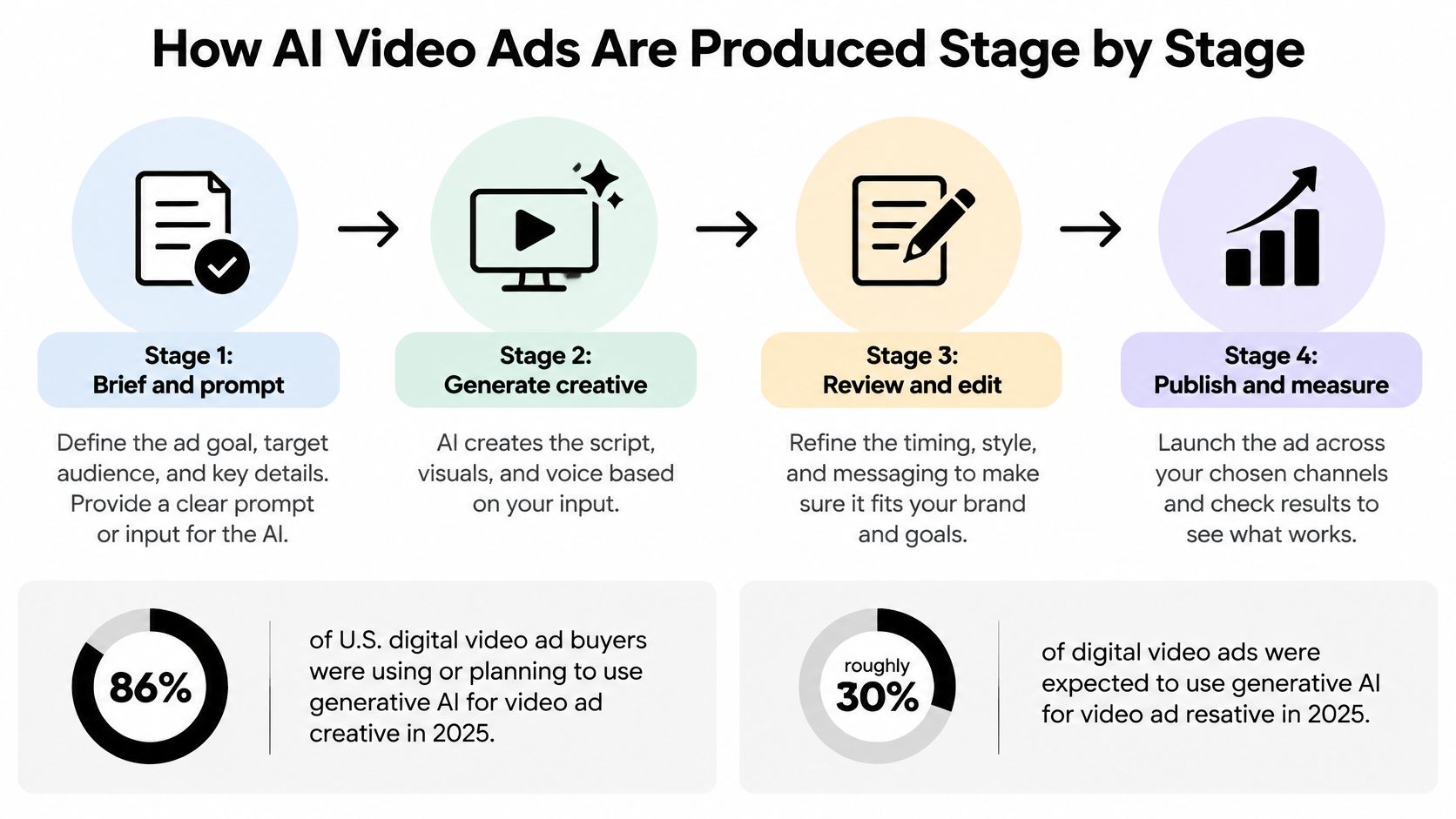
From brief to publishable draft
- Write the brief. Specify the offer, intended buyer, platform and desired action. For a bakery, that might mean promoting advance orders to nearby office managers, rather than vaguely asking for an appealing food video.
- Generate hook and script options. Request contrasting approaches, such as convenience, product quality and occasion. Choose an angle before generating footage so you don't spend production time polishing an unsuitable message.
- Produce scenes or product shots. Supply real photographs, packaging and screen recordings wherever accuracy matters. Use generated material for supporting scenes, not invented evidence of what the product can do.
- Add voiceover and captions. Listen for pronunciation, unnatural emphasis and mismatches between spoken words and text. Check the silent version too, because the offer should remain understandable without audio.
- Prepare placement-specific edits. Make vertical and square versions as needed. Reposition captions and product details deliberately rather than assuming an automatic crop preserves everything.
- Review before launch. Check claims, brand fit, music rights and disclosure wording. Assign a named approver who can reject an attractive but misleading scene.
Keep ownership clear
AI and human roles across the ad production workflow
| Stage | What AI produces | What people decide |
|---|---|---|
| Concept and script | Hook options, scripts and angles from a brief | Which angle fits the offer and brand voice |
| Visuals and footage | Generated scenes, b-roll and product shots | Whether visuals are accurate and on-brand |
| Voiceover and captions | Synthetic voice and timed captions | Tone, pronunciation and required legal wording |
| Edit and format | Vertical, square and landscape cuts | Pacing and length for each placement |
| Variants | Multiple versions from one master edit | Which variants go live and in what order |
| Review | Flags for obvious errors and inconsistencies | Claims, legal sign-off and disclosure wording |
An automated review can help find mistakes, but it isn't approval. People still own the direction, factual accuracy and decision to publish.
Formats and Lengths That Fit Each Placement
Mid-roll, pre-roll, then post-roll was the completion ranking in a large quasi-experimental video-ad measurement study: the same ad was 18.1% more likely to complete mid-roll than pre-roll, while pre-roll was 14.3% more likely to complete than post-roll. These are relative completion differences in that study, not percentage-point gains or predictions for your campaign.
Placement changes the viewing situation. A viewer already watching longer content encounters a mid-roll ad differently from someone scrolling past a social post. Don't judge an AI-generated cut independently of where people will see it.
This comparison illustrates why delivery deserves attention alongside the creative.
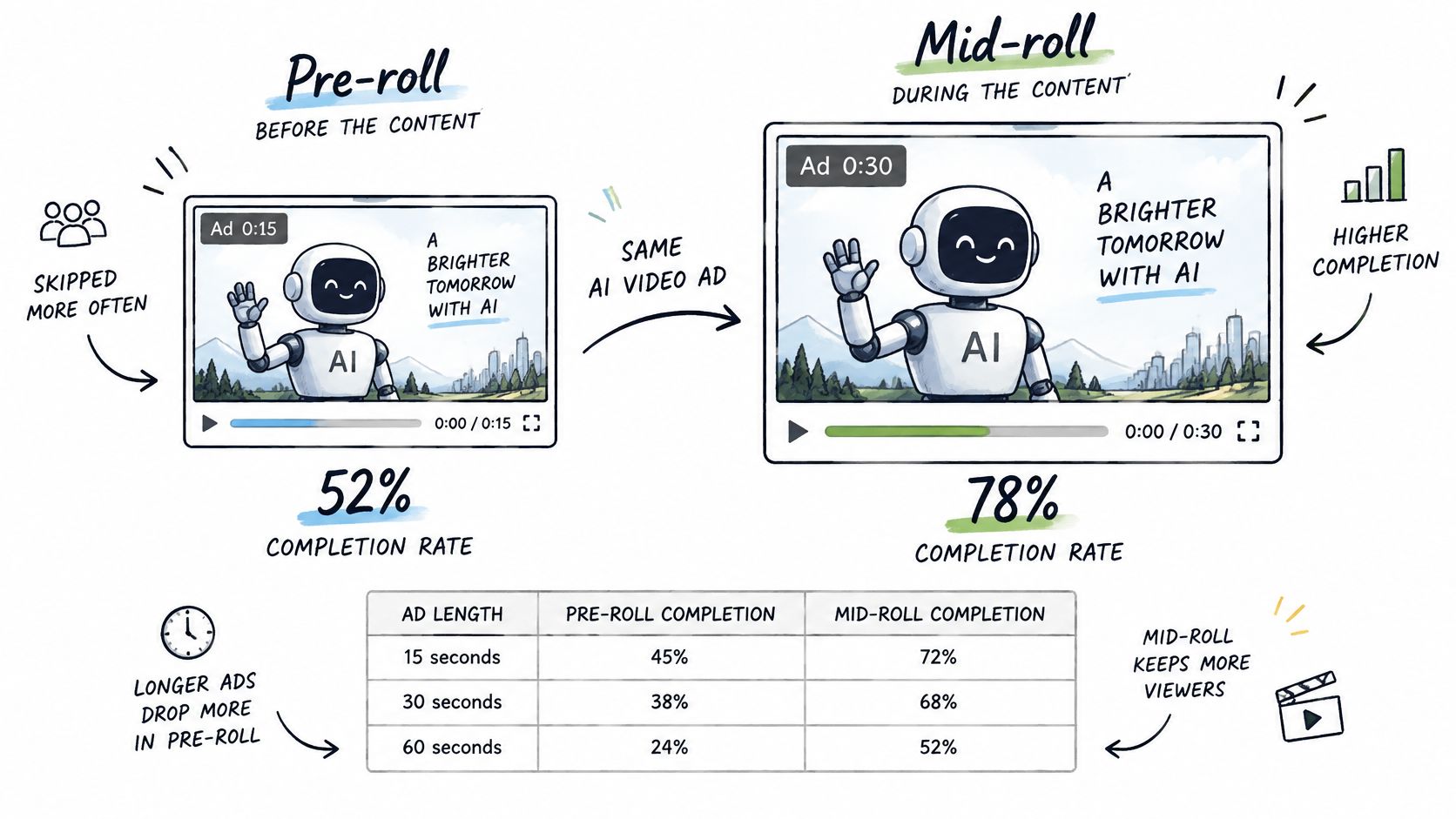
Choose the format before polishing scenes
Use the following as an editing plan, not a claim that every platform requires the same duration. Start with a concise cut that delivers the problem, benefit and action without unnecessary setup, then extend only when the explanation needs it.
Ad formats, lengths and placements
| Format | Typical length | Where it runs | Fit for AI generation |
|---|---|---|---|
| Short vertical ad | Concise hook-to-action cut | TikTok, Instagram Reels, YouTube Shorts | High for producing alternative openings |
| Pre-roll in-stream | Short standalone introduction | Before longer video content | Medium, the opening must earn attention immediately |
| Mid-roll in-stream | Brief, self-contained message | Inside longer content | Medium, avoid relying on earlier campaign context |
| Interactive or end-card | Short main cut with a clear action | CTV and web video | High for modular CTA assets |
| Product demo | Long enough to show the relevant task | Social feeds and web video | High for assembly, with careful product verification |
| UGC-style testimonial | Focused account of a specific experience | Social feeds | Low to medium, authenticity needs protection |
For interactive creative, industry benchmark coverage published by Digital Dealer reported a 9.57% interaction rate for interactive VPAID ads across more than 3 billion global ad impressions. That historical format-specific result isn't a forecast for a modern end card, but it supports treating interaction as a separate design and measurement question.
Give viewers an obvious action, such as exploring a product feature or visiting the offer page. Don't crowd the screen with competing choices.
Placement rule: Build an ad someone can understand where it actually appears, not just in an editor preview.
A product demonstration or presenter-led explanation can be assembled from approved material. A testimonial has a different burden: the speaker's experience must be genuine, not merely convincing.
Building Variants for Different Audiences
Audience adaptation is a practical use of generative video. 42% of advertisers using generative AI to adjust existing video creative used it to produce versions for different audiences, according to MarTech's coverage of the IAB findings. The task is to change what matters to the buyer without losing control of the underlying promise.
Say you sell scheduling software to freelancers and agencies. A freelancer might respond to avoiding missed appointments, while an agency might care about coordinating bookings across a team. You can keep the same product demonstration while changing the opening problem.
Choose a lever with a clear purpose
Five levers for audience-specific AI video variants
| Lever | What changes | Example | When to use |
|---|---|---|---|
| Audience segment | Hook and pain point | Freelancer opening versus agency opening | When one offer serves distinct buyers |
| Visual style | Setting, colour and pacing | Studio look versus handheld phone look | When the same message needs a different feel |
| Offer and call to action | The ask | Free trial versus demo booking | When the conversion path is the question |
| Language and locale | Voiceover, subtitles and cultural cues | Local language and local examples | When the ad runs in different markets |
| Placement context | Length and cut | Concise mid-roll versus a longer social explanation | When one master must fit different placements |
Audience changes need relevant language, not stereotypes. Describe the task the buyer wants to complete rather than assigning motivations based on appearance or demographic assumptions.
Visual style is a separate choice. A handheld presentation may suit a casual explanation, but it shouldn't imply that an actor is an independent customer. Keep the factual script unchanged when testing presentation alone.
For localization, have a fluent reviewer check meaning, pronunciation and the offer's availability. A literal translation can preserve the words while losing the reason to buy.
Change a variable because you have a question about it, not because the generator makes it easy.
Start with a small set of meaningful comparisons. Keep a master edit and approved script, and label each export by its changed element. If you alter the hook, setting, offer and voice together, you'll learn which finished ad won, but not which decision helped.
Disclosure and Trust When Ads Use AI
Production efficiency doesn't automatically earn consumer acceptance. In the Ipsos AI Monitor 2025, 79% of consumers surveyed globally said companies using AI should disclose it, while 62% preferred human-created advertising content on social platforms. Those findings make transparency part of creative planning, not an afterthought.
Distinguish AI-assisted editing from synthetic representation. Cleaning a background or timing subtitles doesn't make the same claim about reality as generating a customer, cloning a voice or fabricating a product demonstration.
The trust trade-off deserves its own production check.
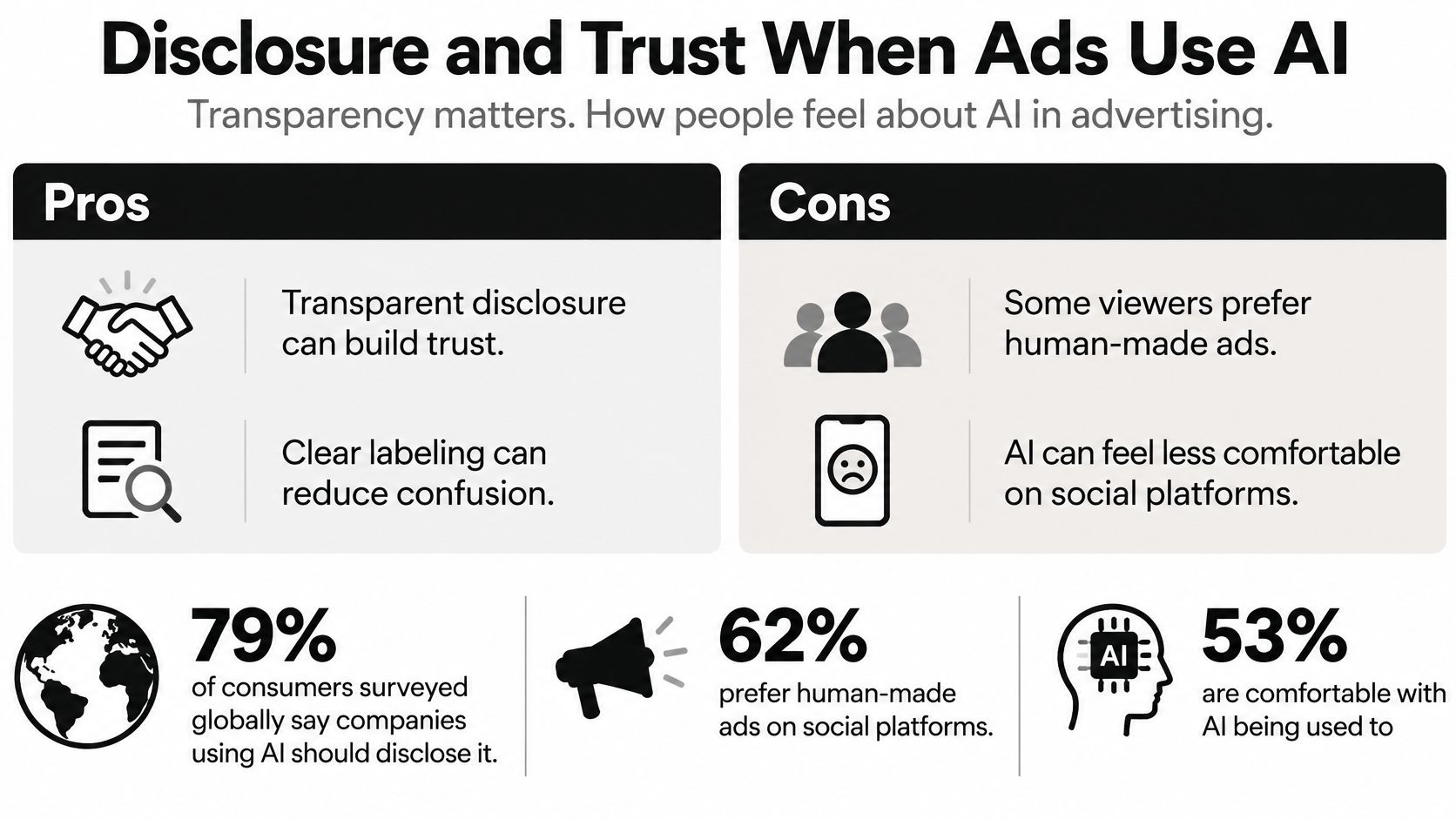
Match the notice to the possible misunderstanding
- Caption or platform label. Use a visible notice when synthetic people or scenes could be mistaken for footage. Put it where viewers can read it, rather than hiding it behind interface controls.
- Voiceover notice. Consider an audible explanation when the voice or performance is central to the message. Keep it plain and integrate it without rushing.
- Landing-page explanation. Describe what was generated and what came from real product assets. This adds detail, but shouldn't substitute for an in-ad notice when the ad itself could mislead.
- Human-review statement. Say that people checked claims and product accuracy only when that review happened. Name the substance of the check rather than offering a vague assurance.
A UGC-style ad needs particular care because its casual appearance can suggest independent personal experience. A synthetic presenter can explain a product; it can't truthfully become a satisfied customer by reading an invented testimonial.
Check the destination platform's current rules before publishing synthetic actors or voices. Disclosure isn't permission to make unsupported claims, and a label won't repair a false demonstration.
Use a practical default: disclose synthetic elements viewers could reasonably mistake for real, then retain the final wording and human approval record. Preserve genuine customer testimony separately from generated performance so nobody accidentally combines them during later edits.
Tools for Each Step of an AI Video Ad Workflow
Choose tools by the job you need completed, not by a universal ranking. A scene generator, avatar tool and timeline editor solve different problems, even when their feature lists overlap.
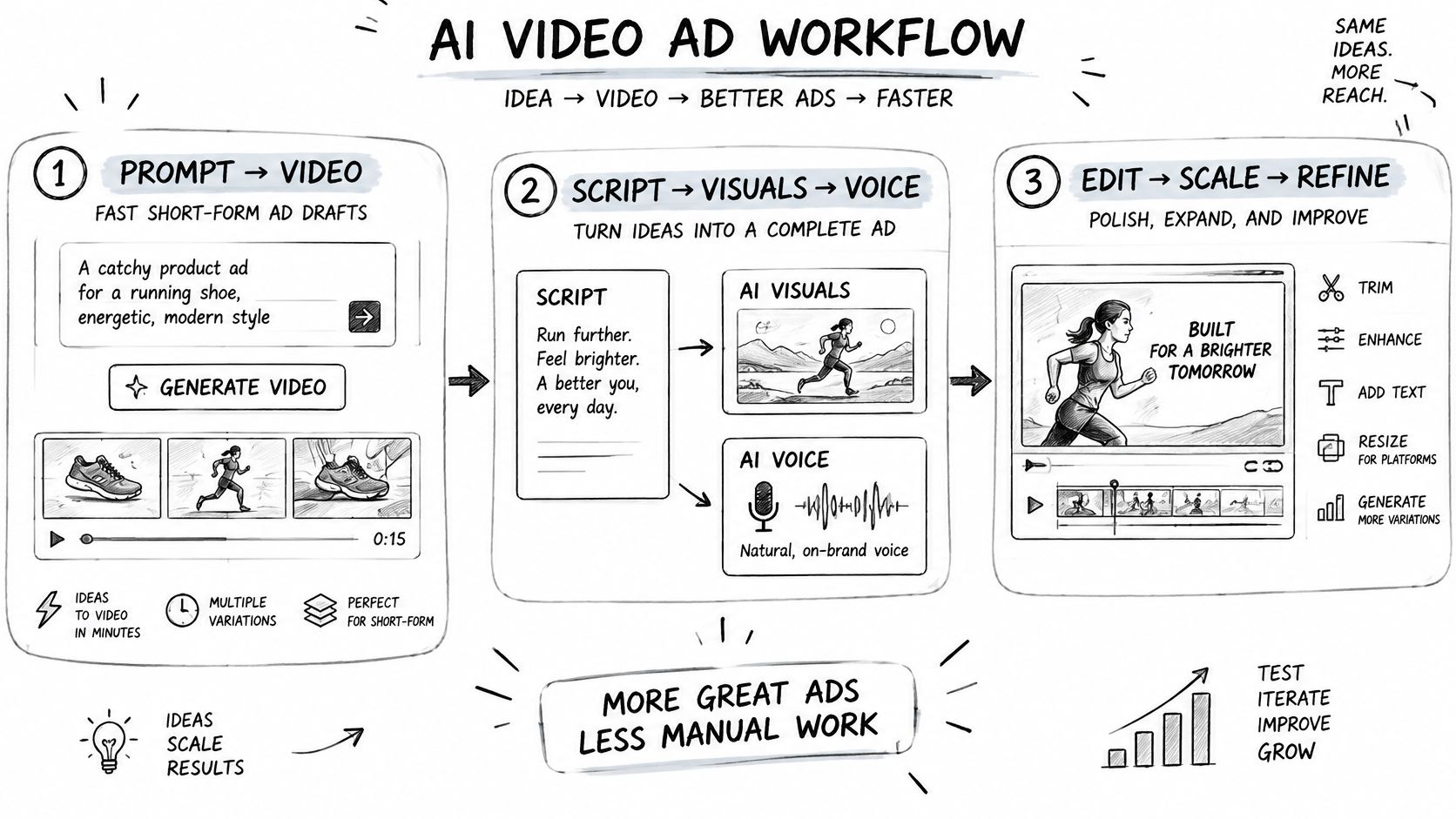
Use this workflow sketch to identify where you need help before subscribing.
Match the tool to the production bottleneck
- Prompt-to-video drafting. Revid turns a prompt into a script, visuals and voice in one generation, with a focus on TikTok, YouTube Shorts and Instagram Reels. Use it to draft an integrated short-form concept, then check that the generated script hasn't added an unsupported benefit.
- Cinematic scene generation. Consider Higgsfield for stylised scenes or a hero-shot workflow. Test the actual product and camera movement you need, then inspect continuity, proportions and any altered packaging.
- Template-based assembly. Evaluate InVideo when your main task is arranging approved footage, text and voice into repeatable edits. Check that stock scenes don't imply features, locations or customer experiences you can't substantiate.
- Avatar presentation. HeyGen is an option to evaluate for presenter-style explainers. Confirm permission for any likeness or voice you supply, and make the presenter's synthetic status clear where needed.
- Article-to-video adaptation. Consider Pictory when starting from a landing page or article. Review the shortened script carefully, because removing qualifications can change the meaning of a product claim.
- Captioning and finishing. Evaluate Captions for subtitle and editing tasks. Check names, technical terms, line breaks and whether important text remains visible in the destination app.
Compare finished work, not demonstration reels
Run the same approved concept through your shortlist. Inspect export formats, output-length limits, commercial-use terms and current pricing on each vendor's own page before committing. Include music, stock assets and synthetic voices in your rights review rather than assuming the subscription covers every use.
Use the video below as an additional workflow reference, then judge any tool against your own production requirements.
Record where manual repairs remain. A fast first render isn't much help if you must repeatedly rebuild captions, replace inaccurate scenes or recreate the project to change a sentence.
Publisher disclosure: Revid Reviews is run by the Revid team. Our buyer guides cover strengths, limitations and common complaints, and our review collection links readers to the original public reviews for verification.
Test AI Video Ads Before You Scale Them
More exports aren't evidence of better advertising. The IAB's account of generative AI adoption documents how buyers use these tools for creative production, but adoption doesn't isolate their effect on sales. Audience selection, placement, offer, opening message and delivery algorithms can all influence the result.
Your test should answer a narrow question: Does this AI-assisted production approach produce a better business result under comparable conditions? Don't compare an old campaign with a new campaign that has a different offer and call the difference an AI lift.
Run a controlled comparison
Choose a product, audience and conversion event. Create a conventionally produced baseline and an AI-assisted version using the same approved offer and message. Both need human direction, so don't frame the comparison as humans versus a tool operating independently.
Then prepare separate variants that change the hook, visual style or call to action. Test those changes independently rather than mixing them into the production-method comparison.
- Keep delivery comparable. Hold the audience, budget, placement, offer and schedule consistent where the platform permits.
- Use an experiment feature. Prefer a platform's controlled split-test setup when available. Uneven automatic delivery can otherwise make raw ad totals misleading.
- Check tracking first. Verify landing-page events, purchase or signup reporting, and variant labels before interpreting results.
- Log production effort. Record generation, revision and approval work. Business value includes production efficiency, not just media performance.
Decide what each metric can tell you
Metrics to track in an AI video ad test
| Metric | What it shows | Read it when |
|---|---|---|
| Thumb-stop rate | Share meeting your defined early-attention threshold | Diagnosing the opening after comparable delivery |
| Watch-through or completion | Share of viewers who watch to the end | Comparing cuts, while accounting for length |
| Click-through rate | Clicks per impression | Assessing whether attention leads to interest |
| Conversion rate | Share of clicks that buy or sign up | Enough conversion opportunities have accumulated |
| Cost per acquisition | Spend divided by conversions | Deciding which variant merits more budget |
| Refund or complaint rate | Negative response to the ad's claims | Throughout the test and after conversion |
Platforms can define early attention and video views differently. Write down the definitions you're using so a reporting change doesn't look like a creative improvement.
Completion is useful for diagnosing an edit, but a shorter ad can finish more often without explaining the offer well enough. Likewise, clicks can rise when an exaggerated promise attracts the wrong buyer.
Scale on business outcomes, not rendering speed or the number of variations you produced.
Write the scale-or-stop rule before spending
Set an acceptable acquisition cost from your margins, and decide what evidence would justify increasing spend. Define a stop condition for misleading output, tracking failure or unacceptable customer complaints, regardless of engagement.
Don't choose a universal impression threshold without considering baseline conversion volume and the difference you need to detect. Keep test conditions stable long enough to avoid declaring a winner from early fluctuations, and allow for the usual delay between a click and purchase.
Retain the approved export, script, disclosure wording and result for each surviving variant. Your next production brief should explain which hypothesis earned further testing, not merely which clip looked polished. That's how AI video ads become a repeatable learning process rather than a growing folder of unproven creative.
Revid Reviews offers public creator reviews linked to their originals, alongside buyer guides covering costs, credits, comparisons and common complaints. Visit Revid Reviews to assess whether Revid fits your short-form ad workflow before you commit, then use an approved product brief to run your own controlled test.