You're trying to finish a faceless YouTube Short before lunch. The generated clip looks convincing until you scrub backward: the coffee cup changes shape, a sleeve changes color, and the hand never quite reaches the table. You start trimming around the mistakes, wondering whether you've found a production shortcut or given yourself a different editing job.
Table of Contents
- Why AI Video Creation Feels Different This Time
- The Core Technology Behind Modern AI Video
- Inputs and Outputs You Will Actually Use
- How to Judge the Output Like a Pro
- A Practical AI Video Workflow for Solo Creators
- The Risks Most Guides Quietly Skip
- Where Leading AI Video Tools Stand in 2026
- Smart Creative Choices and What to Learn Next
Why AI Video Creation Feels Different This Time
That moment captures the challenge of AI video creation. Getting a moving image isn't the same as getting a usable shot. A clip has to communicate the intended action, preserve important details, and fit the surrounding edit.
Suppose your Short explains how coffee beans become a finished drink. You don't necessarily need a continuous generated journey through a café. You need specific visual moments that support the narration: beans moving, steam rising, a cup being placed on a counter.
The useful question isn't whether the software can make something impressive. It's whether you can direct, inspect, and assemble its output without losing control of the story.
A production assistant isn't a finished production
AI-assisted video and fully generated video aren't interchangeable terms. A creator might use AI to develop a script, generate an establishing shot, produce narration, or prepare captions while making the rest through conventional editing.
That distinction helps you read product pages more carefully:
- Generation means creating new visual or audio material from instructions or references.
- Transformation means changing existing material, such as animating an image or restyling footage.
- Assembly means arranging assets into a finished sequence with timing, sound, and captions.
A tool can combine these tasks, but convenience doesn't remove the need to review them separately. A strong script can accompany weak footage. Clean captions can accompany an action that never happens.
Practical rule: Judge the shot by what your viewer needs to understand, not by how impressive its opening frame looks.
Learn the vocabulary instead of chasing demos
Modern AI video products combine capabilities that previously felt like separate production tasks. Prompt-based generation, image animation, motion synthesis, and editing belong to the same broad workflow, but they don't solve identical problems.
For a faceless channel, the bottleneck might be selecting relevant visuals. For a product ad, it might be keeping the package recognizable. For a music video, expressive movement might matter more than literal realism.
Your priorities determine what counts as good output. Learning to name those priorities gives you a more durable skill than memorizing a tool's feature checklist.
The Core Technology Behind Modern AI Video
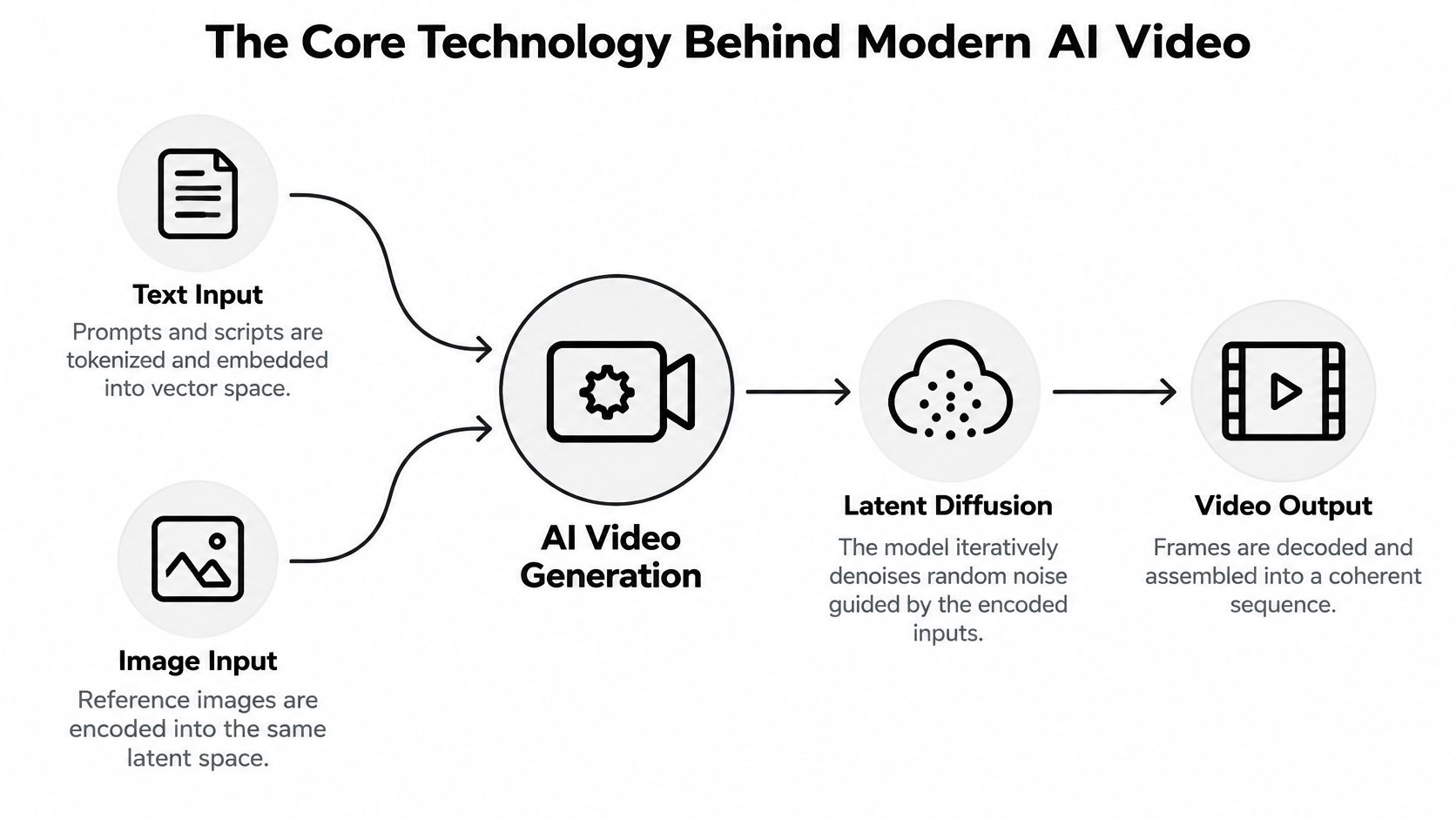
Think of video generation as following a recipe written in a language the kitchen has to translate. Your prompt describes the dish. Reference images show what important ingredients should look like. The model works with encoded representations rather than reading instructions as a human director would.
This diagram provides a simplified map of that process.
From instructions to a visual representation
A prompt encoder turns text into numerical representations the generation system can use. Think of it as translating descriptions of subjects, actions, and styles into working instructions.
Image inputs also need encoding. A reference image provides visual information about appearance, composition, or a starting state. It doesn't automatically guarantee that every detail will survive the generation.
Many systems work in a latent space, a compressed representation of visual information. The practical analogy is preparing a dish from an organized ingredient tray rather than handling every ingredient in its original packaging.
The exact architecture varies. These terms describe useful concepts, not a promise that every product contains identical components.
From noise to moving pictures
In a diffusion-style process, the system starts with noise and progressively refines it toward a result guided by the inputs. Imagine painting by removing static until a scene becomes visible.
The denoiser performs that refinement. Temporal processing helps relate information across time, while the decoder converts the internal representation into visible frames. A transformer describes an architecture for processing relationships within the represented information; diffusion and transformers aren't necessarily competing alternatives.
- Prompt encoding concerns how instructions enter the system.
- Denoising concerns how a noisy representation becomes structured.
- Temporal modeling concerns relationships across the developing sequence.
- Decoding concerns turning the representation into viewable output.
The historical shift matters. A 2025 bibliometric review identifies the 2022 Video Diffusion Model as a major milestone because it extended diffusion architectures to high-fidelity video synthesis, and reports renewed publication growth from 2022 through 2025 after a decline in 2021.
For creators, the important consequence is simpler than the architecture: a model generates a plausible sequence, not a verified simulation. A convincing surface doesn't prove that it has preserved object identity, physical behavior, or the action you requested.
Inputs and Outputs You Will Actually Use
Choose inputs according to what you need to control. Starting from text gives you room to explore; starting from an approved image gives you something concrete to preserve. Neither approach removes the need to inspect the result.
Match the input to the creative problem
| Input mode | Example instruction or asset | Output to evaluate |
|---|---|---|
| Text prompt | A ceramic cup rests on a wooden counter while steam rises; the camera stays still | A newly generated atmospheric shot |
| Reference image | An approved product photograph plus a request for a gentle camera move | An animated product scene |
| Keyframes | A closed box as the starting image and an open box as the ending image | A transition between defined states |
| Video-to-video | Existing walking footage with a request for a paper-cutout treatment | A transformed version of the source sequence |
| Motion or audio guidance | A movement reference or music track | Footage guided by the supplied movement or sound, where supported |
These are workflow categories, not universal product features. Check whether a tool accepts the particular reference you have and what that reference controls.
For example, an image might influence appearance without fixing camera movement. A music upload might guide editing rather than generate synchronized sound inside the footage. Those differences matter when you plan the handoff to your editor.
Decide what must remain unchanged
For a product advertisement, I'd begin with an approved product image and a restrained motion request. The package shape and label matter more than an elaborate camera move. If accurate lettering is essential, plan a separate graphics layer rather than accepting approximate generated text.
For a music video, I'd make a different trade-off. An expressive transformation may be useful even if it wouldn't pass a product demonstration review. A talking-avatar explainer has another acceptance test: the relationship between speech, expression, and the intended message.
Specify what may change and what must remain fixed. “Animate this image” leaves both decisions open.
Before generating, write down the expected deliverable: footage only, footage with sound, an avatar performance, or an assembled edit. Confirm that the output can enter your intended editing workflow. A beautiful preview isn't enough if you can't make the changes your project requires.
How to Judge the Output Like a Pro
A sharp frame can belong to a bad video. The easiest mistake is to inspect a thumbnail, admire the lighting, and assume the rest of the sequence deserves the same confidence.
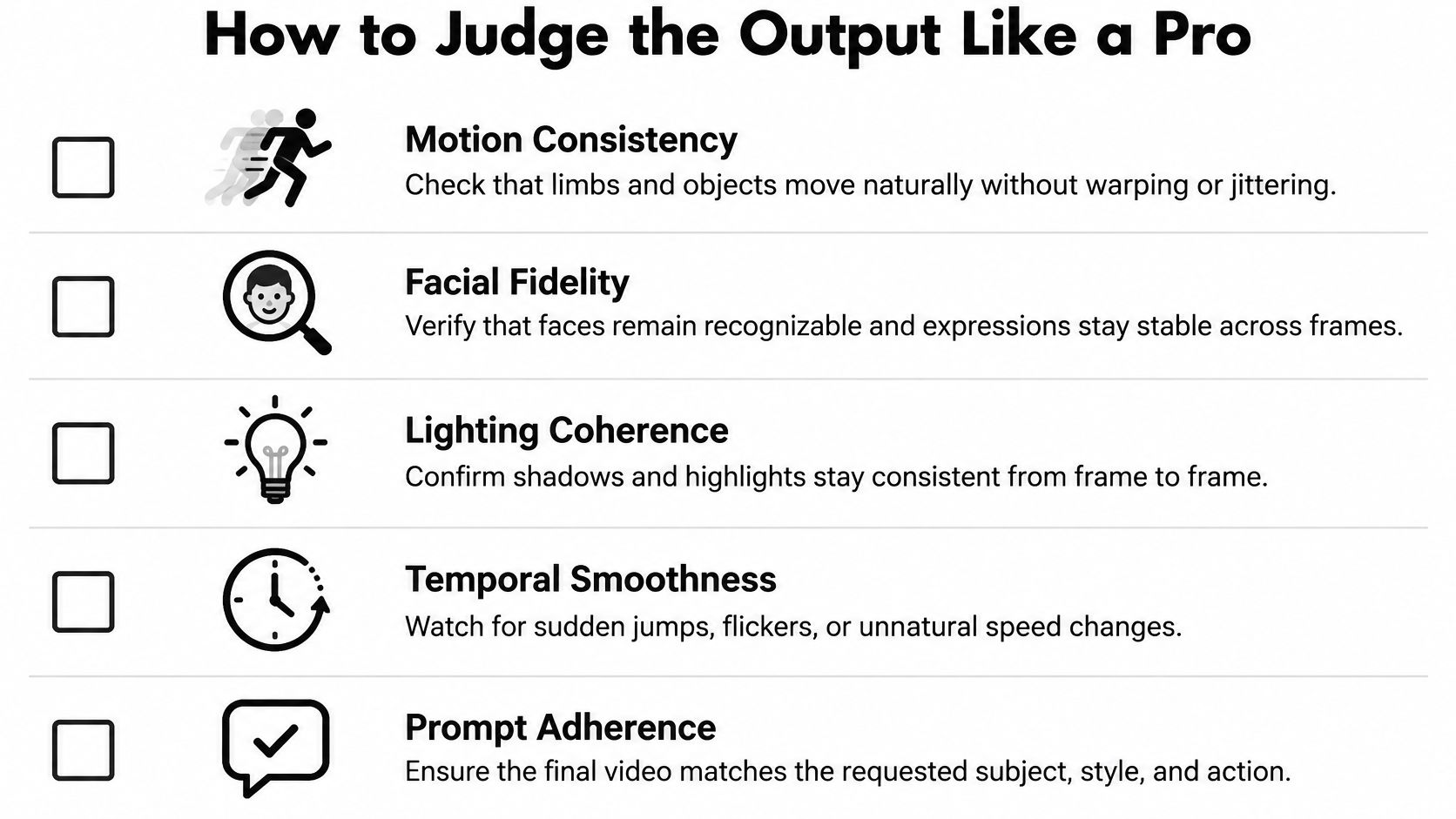
VBench evaluates video generation across 16 dimensions, including subject identity consistency, background consistency, motion smoothness, temporal flickering, and spatial relationships. Its approach distinguishes cross-frame subject similarity from frame-level appearance, which is exactly the distinction a creator needs when reviewing footage.
Use the checklist as a starting point, then judge the details your specific shot depends on.
Name the failure before trying to fix it
Subject identity drift occurs when the apparent subject changes across the sequence. A face becomes subtly different, a jacket gains a pocket, or a bottle changes proportions. The shot may remain attractive while becoming unsuitable for its purpose.
Background inconsistency involves unstable surroundings. A doorway moves, furniture changes, or an object appears without a reason. Temporal flicker is different: textures, brightness, or details fluctuate rapidly between frames.
Motion stutter concerns movement that hesitates, jumps, or changes speed unnaturally. A dropped action means the clip never performs a requested event, even though the scene looks plausible.
These failures call for different responses. More descriptive lighting language won't necessarily repair a missing action.
Review the whole shot, not a sample frame
| Criterion | Inspection question | Possible response |
|---|---|---|
| Visual sharpness | Are essential details readable? | Simplify the composition or reconsider the framing |
| Prompt adherence | Does the requested event actually occur? | Reduce competing instructions |
| Subject continuity | Does the same subject persist? | Strengthen references or shorten the usable shot |
| Motion smoothness | Does movement remain coherent? | Simplify the action or select another take |
| Background stability | Do surroundings remain consistent? | Reduce camera travel or unnecessary scene complexity |
Watch at normal speed for overall communication, then scrub through important interactions. Pay particular attention when hands touch objects, subjects turn, or something passes behind an obstruction.
EvalCrafter separates temporal consistency from other quality measures, using optical-flow-based warping error for pixel-level continuity and CLIP-Temp for semantic similarity between consecutive frames. You don't need to calculate those metrics yourself to adopt the underlying discipline: appearance and continuity deserve separate acceptance decisions.
Record a specific verdict such as “reject because the package changes during rotation.” That note is actionable. “Looks a bit AI” isn't.
A Practical AI Video Workflow for Solo Creators
Treat AI as a set of production helpers rather than an obligation to automate everything. In a 2025 Wondercraft survey of 514 creators, 38.7% used AI throughout their workflow and 44.2% used it for parts of the process. Together, 82.9% incorporated AI somewhere in production, and 54% identified as video creators, but those figures don't establish end-to-end automated video generation.
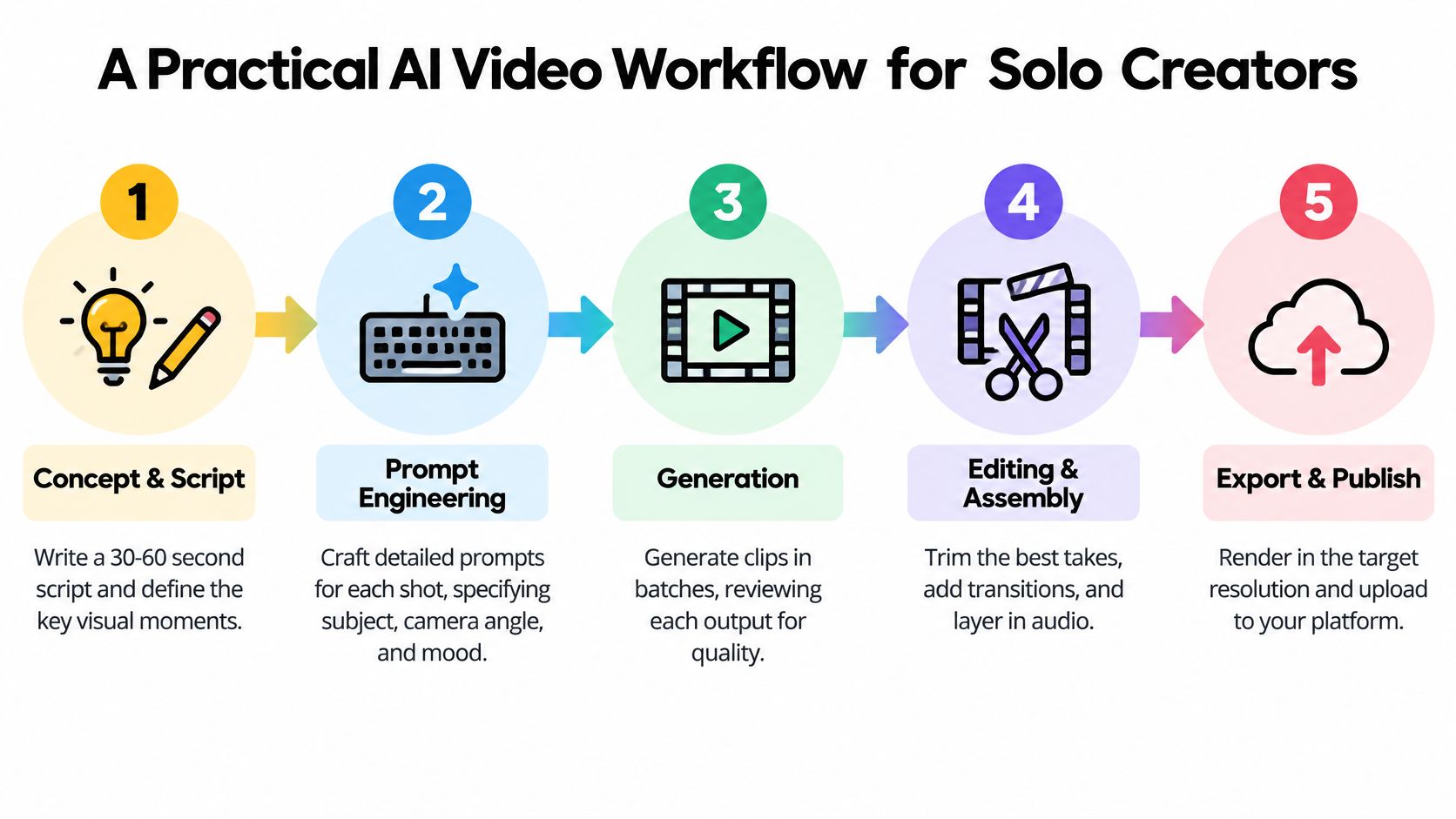
This workflow keeps editorial decisions visible instead of hiding them inside a single generation request.
Plan the edit before generating footage
Brief and script. Define the audience, message, and intended response. Draft narration before requesting decorative footage, so each visual has a reason to exist.
Asset planning. Make a shot list and identify which material should be generated, supplied, or built in the editor. Mark essential references, approved wording, and any element that needs permission.
For the coffee explainer, a generated steam shot might be appropriate. An exact product label or factual process diagram may be better handled with approved imagery and graphics.
Generate, diagnose, and assemble
- Generation loop. Create alternative takes and change a deliberate variable between attempts. Keep the prompt and references attached to each result so you can tell what produced it.
- Review and patch. Apply your acceptance criteria before polishing. Trim a usable portion, replace the shot, or simplify the action rather than trying to rescue every attractive mistake.
- Edit and export. Assemble the story, balance narration and music, check captions, and review the exported file rather than relying only on the editing preview.
Planning consumes attention; generation introduces waiting and iteration; review requires uninterrupted viewing. Don't promise a delivery time based only on the tool's generation speed. The effort often sits in deciding which output to keep and what to do when a required shot fails.
For a supplementary video reference, use the embedded video alongside your own shot list.
Production habit: Keep a fallback for every essential visual. An approved still, a simpler shot, or a clear graphic can preserve the explanation when generation doesn't deliver.
Finish with an audience review: can someone understand the message without knowing how you made the video? Technical effort isn't a substitute for a clear result.
The Risks Most Guides Quietly Skip
A subscription doesn't settle permission, ownership, or disclosure. Those decisions belong in the production brief, especially when you're making advertisements, publishing monetized videos, or delivering client work.
In a 2026 Adobe/Harris Poll survey of more than 16,000 creators across eight countries, 85% said audience expectations for disclosure were increasing or staying steady, while 49% said they always or often disclosed AI use. That's evidence of a gap between perceived expectations and reported practice, not a universal legal disclosure rule.
The comparison graphic highlights risk categories. Treat any pricing or blanket rights statements within it as illustrative, not verified costs or legal conclusions.
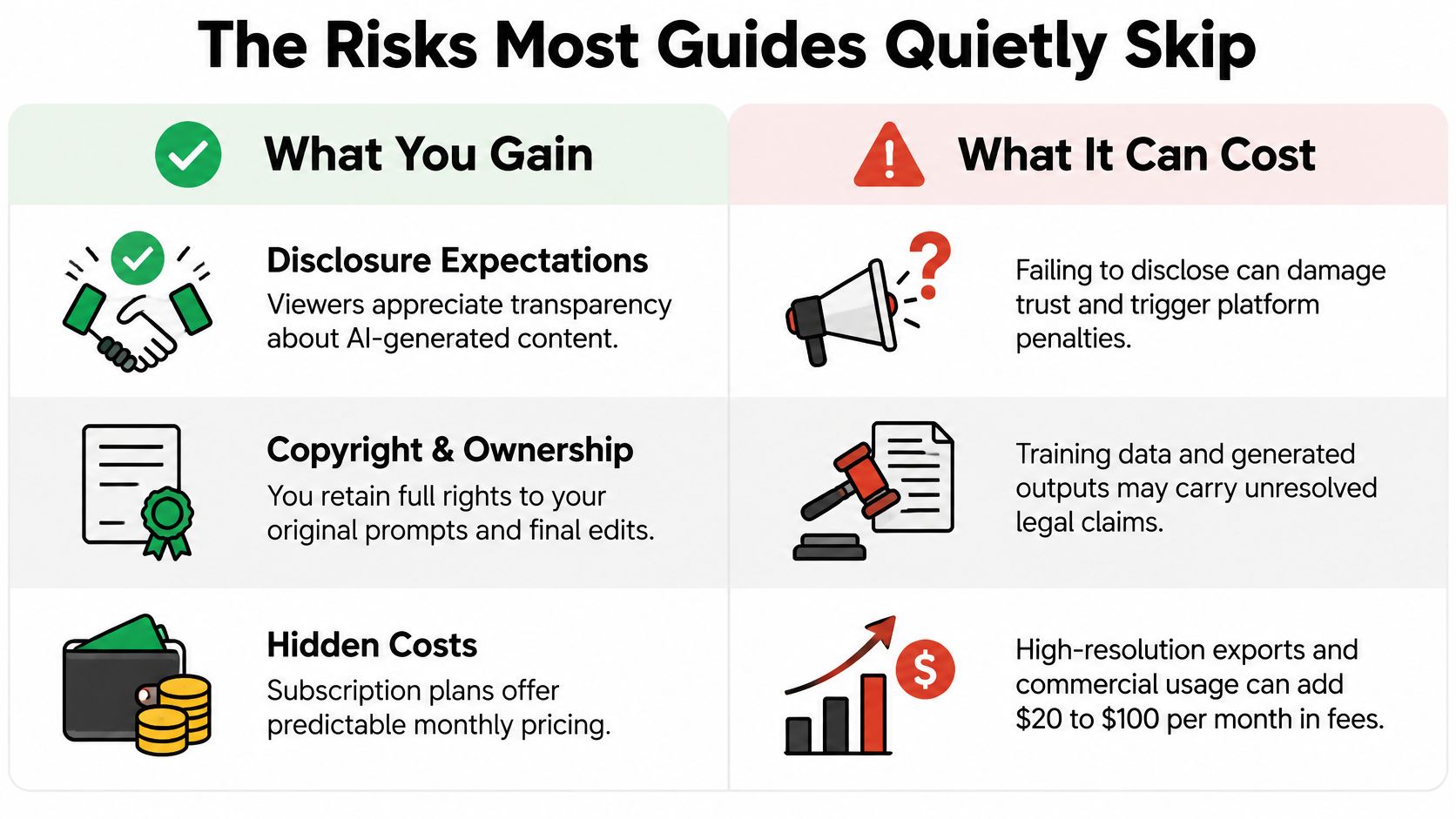
Disclosure and ownership need separate decisions
Disclosure should explain relevant synthetic involvement without obscuring it behind vague production language. Review the applicable platform rules and jurisdiction-specific requirements, then decide how viewers will encounter the explanation.
Commercial-use permission isn't the same as exclusive copyright ownership. Read what a license permits, what it excludes, and which responsibilities remain with you. Don't assume that entering a prompt gives you enforceable exclusive rights over everything the tool returns.
Keep records of your script revisions, original footage, references, edit decisions, and permissions. They document your human contribution and make a client handoff easier to audit, without guaranteeing any particular legal outcome.
Consent belongs before generation
Use that concern to build practical safeguards:
- Obtain documented permission before using a real person's likeness or voice, including the intended context and distribution.
- Check implied claims so an avatar or synthetic testimonial doesn't suggest an experience or endorsement that never happened.
- Define client responsibilities for approvals, supplied assets, disclosure, and permission records.
- Escalate sensitive requests involving public figures, disputed rights, or potentially misleading advertising.
For consequential commercial work, get jurisdiction-specific legal advice. A tool's permission to export a file doesn't answer every question about publishing it.
Where Leading AI Video Tools Stand in 2026
Revid, HeyGen, InVideo, Pictory, Captions, and Higgsfield may appear on the same shortlist, but don't assume they offer interchangeable workflows. Without a verified feature-by-feature assessment, assigning current winners would imply more certainty than the evidence supports.
Use categories to define your test instead. The table describes production needs and trade-offs, not independently verified capabilities of each named product.
Leading AI video tool categories in 2026
| Tool category | Typical strength | Common limitation | Best fit creator profile |
|---|---|---|---|
| Script-to-video assembly | Connecting narration with a sequence of visuals | Relevant-looking imagery may still miss the meaning | Faceless explainers and channel owners |
| Avatar-led production | Presenting a message through an on-screen speaker | Performance needs scrutiny for the intended context | Educators and business presenters |
| Caption-focused editing | Preparing spoken material for caption-led delivery | Caption polish can't repair an unclear message | Short-form creators repurposing speech |
| Generative visual production | Exploring new scenes and visual treatments | Continuity and precise actions require inspection | Musicians, artists, and B-roll creators |
| Ad-oriented assembly | Organizing product assets around a commercial message | Product accuracy and implied claims need approval | Small businesses and marketers |
Compare the work you can finish
Give each candidate the same brief and approved assets. Compare the usable result, the changes you can make afterward, and the effort required to correct a failed shot.
Before subscribing, also check export conditions, credit rules, cancellation terms, and current restrictions. Public reviews linked to their originals can help you investigate reported experiences; that site is operated by the Revid team, so read its comparisons with that relationship in mind.
Shortlist according to the task you need to complete, not the most cinematic demonstration. Your footage is the relevant test.
Smart Creative Choices and What to Learn Next
The most useful AI video skill is editorial judgment: knowing what a shot must communicate and whether the delivered footage does it. A more elaborate prompt isn't always the right intervention. Sometimes you need a simpler scene, a different input, or a cut.
Use this checklist on your next project:
- Define the shot before opening the generator.
- Create alternatives rather than committing to the first attractive result.
- Inspect the sequence against your acceptance criteria.
- Document inputs and permissions while the project is still organized.
- Plan disclosure before publication, not after a viewer asks.
Keep learning shot design, story structure, sound editing, and visual continuity. Those skills help you make deliberate choices regardless of which generator you use.
Choose a focused question from the AI video buyer guides, then test it against an actual project. Finishing a modest, carefully reviewed video will teach you more about your workflow than collecting impressive clips you can't use.
Revid Reviews collects public Revid reviews with links to the originals and publishes buyer guides about pricing, credits, comparisons, and common concerns. Visit Revid Reviews to investigate the questions that matter to your workflow, then use your own shot-level test before committing to a subscription.