Businesses paid $761.6 million for AI video generators in 2025, and Research and Markets projects that market will reach $2.9 billion by 2032 (Research and Markets). That's a lot of money moving toward clips that often look indistinguishable from stock footage.
The pitch is always the same: type a prompt, get a finished video. Output quality is no longer the interesting question, because most paid tools now clear the "watchable" bar. What separates them is everything after the render. Can you prove the person in the clip consented? Can your audience tell the footage was synthetic? How many regenerations does it take to get one clip your legal reviewer will sign off? Those questions decide renewals, and almost no comparison table answers them.
The test that matters: a tool that produces a usable clip in one render and passes review is cheaper than a cheaper tool that takes six attempts.
Treat the demo as the start of the evaluation, not the end. The numbers that decide whether an AI video generator for business earns its budget are unglamorous: approval rate, editing hours, consent records and measured funnel impact. A team that publishes twice as many videos into the same flat click-through rate has bought activity, not growth.
Table of Contents
- Business Video Types an AI Generator Handles Well
- How AI Video Generation Turns a Brief Into a Finished Clip
- What Business AI Video Actually Costs
- Criteria to Test Before Paying for a Tool
- Limits and Consent Gaps to Plan Around
- Disclosing AI Use Without Losing Trust
- Run a Four-Week Pilot Before Committing Budget
Business Video Types an AI Generator Handles Well
41% of businesses used AI to create videos in 2025, up from 18% in the year before, according to a 2025 industry report cited in Luma's roundup of AI filmmaking and production statistics. The same body of reporting found that more than 60% of respondents used or planned to use AI captions, 38% used AI voice dubbing and 31% used AI for language translation. Read those three figures together and the business use case appears.
Companies aren't only asking a generator to invent footage. They're using AI to caption, dub, translate and assemble, which means value often comes from shortening one stage of a workflow rather than replacing every creative step. That distinction changes how you shop. A tool that's mediocre at generating original scenes but excellent at captions, dubbing and brand templates may be the better purchase for a small team.
Match the format to the placement
Format comes before tool choice, because aspect ratio and runtime set the brief, the shot list and the review work that follows.
| Use case | Typical format | Aspect ratio | Typical length |
|---|---|---|---|
| Paid social ad | Offer or product hook with on-screen captions | 9:16 or 1:1 | 15-30 seconds |
| Short-form organic post | Tips, trends and product teasers | 9:16 | 15-60 seconds |
| UGC-style testimonial ad | Scripted customer-style talking clips | 9:16 | 15-30 seconds |
| Product explainer | Feature walkthrough on a landing page | 16:9 | 60-90 seconds |
| YouTube tutorial | How-to or demo content | 16:9 | 2-8 minutes |
| Localized version | Same master video with dubbed voice and translated captions | Same as master | Same as master |
| Internal training | Onboarding or process video | 16:9 | 3-10 minutes |
Aspect ratio is the first decision because it reframes every shot. 9:16 fills TikTok, Instagram Reels and YouTube Shorts and leaves no room for a wide product hero shot. 4:5 and 1:1 sit in feed placements where the caption carries half the message. 16:9 belongs on YouTube, landing pages and training libraries, where viewers expect a horizontal frame and a longer runtime.
Write the shot list for the ratio you'll publish. A 16:9 render pulled into a vertical cut crops the edges and can slice a presenter's face in half.
Two use cases to pilot first
Start with short-form paid ads and localized versions of one master video. Both have short briefs, a repeatable structure and results you can read within a few weeks.
Localization earns the early slot because it reuses what you already approved. One master video with a dubbed voice and translated captions becomes several market-ready assets, which is exactly where the caption, dubbing and translation figures show adoption has already settled.
Training and long-form explainers come later, once the team knows how much editing each clip consumes. Teams that want worked examples of prompt-to-video workflows for social ads can browse the Revid Reviews blog, which collects tool comparisons alongside creator feedback.
How AI Video Generation Turns a Brief Into a Finished Clip
A restaurant kitchen is the right mental model. The generator is a prep cook that chops, plates and seasons quickly. The business still writes the recipe and tastes every dish before it leaves the pass.
The technology arrived fast. Text-to-video research moved from generating images from text in 2016 to dedicated text-to-video systems by 2018 and to minute-level clips with more advanced simulation of environments and interactions by 2024, a trajectory documented in a 2025 review of text-to-video generation published by Springer. That history explains why current tools do more than animate slides, and why consistency and physical accuracy still can't be taken for granted.
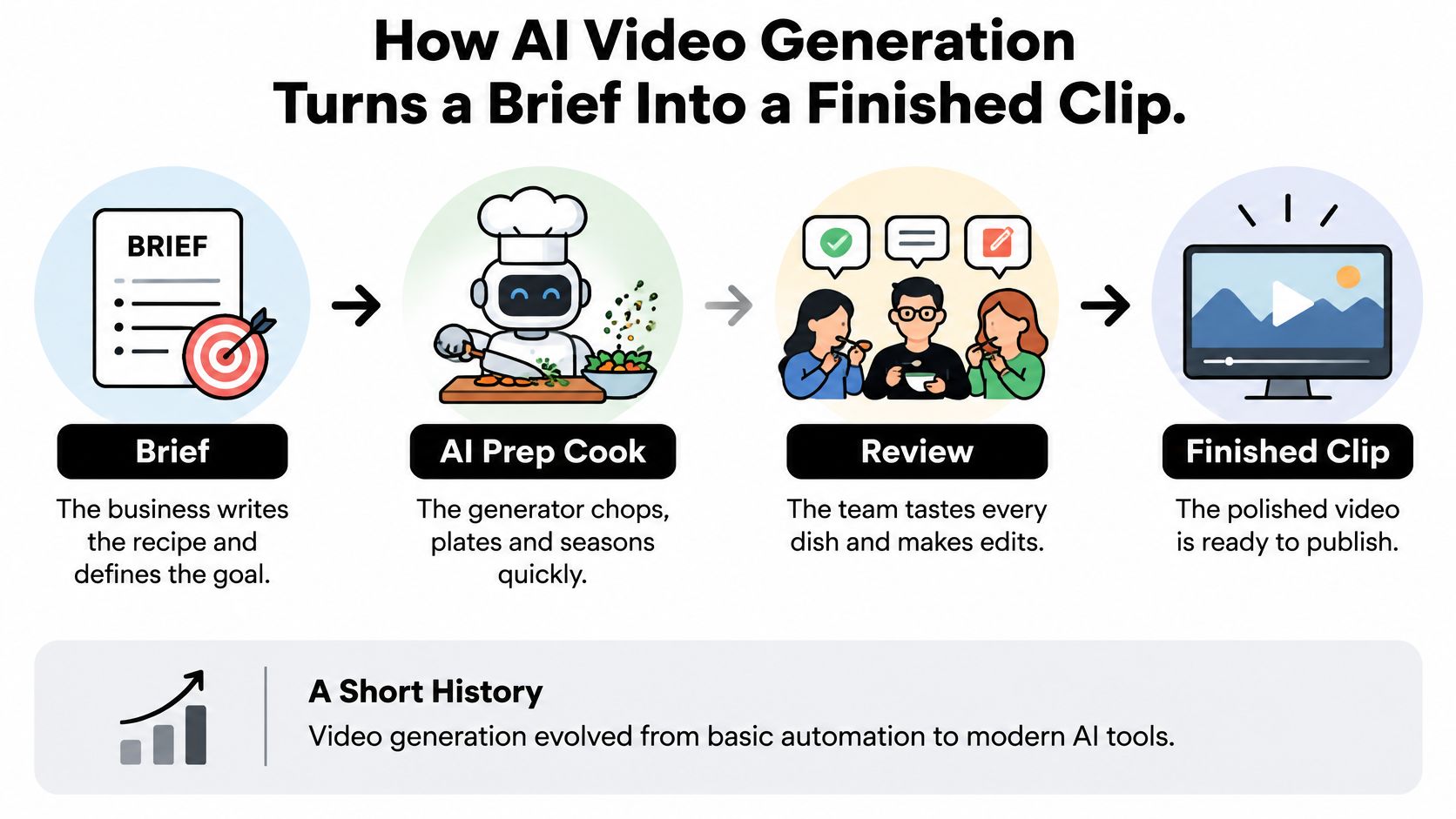
Run the job as five stages, and give each one a human owner.
- Write the brief or script. The tool turns text into scenes. Your task: approve every factual claim and number before a render exists.
- Generate the visuals. Language understanding drives image and motion synthesis. Your task: check people, products and packaging against a fixed reference image, not against memory.
- Add a voice. Synthetic narration or a cloned voice gets attached here. Your task: confirm written voice rights before anyone clones a real person.
- Assemble scenes and captions. Templates set pacing, fonts and logo placement. Your task: check brand fonts, colours and logo position frame by frame.
- Upscale and export. The file is rendered at the resolution and aspect ratio the platform needs. Your task: watch the final cut on the target device before it publishes.
For a short walkthrough of the brief-to-export loop inside a live tool, this demo covers the same sequence.
Judge each stage by the rework it creates per approved clip. A tool that nails the voice but forces a full re-render for a caption change will cost more editing hours than one that lets you fix a single scene.
What Business AI Video Actually Costs
The subscription price is the least useful number on a vendor's pricing page. What a business pays is the sum of every attempt it takes to reach a clip that passes review, plus the staff hours spent reviewing. A low monthly fee that needs six renders per usable clip and four hours of brand checking costs more than a higher fee that gets there in two.
What drives the bill
| Cost driver | What makes it rise | How to budget |
|---|---|---|
| Subscription credits | Monthly credit allowance runs out before the content calendar does | Multiply planned videos per month by credits per video |
| Per-video or credit-pack billing | Irregular volume makes packs expire or run short | Compare pack size with the three-month content plan |
| Output length and resolution | Longer or higher-resolution renders use more credits | Test the shortest length that meets the platform need |
| Revisions and regenerations | Each retry of a scene consumes credits again | Budget regenerations per approved clip during the pilot, then replace with measured numbers |
| Team seats and commercial licence | Extra users or client-use rights may be priced separately | Confirm seat count and licence tier in writing before the pilot starts |
| Human review and editing time | Brand, fact and likeness checks take staff hours | Log editing hours per finished video for the first month |
| Voice and translation | Dubbing or extra languages can be billed as add-ons | Price each added language per video before promising it to a client |
Turn renders into a cost per approved video
Count the renders it takes to get one clip that survives review. Add the editing and approval hours at your loaded rate. Divide the total by the number of clips that ship.
Say the content plan needs 10 finished ads, each needs 3 regenerations to land a usable scene, and each surviving clip takes 2 hours of editing, captioning and brand review. That's 30 renders and 20 staff hours against however many clips you get approved. Swap in your own quotes and the same arithmetic gives a number you can compare across every tool on the shortlist.
Two variables usually decide the result. Most tools meter longer or higher-resolution output more heavily, so test the shortest length that satisfies the platform. A 15-second vertical ad doesn't need a four-minute render behind it.
Budget rule: record current prices, credit allowances and licence terms in the same cost sheet on the day you compare tools. Vendor pricing changes, and a quote you remember is not a quote you can defend.
The rule of thumb is blunt. A cheap tool that needs heavy regeneration costs more per approved video than a pricier one that gets the scene right first time. Price the rework, not the subscription.
Criteria to Test Before Paying for a Tool
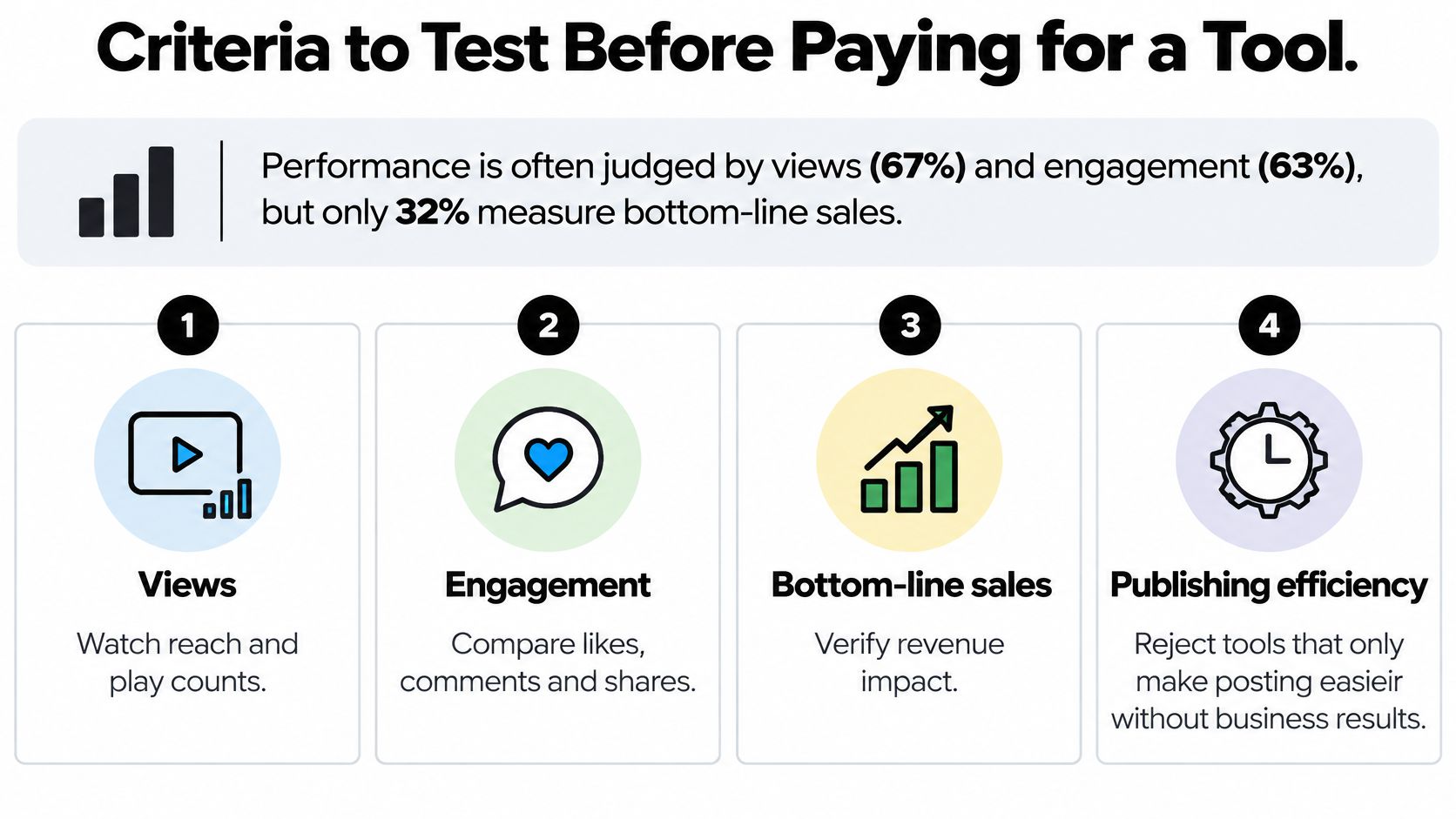
Wyzowl's 2026 video marketing statistics show video marketers most often judge performance through views (67%) and engagement, meaning likes, shares and reposts (63%). Leads and clicks account for 52%, and bottom-line sales for 32%. A separate figure from the same dataset complicates the picture: 82% of marketers say video delivers good ROI.
That 32% is the number to sit with. A generator that raises publishing volume without a connection to a funnel event has demonstrated activity, not value. Keep views and engagement as diagnostics and tie each asset to one outcome: click-through rate for acquisition ads, qualified leads for explainers, conversion rate for product demos.
Seven checks that stop a bad purchase
| Criterion | What to test | Red flag |
|---|---|---|
| Output control | Edit one scene without regenerating the whole video | Any change requires a full re-render |
| Brand consistency | Apply your fonts, colours, logo and aspect ratio via templates | Brand elements cannot be saved or reused |
| Export and metadata | Download captions, aspect-ratio versions and project records | Only one format or watermarked exports |
| Commercial rights | Read the licence terms for generated clips and music | Commercial-use terms are unclear or missing |
| Consent tools | Check how voice and likeness permissions are recorded | No way to store consent or approvals |
| Support and turnaround | Send one real support request and time the reply | No reply within the pilot window |
| Measurement fit | Add tagged links or UTM parameters to a test video | Results cannot be connected to landing-page events |
Run the same brief through two or three tools, time each approval cycle and score the outputs against a shared checklist. Exportable files, caption formats and tagged links are what make the results traceable, so treat any tool that locks them down as disqualified before you reach the pricing page.
Public feedback is a useful second opinion on speed and output-control claims. Revid Reviews' Product Hunt collection links each review to its original post, so you can read the pattern rather than a pulled quote.
Write every score into one sheet before you sign anything. A purchase decided on a demo reel is a purchase decided on the vendor's best ten seconds.
Limits and Consent Gaps to Plan Around
The riskiest thing about a generator isn't a bad render. It's what you upload to get one.
An OECD survey reports that 54.1% of SMEs identify copyright, legal or regulatory concerns as a barrier to generative AI, and only 35.6% of SMEs using generative AI had researched those issues (OECD, Generative AI and the SME workforce). Most buyers know there's a legal question. Fewer have looked up the answer.
Know the limitations before the pilot, and pair each one with the control that handles it.
- Output consistency: the same character or product can drift between clips. Keep a fixed reference image and check every scene against it.
- Physical accuracy: hands, text on packaging and product mechanics are the usual failures. Human-check each product shot against the physical item.
- Editing control: some tools can't change one element without a full re-render. Budget regeneration time into the schedule rather than discovering it mid-campaign.
- Factual claims: generated scripts state unverified numbers and comparisons. Require sign-off on every claim before export.
- Consent and rights: identifiable people, voices and music need written permission, and customer footage or confidential product detail shouldn't be uploaded without a review.
- Ownership and training use: check whether the vendor trains on uploaded material and whether your business keeps rights to the outputs.
Provenance is a separate layer. Google DeepMind's SynthID embeds an imperceptible watermark into the pixels of every frame, designed to stay detectable after cropping, filters, frame-rate changes and compression (DeepMind's SynthID). It supports identification and traceability. It does not prove a clip is accurate or legally cleared.
Keep this checklist next to the upload button.
- Written consent on file for every identifiable face and voice.
- No confidential customer data or unreleased product detail in the source folder.
- Commercial-use terms for generated assets verified and saved.
- Source project, prompt and tool version recorded in an asset register.
- Human approval on claims, likeness and final edit before publishing.
Disclosing AI Use Without Losing Trust
A September 2025 survey of 460 U.S. consumers and small-to-midsize-company marketers found that 75% of U.S. adults consider it very or extremely important to know whether content was made by AI or by people (StudyFinds coverage of the AI trust survey). The same study found more than one-third of viewers say perceived AI content reduces trust in the brand, while nearly 78% trust videos with real people more than videos without human faces or voices.
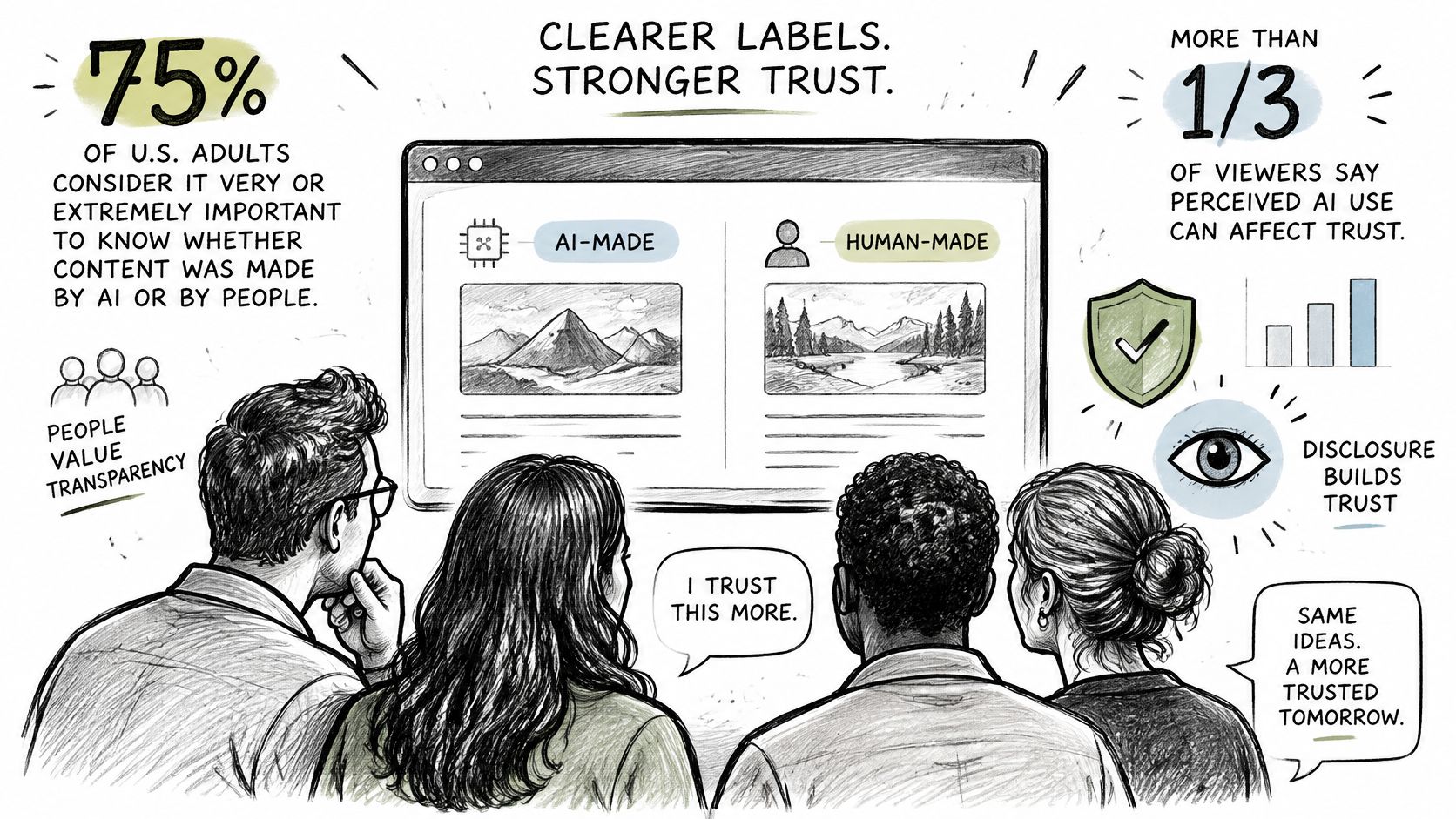
The distinction that matters is between AI assistance and synthetic people. Scripting, captioning, colour work and edit assembly are assistance. A generated presenter saying words a real employee never said, or a synthetic customer describing a result that never happened, is a different category, and that's where disclosure expectations bite hardest.
Ads and testimonials need a clear label where platform rules require one, plus an honest one where they don't. Product demos should note when the footage is simulated rather than filmed. Organic posts can disclose in the caption, which costs nothing and travels with the video when it's shared.
Plain wording works better than legal phrasing.
"This video was made with AI tools and reviewed by our team."
Then test whether disclosure costs you reach. Run a disclosed AI-assisted version and an undisclosed version of the same ad on equal budget, compare click-through and completion rates over two weeks, and write the result down. Transparent disclosure may protect trust rather than reduce performance, but the only way to know for your audience is to measure it rather than assume it.
Third-party reviews are worth reading before you set a policy, provided you can check them at source. Revid Reviews' Trustpilot collection links each review to its original post, which makes the pattern visible.
Run a Four-Week Pilot Before Committing Budget
A pilot beats a demo because it prices the work. Four weeks is enough to see how much editing a tool demands.
- Week one. Pick one use case from the format table, usually short-form paid ads or a localized version, and write a brief with a target metric tied to a funnel event such as click-through rate.
- Week two. Produce three to five videos with each shortlisted tool from that same brief. Log render counts, regenerations and editing hours as you go, because memory will round in the vendor's favour.
- Week three. Score each tool against the criteria sheet, add the consent and disclosure steps to the workflow, and get current pricing and licence terms confirmed in writing.
- Week four. Publish, compare results against the target metric and calculate cost per approved video using the render-and-hours arithmetic.
Rate the evidence as carefully as the tools. Revid Reviews is run by the Revid team, so weigh its tool coverage accordingly and check any review claim at its original source before relying on it. Vendor-run review sites can still be useful, but only if you follow the links back.
Buy signal: commit only when the chosen tool wins on cost per approved video and on the target metric. Output volume on its own is not a result.
Revid Reviews collects public reviews of Revid, the AI video generator used by more than 3,000,000 creators with around 59,000 new signups every month, and links each one to its original post on Trustpilot, X or Product Hunt. If you're weighing a subscription for short-form ads or faceless channels, the site's buyer guides and reviews give you the pricing, credit and comparison detail to check before you commit budget. Visit Revid Reviews to read the reviews at source and run your own four-week test with better inputs.