You've got the mix finished, a release date two weeks out, and nothing to watch. The distributor wants a Canvas loop, YouTube needs a full upload, and whoever runs your socials is asking for a vertical clip by Friday. Hiring an editor costs more than the track did, and the last freelancer delivered a lyric video that slid half a second behind the vocal.
An AI video generator for music closes that gap in an afternoon. It just doesn't close it evenly, and the demo reels won't tell you where it breaks. The tools that look spectacular on a four-second abstract loop often fall apart on a three-minute song with a repeated chorus and one character who has to look like the same person in shot twelve as in shot one.
What follows is the order I'd work in. Choose the video type, prove the sync, hold the character, run the nine-step production routine, clear the rights, then test any tool on one real track before a paid plan. Every one of those steps has a failure mode you can spot in an hour instead of discovering it after publishing.
Table of Contents
- Match Your Music Video Type to a Workflow
- Syncing Visuals to Beats and Song Sections
- Keeping Characters and Style Steady Across Shots
- Step by Step Workflow From Track to Finished Video
- Rights, Consent and Disclosure Before You Publish
- Choose the Tool With One Track Test
Match Your Music Video Type to a Workflow
Four outputs cover almost every request a musician brings to a generator, and each one needs different inputs, a different prompt structure and a different thing to worry about. Set the type before you open any tool. The workflow follows from it, not the other way round.
| Video type | Best AI approach | What you supply | Typical length | Main risk |
|---|---|---|---|---|
| Lyric visualizer | Animated text over generated backgrounds | Lyrics, tempo, audio file | Full song length | Lyrics drift from vocal timing |
| Performer or avatar clip | Character reference with generated motion | Likeness release, voice file | 15 to 60 seconds | Identity and consent problems |
| Narrative music video | Shot-by-shot prompts mapped to song sections | Storyboard, character references, section map | 2 to 4 minutes | Identity drift across shots |
| Short promo cut-down | Hook-first clips with captions for Shorts, Reels and TikTok | Best 15 to 30 seconds of the track, captions | 15 to 60 seconds | Weak opening hook |
Lyric visualizers are the highest-volume, lowest-risk job, which is why they're the right first project for anyone new to these tools. You feed in the lyric sheet, the audio and the tempo, and the honest failure is drift: text that sits a beat behind the vocal by the second chorus. Fix it by timing lines to the waveform rather than to a fixed reading speed, and check the bridge first, because that's where sync usually slips.
Performer and avatar clips bring consent into the room. A generated singer with a face and a voice needs a likeness release from the person it's modelled on, whether that's you, a session vocalist or a hired actor. Fifteen seconds of footage can create a year of disputes if the paperwork doesn't exist.
Narrative videos cost the most time because every shot is a decision. You need a storyboard, a character sheet and a section map before generating anything, and the recurring character is the part that most often fails. Promo cut-downs invert the problem: the hook has to land in the first two seconds, so pick the strongest 15 to 30 seconds of the track and caption every line.
The market context explains why the visual plan now carries as much weight as the master. A CISAC-commissioned economic study estimates that complete AI-generated audiovisual outputs could reach approximately €48 billion in value in 2028, and that fully generative-AI music outputs alone could be worth about €16 billion annually by the same year. Those are scenario forecasts rather than observed totals, so treat them as a direction of travel, not a revenue promise.
Choose the type first: a tool that handles a full-song lyric visualizer well can still be weak at a two-minute narrative with one recurring character. Test the row you actually need.
Syncing Visuals to Beats and Song Sections
Whether a cut lands on the drop is a measurable result, not a matter of taste. A diffusion-based music-video study built an Audio-Visual Synchrony (AVS) metric that scores whether visual transitions coincide with musical changes; scores near 1 marked strong synchronisation, while simple linear interpolation produced substantially lower values (the AVS study on arXiv). That gap is the difference between a video that feels cut to the song and one that merely plays alongside it.
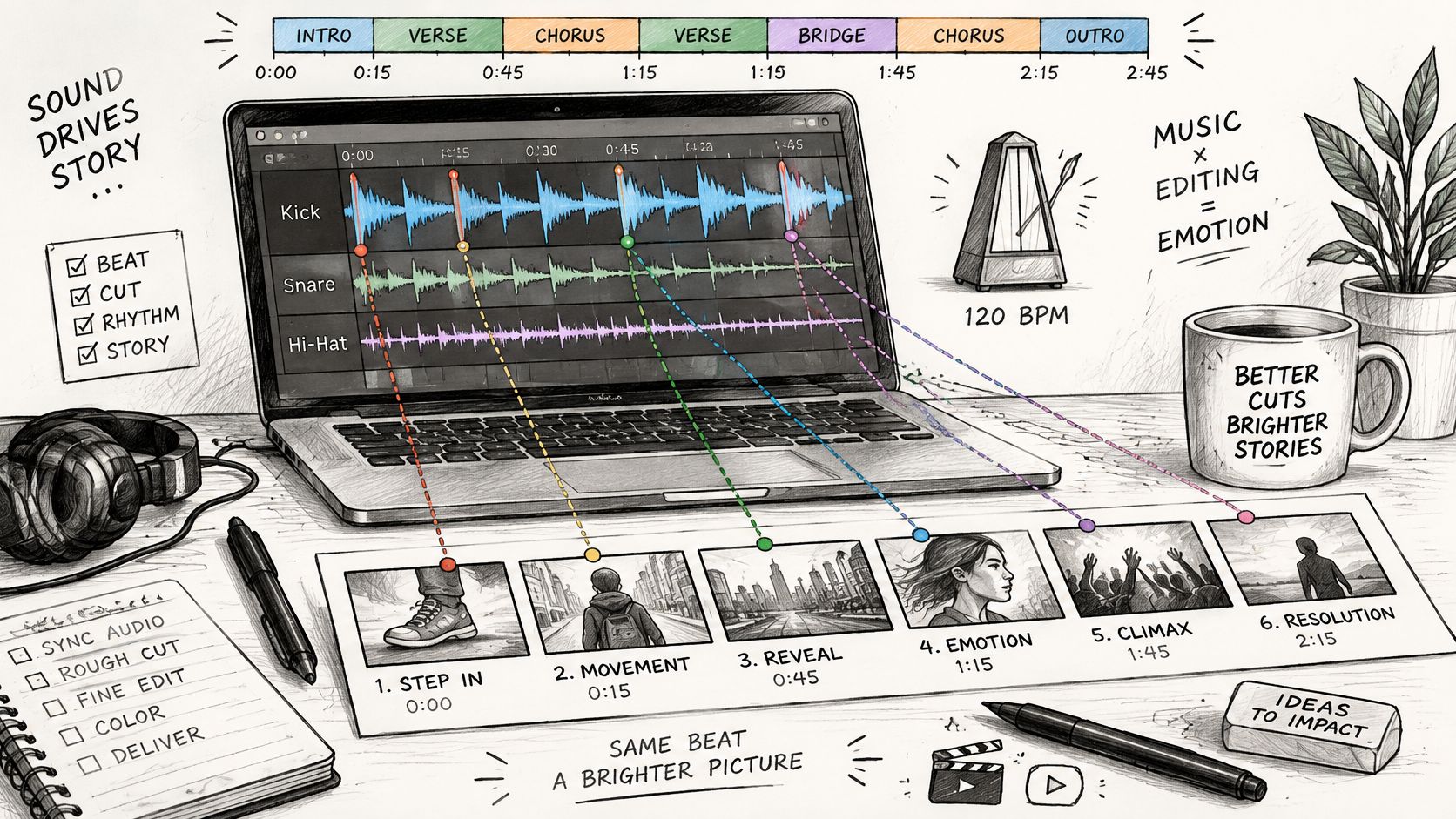
Here's the workspace where that judgement happens, with the beat track sitting above the picture:
Why generic motion looks loose against a track
The cause is architectural. Models conditioned on harmonic and percussive features can drive motion and scene changes from distinct musical cues, so a snare hit can trigger a cut and a chord change can trigger a lighting shift. Generic interpolation has no idea any of that exists. It changes visuals continuously across frames and produces something that reads as drifting wallpaper rather than editing.
The practical consequence is that image quality tells you very little. A tool with stunning frames and no audio conditioning will lose to a plainer tool that reads the structure of the song, because the viewer's ear sets the rhythm expectations and the eye either meets them or doesn't.
Genre stress-tests timing differently. Electronic and hip-hop tracks with dense percussion expose frame-level misses immediately, pop lives or dies on the chorus entry, and acoustic material punishes tools that only react to transients, since phrasing and sustain carry the emotion. Run the same prompt across two genres before you trust a result.
When you compare tools, weight the controls that touch timing: beat-aware transitions, audio-reactive motion, BPM detection and scene-duration editing. Those connect directly to sync quality. A larger text-to-video model with none of them doesn't get you closer.
Pass or fail rule: mark every kick, snare, drop and chorus entry on the beat track, then count the major visual events landing within three frames of a marker. A chorus passes only when every drop and chorus entry lands in that window and no cut falls inside a section with no marker. One miss on a drop is a fail. Retime that shot before generating the rest of the video.
Keeping Characters and Style Steady Across Shots
Face drift is the symptom that ruins more AI music videos than anything else. The singer in shot four has the right jacket and a different jaw, or the hair changes length between the verse and the chorus. Diffusion video systems generate in windows or segments, and independent sampling lets identity, clothing and camera geometry wander, with visible discontinuities at the clip boundaries.
A recent audiovisual benchmark treats this as two separate problems, splitting synchronisation into temporal and semantic dimensions and scoring global offset, local jitter and speed changes across a dataset of 3,269 videos and 38,390 samples (the audiovisual benchmark on arXiv). The split matters on a timeline. A shot can carry the right musical meaning and still be visibly late, or land on time while the performer's face has become someone else.
| Symptom | Likely cause | Fix |
|---|---|---|
| Face or hairstyle changes between shots | Each clip sampled independently | Attach the same character reference image to every shot |
| Clothing changes within one chorus | Prompt lacks fixed wardrobe details | Write the outfit into every shot prompt |
| Camera angle jumps at a cut | No shared camera description | Specify lens and camera move in each prompt |
| Visible seam at a clip boundary | No overlap between generated windows | Use overlap frames or a transition shot at the cut |
| Visuals land late or early against the beat | Timing not conditioned on the audio | Retime cuts to beat markers and shorten shots |
| Style drifts across the song | Style not carried between prompts | Keep one style sheet across all prompts |
What a locked character looks like in practice
Locking a character is mostly discipline, not a premium feature. Keep one reference image on disk and attach it to every shot that includes the performer. Write the wardrobe into each prompt as fixed text, not as a suggestion, and describe the lens and camera move the same way every time so the geometry stays consistent.
Generate footage in short, beat-aligned shots of three to six seconds and stitch with overlap or a transition shot at each boundary. Architectures that exchange information across overlapping temporal windows exist precisely to reduce seams, and temporal-aware attention models the relationship between audio segments and visual motion. You still get better results by giving those systems aligned inputs than by hoping they infer them.
Test it on the chorus, not the intro. Drift shows up when the same character appears ten times in ninety seconds with fast edits. A single slow prompt hides every problem you're trying to find.
Before you pay for a full render, check three things: the face holds across ten shots, the outfit holds across one full chorus, and each transition has no visible seam on a paused frame. If two of the three fail, change the reference setup rather than regenerating more takes.
Step by Step Workflow From Track to Finished Video
A condensed version of the routine looks like this, from the export that starts it to the review that ends it:
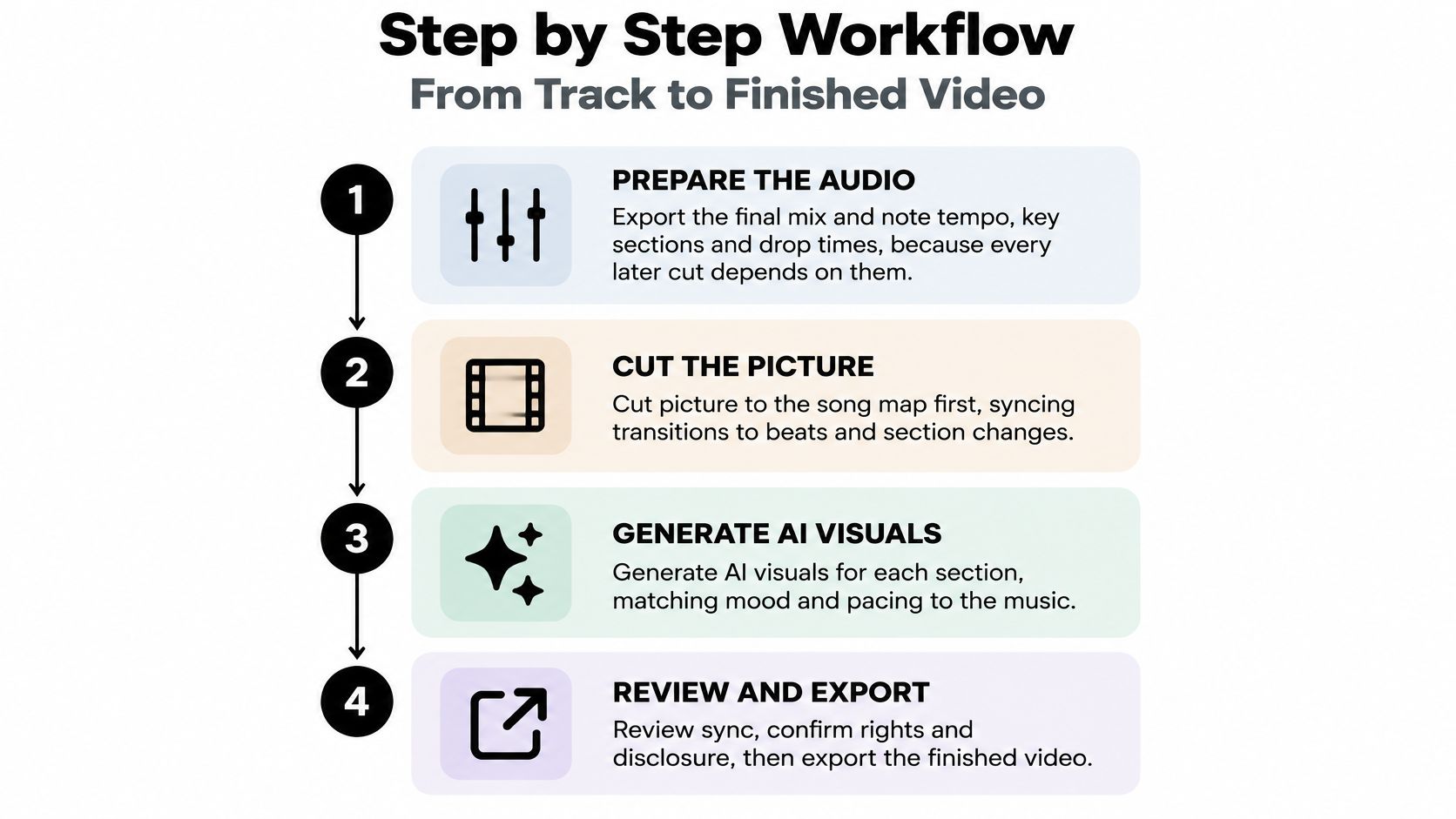
- Export the final mix and log the numbers. Bounce a clean WAV, write down the tempo in BPM and the timestamp of every drop and chorus entry. Every later cut inherits those numbers, so skipping this means re-rendering everything when you notice a mistake.
- Build a section map. One line per section with in and out points: intro, verse, chorus, bridge, outro. This map is the spine of the storyboard. Without it the model decides structure for you and usually guesses wrong on the bridge.
- Write a style sheet and reuse it verbatim. Palette, lens, era, lighting direction, mood. Paste the same text into every prompt. The common slip is rewriting the description each session, which produces four different videos that won't cut together.
- Generate short shots, three to six seconds each. One shot per beat-aligned section. Longer clips drift more and leave you fewer places to cut around a bad frame.
- Attach one character reference to every performer shot. This is the cheapest consistency fix available. The second most common mistake is letting the tool invent the character fresh for each scene.
- Assemble with overlap frames. Give every boundary two or three overlapping frames or a transition shot. Hard cuts between unrelated backgrounds advertise that the footage came from separate generations.
- Check every major cut against the beat track. Mark each kick, snare, drop and chorus entry, then count the cuts landing more than three frames off a marker and retime those shots. Producers who skip this step discover the sync problems after publishing.
- Add lyric text and captions, then export both ratios. Vertical 9:16 with word-level highlighting for Shorts, Reels and TikTok, widescreen 16:9 for YouTube. Check caption placement against the safe area on a phone before you upload.
- Archive the paperwork. Track license, prompts, source files, model and likeness releases, disclosure notes. Two minutes now versus a takedown dispute in six months.
The last stage is a viewing, not a rendering. Watch the finished cut once with the sound off to catch framing and identity breaks, then once with your eyes closed to hear whether the story still makes sense. The pair of passes catches problems a timeline scrub never shows.
For the surrounding steps, including how a song becomes a publishable upload, the Revid Reviews blog walks through the wider workflow.
Musicians tend to describe the finished-video moment the same way:
"Revid took my song and created the perfect video for me.", Uncle Grape, United States (Trustpilot)
Rights, Consent and Disclosure Before You Publish
A generated visual doesn't make the soundtrack safe to publish. That's the assumption worth killing first, because it's the one that gets videos muted, demonetised or pulled. The picture is the easy half of the permission question.
The barriers are documented. A 2026 Berklee survey of 1,003 video creators, musicians, marketers and music supervisors found that 86.6% faced barriers using recognizable or commercial music, with cost (42.9%), confusing licensing (33.6%), inconsistent platform rules (32.9%) and copyright or Content ID claims (32.3%) leading the list (Berklee's survey coverage in Music Connection).
Separate the two rights questions
Music rights and visual-generation rights are different permissions with different paperwork. On the audio side, be clear about which category you're in: an original master you own, a licensed track with defined media and territory, a sample that needs clearing separately, or audio generated by an AI music tool. Each carries its own terms, and the last one doesn't remove the platform's disclosure rules.
On the visual side, check the tool's commercial terms, whether the paid plan covers monetised export without a watermark, and whether the model or likeness in your footage has signed off. Then run the platform checks.
| Platform | Rights check | Evidence to keep |
|---|---|---|
| YouTube | Music license covers monetized upload; check Content ID match; apply altered or synthetic content disclosure where required | License, Content ID result, disclosure setting |
| TikTok | License covers commercial or branded use; check the AI-generated content label | License, label setting, prompts |
| Reels audio must be licensed for the use; avoid unlicensed library tracks in ads | License, invoice, source files | |
| Spotify Canvas | Looping visual needs label or distributor approval; check any likeness consent | Approval email, model release |
| Paid ads | Sync license must cover paid media and territory | Ad license, invoice, usage records |
Consent, likeness and disclosure
Audiences care about this more than the tutorials admit. A 2026 survey of 3,000 U.S. and U.K. creators found that 93% associated AI with significant risks in music and content creation, with 44% worried about undisclosed fully AI-generated content, 37% about their work training AI without permission and 33% about AI replicating their voice or style (Epidemic Sound's creator economy report). The same survey found 75% calling disclosure essential for trust and 72% saying transparency about AI involvement improves performance.
That flips the usual instinct to hide the method. Practical steps:
- Get releases in writing. A model release for every real person whose face or voice appears, including your own if you're the avatar.
- Don't imitate living artists. Recreating a recognizable performer's likeness or vocal style invites claims that no license will fix.
- Label synthetic performers. A line in the description or a small caption is enough, and it protects the brand deals later.
- Keep the evidence file. Licenses, invoices, source files, prompts and disclosure records, stored with the project.
The rule that settles most arguments: if you can't produce the license for a track within five minutes of being asked, you don't have one.
Choose the Tool With One Track Test
Demos are cut from the best ten seconds of thirty songs. Your decision should come from one song, rendered on every candidate with identical prompts, and scored on the things that decide whether the video is publishable.
| Criterion | What good looks like | Test to run |
|---|---|---|
| Beat-aware transitions | Cuts land within a few frames of beat markers | Import a tempo track and check the first 30 seconds |
| Audio-reactive motion | Motion follows kicks and snares | Run the same prompt on a drum-heavy track and a ballad |
| Tempo detection or manual BPM | Tool reads tempo or accepts a set BPM | Enter a known BPM and check the cut grid |
| Character consistency | Same face and outfit across ten shots | Generate a ten-shot chorus with one reference |
| Export formats | Vertical and horizontal files for each platform | Export both and check framing and captions |
| Cost and commercial terms | Paid plan covers monetized export without watermark | Price one finished three-minute video and read the license text |
| Onboarding speed | Time to a first finished video | Time the first project from track upload to export |
Score the chorus, not the highlight reel
Pick the hardest ninety seconds you own: a chorus that repeats, a drop, and a vocal with rapid phrasing. Feed every tool the same section, the same character reference and the same style sheet. Then score three things only. Cut timing against your beat markers, identity and wardrobe across the ten shots of the chorus, and seams at each transition on a paused frame.
Log the failures rather than the impressions. "Two cuts landed six frames late on the second drop" is a decision. "Visuals felt less cinematic" isn't. Onboarding speed belongs in the same log, measured with a stopwatch from upload to usable export, because a tool that takes three sessions to learn has a cost the pricing page never shows.
Set the go or no-go rule before you render anything: go only if the chorus passes on timing and identity with no manual rebuilds. If you're rebuilding the character in an external editor, you're paying twice for the same footage.
Cost belongs in the same test, priced as one finished three-minute video rather than per credit. Read the commercial terms in the same sitting, since a plan that blocks monetised export or stamps a watermark on the output isn't cheaper at any price. Then cross-check the tool against the rights checks you'd run before publishing, because a generator with great sync and unclear licensing still leaves you exposed.
Revid, the tool this site reviews, is used by more than 3,000,000 creators, with around 59,000+ new signups every month, which means a large enough user base to find honest complaints as well as praise. Public reviews, each linked to the original post on Trustpilot, X or Product Hunt, sit alongside buyer guides at Revid Reviews. Read a few before you commit a render budget to anything.
The one-track test takes an afternoon. A wrong annual plan takes twelve months to undo.
Run your hardest chorus through two or three generators before you pay for anything, then check what musicians who already shipped with Revid have said about it. Revid Reviews collects those public posts from Trustpilot, X and Product Hunt with links back to the originals, plus plain answers on credits, pricing, refunds and cancellations, so you can verify a claim before you commit a render budget. Start with the reviews, then let your beat markers decide.