
AI video generator pricing in 2026 usually lands around $1.50 to more than $15 per finished minute once rerolls, audio, and post-production are included. If you shop by the lowest monthly fee instead of the cost of one publishable minute, you'll overpay in failed generations and wasted credits.
You've probably got three pricing tabs open right now, and none of them makes the choice obvious. One plan looks cheap, one looks generous, and one hides the actual bill behind credits, resolution tiers, and add-ons. The market has also moved fast, because industry analyses report that AI video generation costs fell from about $0.25–$0.40 per second in early 2025 to roughly $0.10–$0.15 per second in 2026, a decline of around 60% in less than 18 months Axis Intelligence. That drop sounds great until you realize the only number that matters is what one usable video costs after retries, voice, music, and export.
Table of Contents
- Why AI Video Generator Pricing Feels Confusing at First
- The Four Pricing Models AI Video Tools Use
- From Per Second to Per Finished Minute
- How Credit Plans Work in Tools Like Revid
- Comparing Revid, HeyGen, InVideo, Pictory and Higgsfield on Real Cost
- Hidden Costs the Cheapest Plan Does Not Mention
- Matching Your Plan to Your Real Workload Before You Pay
Why AI Video Generator Pricing Feels Confusing at First
Compare two pricing pages side by side and they can look like different products. One sells a subscription, another sells credits, a third charges per second, and a fourth mixes all three. The headline number is rarely the number that hits your budget.
The price on the page is not the price you pay
A cheap-looking plan can turn expensive fast if you burn credits while testing prompts, rerolling scenes, or upgrading quality. A pricier plan can cost less in practice if it gives you predictable usage and fewer failed attempts. Buyers get tripped up because they compare sticker price instead of publishable output.
Ask the right question instead. How much does one publishable finished minute cost on this plan after retries, audio, voice, and export are included? If a tool cannot answer that clearly, you are buying uncertainty.
Practical rule: do not compare subscriptions until you translate them into usable minutes, because raw generation and publishable output are not the same thing.
The market range is wide enough to punish sloppy comparison. Industry figures cited earlier put AI generation at roughly $0.50–$30 per finished minute, while traditional freelance video work is commonly estimated at $1,000–$5,000 per minute and agency production can start around $15,000 per minute for complex projects. That gap explains why buyers rush in, and why they make bad assumptions.
The only pricing lens that holds up
Use one lens across every vendor, whether you are looking at Revid, HeyGen, InVideo, Pictory, or Higgsfield. Translate everything into cost per acceptable finished minute. Then add the actual friction, like failed renders, model upgrades, commercial rights, and exports.
That approach cuts through the noise. It also exposes when a “cheap” plan is just a low-friction way to spend more later.
The Four Pricing Models AI Video Tools Use
Subscription tiers and monthly credits
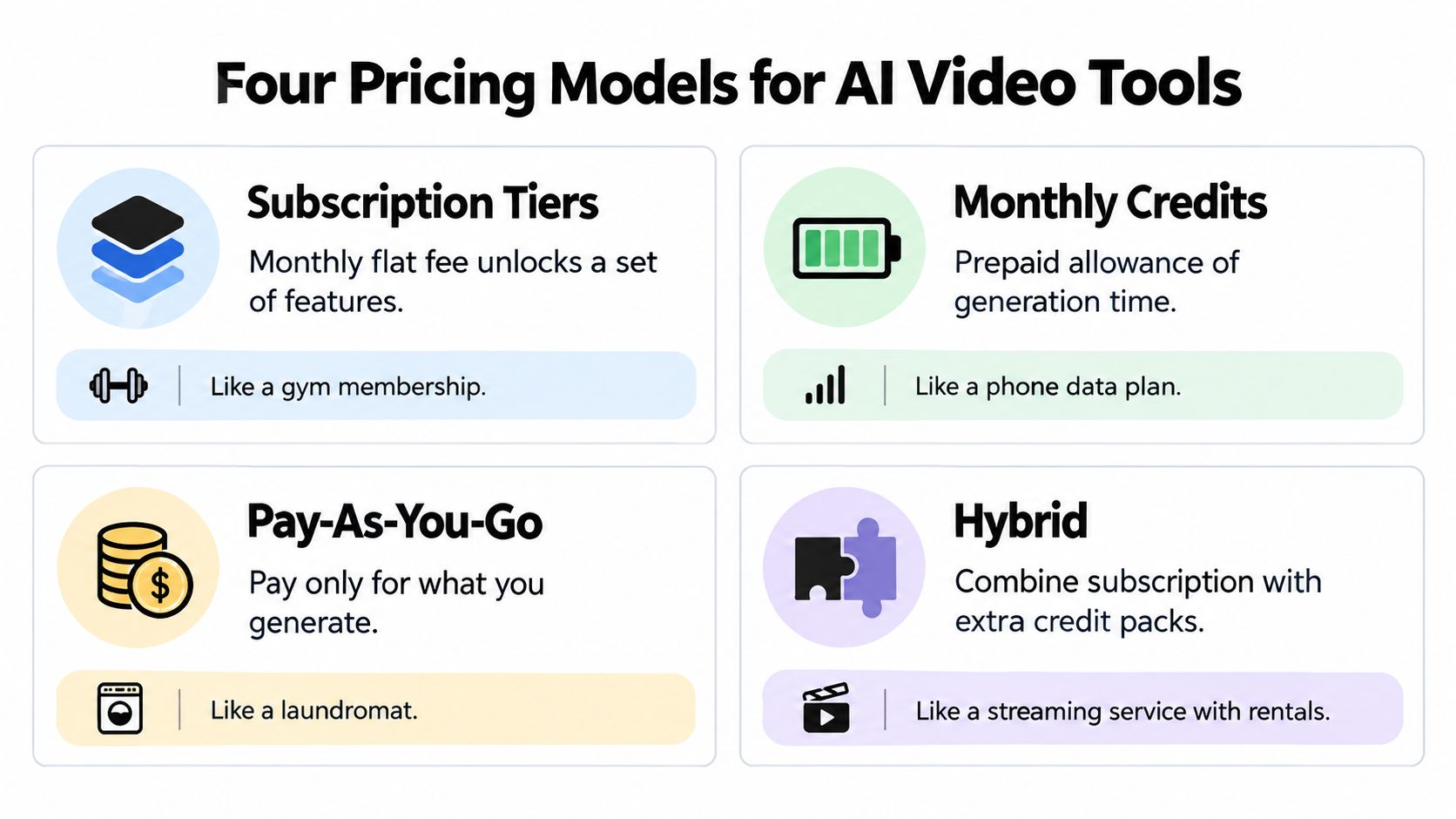
Subscription tiers are the simplest pricing model to read. You pay a fixed monthly fee, then get access to a defined feature set, model limits, or export quotas. The price looks clean. The usage rules usually are not.
Monthly credits work like prepaid usage. Each clip, resolution upgrade, reroll, or failed attempt burns part of the balance. If you run out, you stop or buy more. That works for steady output. It punishes teams that batch content or test a lot of variants.
Pay as you go and hybrid plans
Pay-as-you-go charges only for what you generate. For light or irregular use, that is the most efficient setup. The trade-off is simple. If your publishing schedule spikes, the bill spikes with it.
Hybrid plans mix a base subscription with usage-based top-ups. They look flexible because they are flexible. They also create more ways to overspend if you do not watch credit burn, top-up rules, and limits on the models you need.
A plan can look generous and still be the wrong fit if credits expire, daily limits kick in, or the cheapest tier blocks the model you need.
The reason vendors split pricing this way is compute cost. Industry estimates from LTX show that a 5-second 480p generation may use roughly 20–30 seconds of H100 time, while a 10-second 1080p generation may require about 2–5 minutes. Higher quality burns more compute, so vendors meter it more aggressively.
For buyers, that creates a clear test. If the plan does not match the compute load, the sticker price is misleading.
What to look for on any pricing page
Read the label first, then check the limits.
- Subscription tier: fixed monthly fee, but watch caps and quality restrictions.
- Monthly credits: prepaid usage, but check expiry rules and overages.
- Pay-as-you-go: only pays for what you use, but burst usage gets expensive fast.
- Hybrid: flexible on paper, messy in practice if top-ups and limits stack.
That is enough to classify most plans fast and see where the true cost will land.
From Per Second to Per Finished Minute
Raw generation is only the starting point
The raw per-second number is useful, but it's not your final cost. Industry pricing analysis shows that Veo 3 launched at about $0.75 per second, later dropped to $0.40 per second for Veo 3 and $0.15 per second for Veo 3 Fast, while Veo 3.1 Lite was listed at $0.05 per second for 720p DataIntelo. That's a huge spread, and it proves the market doesn't have one price.
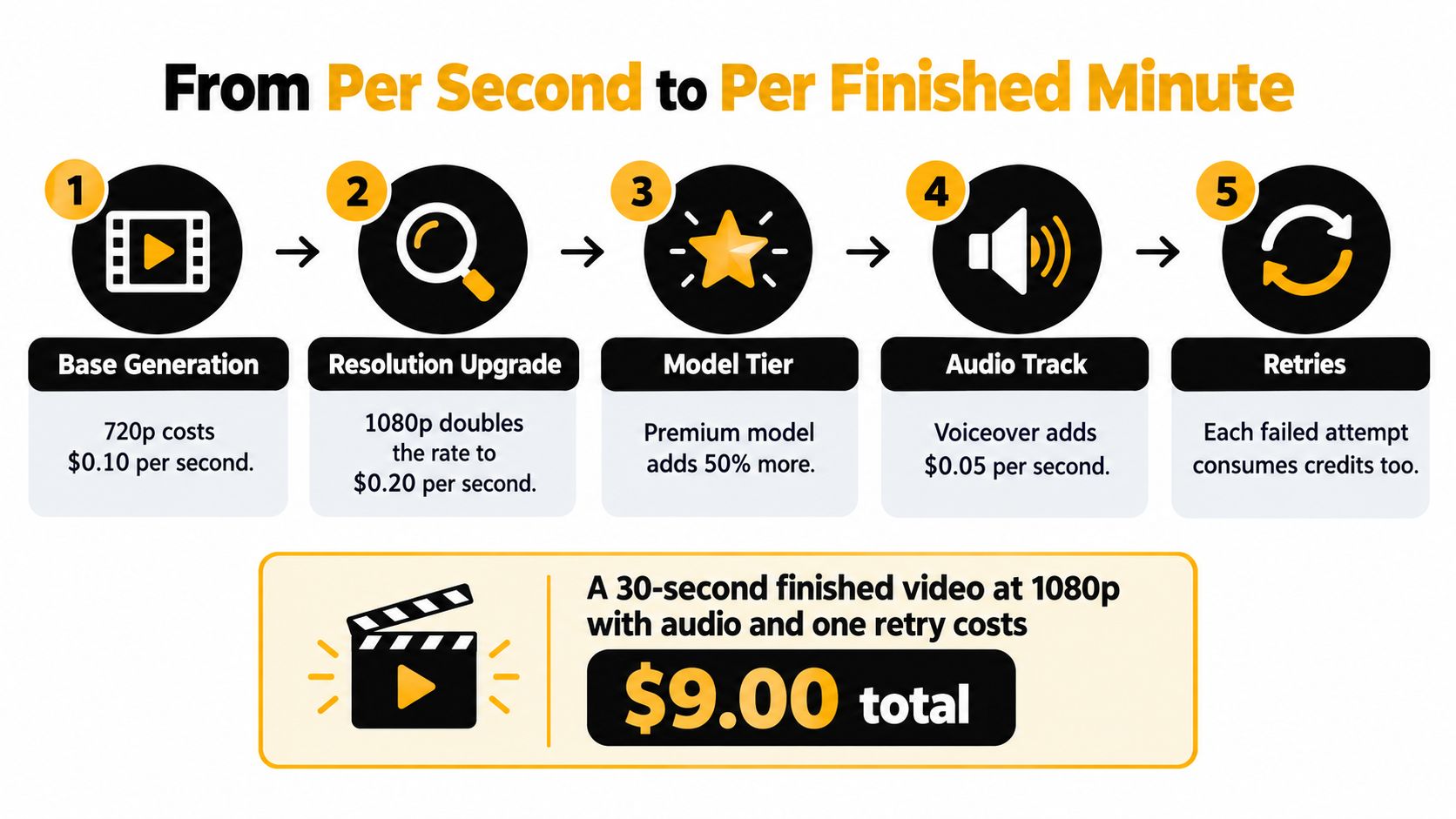
A 30-second clip can therefore cost roughly $1.50 at the Lite tier before editing, retries, or extras, or much more if you choose a premium path. The wrong move is to stop there and call it “cheap.”
Retries are where budgets break
Usable output costs more because creators regenerate shots to fix motion, identity, camera, or prompt-following failures. One industry estimate puts a usable 1080p result at 1.4 to 1.8 times nominal generation cost, while highly constrained brand or stylized shots can reach 2 to 4 times nominal cost Kompozy. That's the number buyers ignore, and it's the one that matters.
Budgeting formula: effective cost = listed generation cost × retry multiplier + post-processing cost.
Use that formula every time. A tool that looks cheaper per second can still cost more per usable clip if it fails more often, forces upscaling, or makes you rebuild scenes repeatedly.
A simple worked example
Take a 30-second clip. On a low raw rate, you might expect a manageable bill. Add one failed attempt, a usable 1080p result, voice, and editing, and the total moves quickly. On a highly stylized brand shot, the multiplier can climb again because the model struggles with consistency.
That's why the right unit is per finished minute, not per generation second. The number on the pricing page is a starting point, not the answer.
How Credit Plans Work in Tools Like Revid

Credit plans look simple until you run real work through them. Credits usually get spent on generation, rerolls, resolution upgrades, audio, image references, and extensions. The trap is assuming every credit becomes usable video. It does not.
As shown in the compute breakdown above, higher resolution burns disproportionately more infrastructure time, which is why the same credit allowance feels different at 480p versus 1080p.
For Revid-style plans, the right question is not “How many credits do I get?” It is “How many publishable seconds do I get after rerolls and quality upgrades?” If the plan does not make that clear, you are guessing.
Three workloads that stress a credit plan
A faceless TikTok creator posting every day needs steady small outputs, so a credit plan can work if the model stays consistent and the failure rate stays low. A musician making one video a month can waste unused credits unless the plan rolls over or stays cheap enough to forgive idle time. A small business running a burst campaign of 20 UGC ads in a week will usually punish a small credit allowance and force top-ups or a higher tier.
That is why monthly credits stop being simple. A plan that fits one cadence can be wrong for another.
A practical Revid example helps. A 30-second workflow with one reroll, a resolution bump, and basic audio or asset use can burn through a meaningful share of a modest credit pool fast. On a credit plan, the bill is not just the first render, it is the second and third attempt that finally gets you something publishable. For public feedback, cost questions, and user complaints, the Revid Reviews pricing and review hub is the place to check.
Match the plan to the production rhythm
- Daily creator: choose predictability over the lowest sticker price if rerolls are frequent.
- Monthly creator: avoid oversized plans that expire before you use them.
- Burst campaign buyer: prioritize overage clarity and top-up pricing over the entry fee.
A daily creator cares about repeatable output and low failure costs. A monthly creator cares about not paying for idle capacity. A burst buyer cares about how fast credits disappear once the team starts iterating. That is the only way to avoid paying for empty capacity.
Comparing Revid, HeyGen, InVideo, Pictory and Higgsfield on Real Cost
The cheapest-looking tool is not always the cheapest tool for your workflow. That's especially true when pricing differs by model type, credit consumption, and output style. A talking-head workflow and a faceless short-form workflow do not burn money the same way.
What the comparison should measure
Don't compare these tools on features alone. Compare them on the same cost axis: entry tier, included usage, effective cost per finished minute on a normal workload, and whether the cheapest plan supports commercial use. That keeps the discussion honest.
| Tool | Entry tier | Included usage | Effective cost per finished minute | Commercial rights on entry plan |
|---|---|---|---|---|
| Revid | Paid subscription model | Monthly credits | Depends on retry rate and output mix | Check the plan before publishing client work |
| HeyGen | Paid subscription model | Credits tied to generation and avatar use | Can be high for cinematic or avatar-heavy work, with usable outputs often landing higher than sticker price | Check the plan before commercial use |
| InVideo | Tiered subscription | Minutes or feature caps depending on plan | Usually better when your workload is marketing-driven and predictable | Verify the entry tier |
| Pictory | Subscription with workflow limits | Credits or export limits depending on plan | Often fits repurposing work more than high-iteration generation | Verify the entry tier |
| Higgsfield | Model-driven pricing mix | Usage varies by output type and tier | Can swing sharply with model and quality choices | Verify the entry tier |
Cinematic and avatar-heavy tools can get expensive faster than casual buyers expect. One pricing analysis places cinematic models at about $1.50 to more than $15 per finished minute before rerolls, with credits also consumed by higher resolution, audio, image references, extensions, and failed outputs HeyGen. That's why a talking-head creator can love one tool while a short-form ad buyer hates it.
Where each tool tends to make sense
Revid tends to suit high-volume faceless creators who need repeatable output and don't want to hand-build every video. HeyGen makes more sense when the workflow is avatar-heavy or centered on presenter-style content. InVideo is more comfortable for marketers who want structured templates and predictable production. Pictory fits repurposing and editing-led workflows better than experimental generation, and Higgsfield is more niche, so you should judge it by the exact output style you need.
One useful reference point is the public review and comparison content at Revid Reviews, especially if you want buyer-side context rather than platform marketing. Use it as a checkpoint, not as a shortcut.
Hidden Costs the Cheapest Plan Does Not Mention
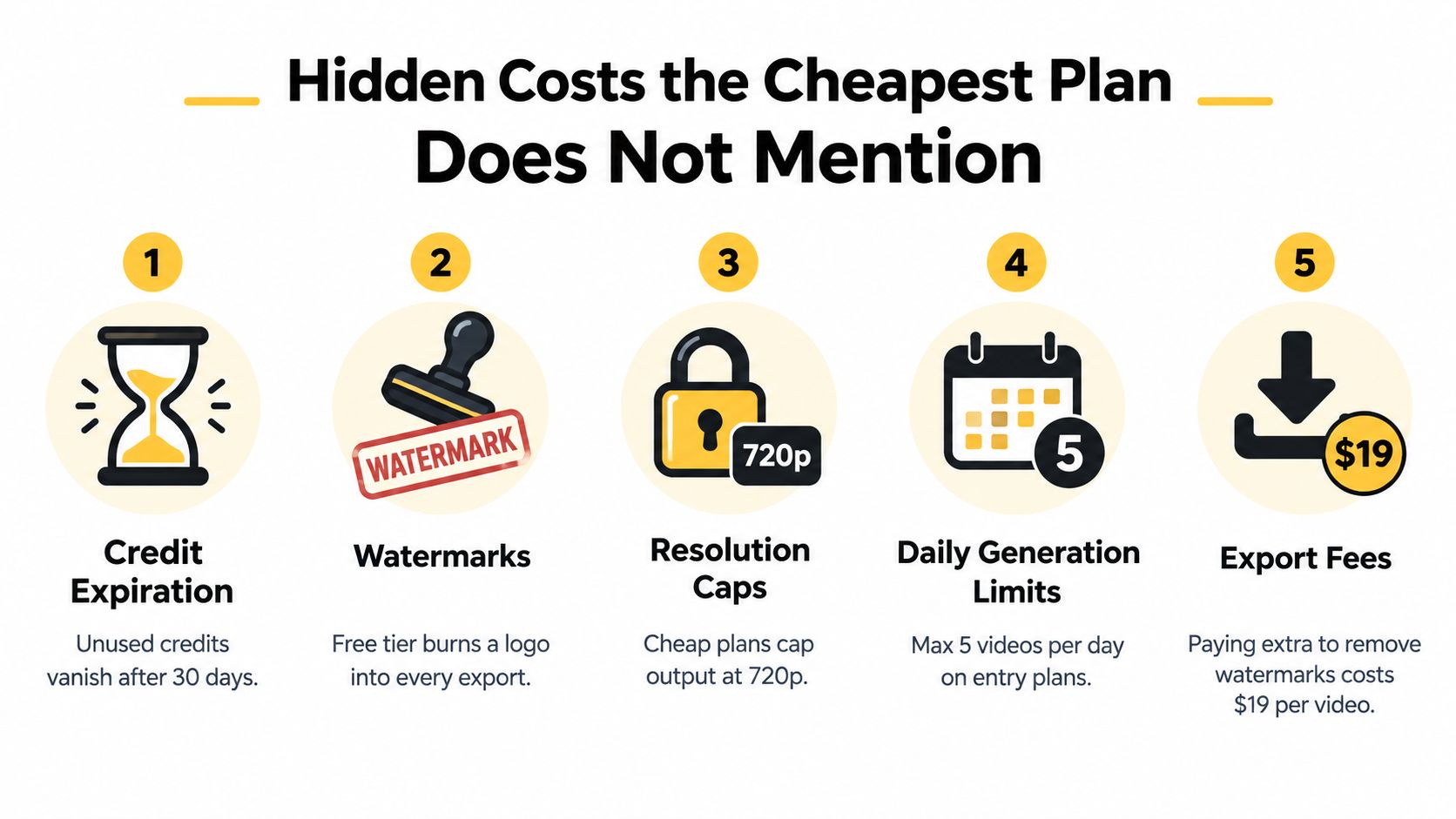
The cheapest plan usually wins on sticker price and loses on real cost. The bill shows up in limits, exclusions, rerolls, and failed exports. If you skip the fine print, you can spend more than you saved.
The common traps buyers miss
- Credit expiration: unused credits disappear, so value vanishes before you use it.
- Watermarks: free tiers often stamp every export, which makes the output unusable for client work.
- Resolution caps: low-cost plans commonly stop at 720p, which pushes you toward an upgrade later.
- Daily generation limits: an entry plan can look fine until you hit the cap in the middle of a campaign.
- Export fees: removing a watermark or getting a clean download can cost more than the plan first suggested.
Recent comparisons also show a spread from about $0.01 per second for some models to roughly $0.10 per second for premium models, a roughly tenfold difference for outputs that may look similar to casual viewers Mobbi. That gap is why the lowest monthly fee tells you almost nothing about the finished bill.
Why cheaper can end up costing more
A low-price plan gets expensive fast when you are still testing ideas. Drafts, reruns, and rejected clips burn through credits, then the commercial license turns out to sit behind a higher tier. In many cases, the plan with predictable included usage costs less because it cuts waste.
Light usage, normal usage, and burst usage behave differently. A light creator may tolerate a cheap tier with tight limits. A normal publisher needs steady access and fewer surprises. A burst buyer cares more about top-up rules and cap behavior than the entry fee.
Cheap plans do not stay cheap when credits evaporate during iteration.
If a vendor will not tell you how it handles expiration, commercial rights, refunds, and watermark removal, treat that as a warning sign. Real buyer complaints about expired credits, watermark surprises, and refund friction are collected at the Revid Reviews Trustpilot roundup, so check documented complaints before you commit.
Matching Your Plan to Your Real Workload Before You Pay
Start with your monthly output, not the vendor's monthly price. If you know roughly how many finished videos you need, you can estimate whether the plan is light, normal, or burst usage and compare that against the effective cost per finished minute.
Use three workload bands
- Light usage: a few finished videos a month, best suited to pay-as-you-go or a small credit plan.
- Normal usage: regular publishing, where a subscription often beats ad hoc generation.
- Burst usage: campaign weeks or launch periods, where top-up rules and cap behavior matter more than the entry fee.
Then run a basic break-even check. Multiply your expected finished videos by your realistic per-finished-minute cost, add the chance of overages or retries, and compare that total to the subscription price. If the monthly plan is cheaper only when everything goes perfectly, it's not the safer choice.
My blunt recommendation
Buy for your worst normal month, not your best-case test run. If your output is uneven, seasonal, or campaign-driven, favor plans with transparent top-ups and no nasty expiration rules. If you publish steadily and reroll often, pay more for predictability and less for regret.
The right plan is the one that lets you keep shipping without thinking about every failed render. If you want buyer-side pricing breakdowns, public review context, and direct comparisons across Revid and competing AI video tools, visit Revid Reviews and use it before you commit to a monthly plan.