
Stop trusting the star rating. It's the most popular advice in this category, and it's how buyers end up paying for a tool that demos beautifully, burns credits on garbage, and falls apart on a real deadline. If you're researching AI video generator reviews, your job isn't to find the highest score. It's to audit the evidence behind that score, then decide whether the tool survives contact with your workflow.
Table of Contents
- Why Most AI Video Generator Reviews Fail the Buyer
- A Working Rubric for Reading AI Video Generator Reviews
- What Reviewers Actually Praise in AI Video Generators
- The Hidden Cost Story No Review Roundups Publish
- Reading Reviews on Quality When Clips Look Great
- Rights, Disclosure, and the Reviews That Ignore Them
- How to Build Your Own Multi-Source Review File
- The Five-Question Audit Before You Subscribe
Why Most AI Video Generator Reviews Fail the Buyer
A single average tells you almost nothing. A tool can collect glowing launch-day praise from hobbyists making novelty clips and still fail a marketer who needs consistent characters, predictable credits, and support when an export breaks. Single-source dependency is the first failure mode. One platform, one audience, one moment in time.
The second is recency blindness. Models, pricing, credit rules, and cancellation terms change fast. An enthusiastic review written before a pricing overhaul isn't evidence about the product you're buying today, it's history. Yet roundups keep recycling old conclusions and updating the publish date.
The trust problem is measurable
Buyers lean on reviews even when they doubt them. In the fall 2024 Prodege survey of 2,000 U.S. consumers, 54% trusted online reviews first when making purchasing decisions, while 53% feared AI could reduce the trustworthiness of those reviews and 87% said they struggled to distinguish genuine reviews from AI-generated ones. That tension is the whole story. You need reviews, and you can't take them at face value.
The same survey also found 77% described online reviews as mostly trustworthy, and freshness shaped that trust. Reviews from the previous three months carried far more weight than feedback over a year old. For AI video software, that matters more than in most categories because rendering quality and policies can shift mid-subscription.
What weak reviews hide
Watch for these patterns before you believe any verdict:
- Undisclosed commercial ties: Free access, affiliate commissions, or vendor sponsorship aren't mentioned, so praise reads as independent when it isn't.
- Selective complaints: The review lists minor gripes like a cluttered dashboard but skips refunds, credit burn, and support failures.
- Showcase cherry-picking: One polished clip stands in for typical output, with no mention of failed attempts.
- No workflow fit: The reviewer never says whether the tool suits faceless channels, UGC ads, music videos, or client work.
A review collection earns trust when it links to originals, dates everything, and publishes the complaints a vendor would rather bury.
The product you're buying from a good review site isn't a recommendation. It's the synthesis. Patterns across many buyers, sorted by recency and use case, beat any individual's hot take. Treat every AI video generator review as a witness statement. Cross-examine it.
A Working Rubric for Reading AI Video Generator Reviews
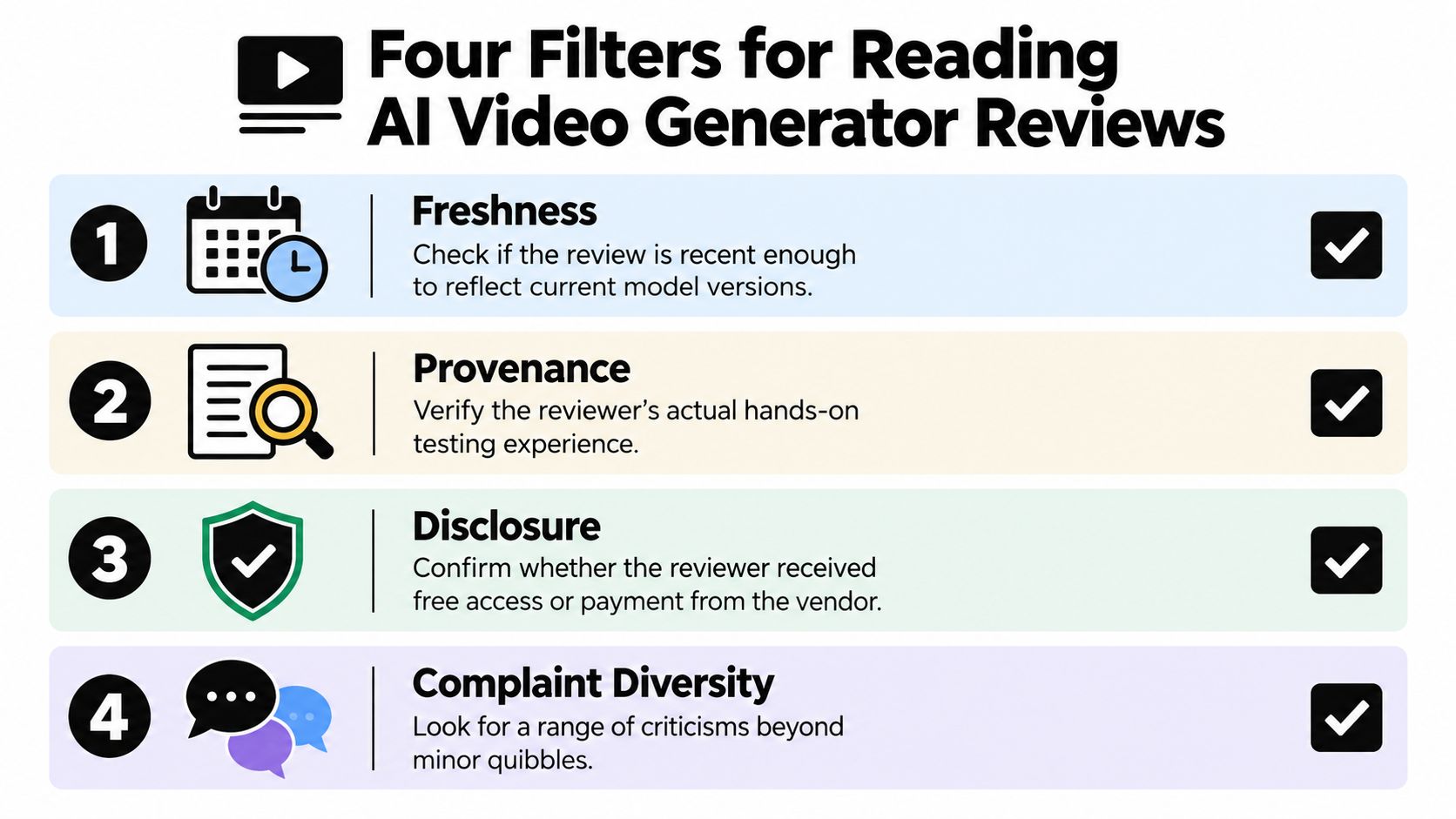
Run every review through four filters before it influences your wallet. This takes minutes and kills most bad purchases early.
The visual below sums up the four checks in the order I'd run them.
Freshness and provenance first
Freshness asks whether the review reflects the current model, current credits, and current terms. If the most useful comments predate a major model release, downgrade them. Recent reviews mentioning a specific version, mode, or pricing change are worth more than a wall of undated five-star blurbs.
Provenance asks who tested what. A credible reviewer names the prompt style, output length, aspect ratio, and post-processing used. Vague language like stunning results with no settings, no failed runs, and no export details usually means the writer barely touched the tool. Identifiable reviewers with real channels or client work carry more weight than anonymous roundup copy.
Disclosure and complaint diversity
Disclosure matters. Did the publisher receive free access or affiliate revenue? Is the site run by the vendor? None of that automatically disqualifies a review, but hiding it does. A publisher that states its relationship upfront and still publishes negative feedback is more credible than a supposedly neutral site that never criticizes a sponsor.
Complaint diversity is your reality check. Strong review collections surface distinct failure modes, not the same complaint repeated. Look for specifics about:
- Output failures: Anatomy errors, scene changes, garbled text, or prompts ignored.
- Business failures: Credits consumed by bad renders, refund friction, slow support.
- Fit failures: Great for Shorts, weak for longer narrative work.
Different platforms expose different biases. Launch communities skew enthusiastic, which is why checking a Product Hunt review collection alongside service-focused and social sources gives you a fuller picture than any one feed. Grade the review before you grade the tool. If it fails two filters, move on.
What Reviewers Actually Praise in AI Video Generators
Strip away the slogans and genuine praise clusters into three operational patterns. When reviewers describe these concretely, pay attention. When they use them as adjectives, don't.
This sketch captures the first pattern, the race from idea to a postable clip on a phone.

Speed to first clip is the most cited strength, and the most abused. Real praise sounds like a workflow, prompt in, captions placed correctly, export ready for TikTok without a separate editor. Fake praise just says lightning fast. What predicts success for a faceless channel operator isn't raw render speed. It's how few steps sit between an idea and a publishable file, including hooks, voiceover, and formatting.
Social-format fluency is the second pattern. Reviewers who post daily care about vertical framing that keeps subjects centered, captions that don't cover faces, and templates built for YouTube Shorts and TikTok rather than adapted from widescreen. Tools such as Revid, InVideo, and Pictory get discussed in these terms because the format is the product. A cinematic generator that needs heavy reformatting loses to a less glamorous tool that exports platform-ready files.
The video below is a useful test case for spotting the difference between described workflow and pure hype.
Creator-loop economics is the pattern serious creators praise most. They describe iterating on hooks, swapping a voice, or regenerating one scene without restarting the whole project or torching their monthly allowance. That's different from a tool that produces one brilliant clip after many expensive attempts. Scrolling creator posts collected from X shows this distinction clearly, because daily users talk about iteration habits, not launch-day excitement.
For music videos, the winning praise mentions beat-aware cuts and reusable visual motifs. For short-form ads, it mentions variant generation for testing. Match the praise pattern to your job. A strength that doesn't map to your workflow isn't a strength for you.
The Hidden Cost Story No Review Roundups Publish
Monthly price is marketing. Cost per usable clip is the truth, and almost no roundup calculates it.
Independent coverage reports that creators commonly need roughly 3 to 5 generation attempts for one acceptable clip, with every attempt consuming credits, and one analysis found finished production costs ranging from approximately $315 to $750 per finished minute in documented workflows, while credit consumption varies by model, resolution, and clip length. Those finished-minute figures reflect demanding productions, not casual social clips, but the mechanism applies everywhere. Failed renders aren't free. That's the retry tax, and it rewrites every pricing page.
Do the math reviewers skip
A cheap plan with a low keeper rate loses to a pricier plan that nails your style on the first or second attempt. Before subscribing, run identical prompts on trial credits and record what happened. Don't track how many videos you generated. Track how many you could publish.
Reviewer Cost Math Beyond the Subscription Price
| Metric | What to Capture | Why It Matters |
|---|---|---|
| Attempts per keeper | Total generations divided by publishable clips | Exposes the retry tax behind the headline price |
| Credits lost to failures | Spend on clips you deleted | Shows how fast a monthly allowance really drains |
| Cost per 10 usable seconds | Plan spend divided by usable output length | Lets you compare credit systems apples to apples |
| Add-on consumption | Upscaling, lip sync, voice, and export charges | Reveals costs hidden outside base generation |
| Cost per finished minute | Total spend for one completed, edited minute | Connects the tool to real production budgets |
Where allowances quietly leak
Ask whether failed renders consume credits, and whether retries at higher resolution cost more. Check if upscaling, voice generation, lip sync, and watermark-free exports draw from separate allowances. Reviewers rarely test this because it requires burning their own credits on failures, which is exactly why you must.
Practical rule: If a review praises pricing without reporting attempts per keeper, treat the pricing section as advertising.
For faceless channel owners and small businesses, predictable iteration cost beats a spectacular best-case demo. You don't monetize the one clip that worked. You monetize a repeatable output rate, week after week, at a cost your revenue can carry. The cheapest subscription is rarely the cheapest workflow.
Reading Reviews on Quality When Clips Look Great
Beautiful frames lie. A generator can produce gorgeous stills and still wreck a story-driven Short because the subject's face drifts, the jacket changes color, or the background rearranges itself between frames.
Serious evaluation frameworks already separate these failure modes. VBench-based evaluation decomposes AI video quality into 16 dimensions including subject consistency, background consistency, motion smoothness, flickering, dynamic degree, and text-video alignment, using models such as DINO for object consistency, CLIP for semantic consistency, and optical-flow analysis for temporal behavior. You don't need the technical pipeline. You need the habit of scoring dimensions separately instead of trusting one verdict.
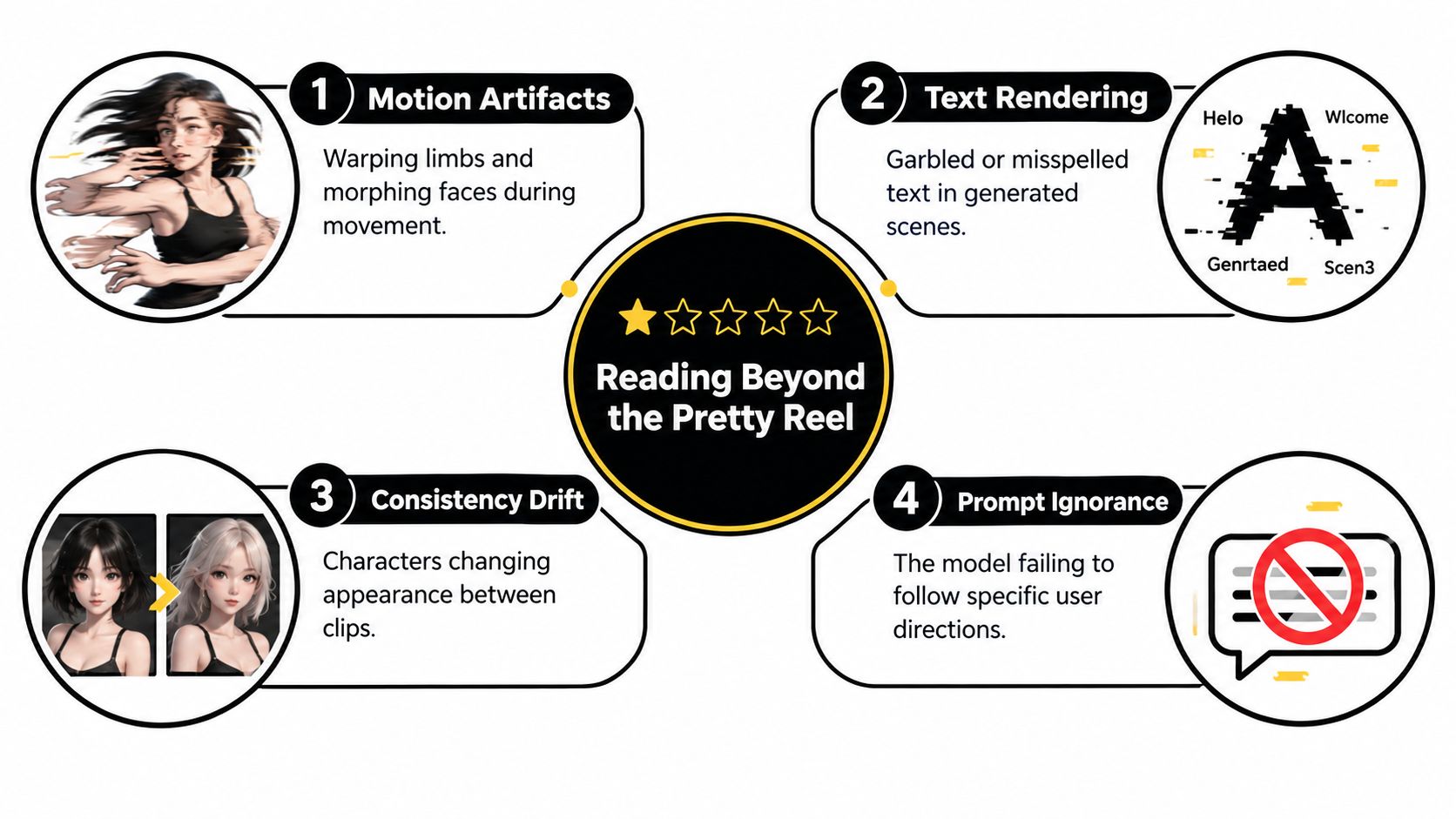
The concept map below shows the failure modes that hide behind a pretty reel.
Translate reviewer language into submetrics
When a review says the output felt off, figure out which dimension failed:
- Subject consistency: Does identity, clothing, and geometry persist across frames and across separate clips of the same character?
- Background consistency: Does the scene layout hold, or do objects appear and vanish?
- Motion smoothness and flickering: Does movement flow, or do limbs warp and textures strobe?
- Text-video alignment: Did the requested action and composition happen, or did the model produce something plausible but wrong?
Weak temporal modeling produces flicker, deformation, and drift. Weak conditioning produces a nice scene that ignores your instructions. These are different problems with different workarounds, and a single star rating blends them into mush.
Test like an evaluator, not a fan
Run the same prompt several times. Rate prompt fidelity and temporal coherence separately, count unusable generations, and note how many rerolls one publishable clip required. Disclose your own settings to yourself, prompt wording, mode, duration, resolution, and any editing or upscaling, or you'll confound the tool with your post-processing.
Human judgment still decides whether a clip works in a real edit. But structured subratings make your decision reproducible, and they expose weaknesses that a polished showcase reel is designed to hide.
Rights, Disclosure, and the Reviews That Ignore Them
A clip you can't safely publish is worthless, no matter how realistic it looks. Most AI video generator reviews barely touch this, and that's a dereliction.
Review mining at scale shows what individual reviewers miss. An analysis of 10,900 G2 reviews identified recurring risks around unclear ownership, AI disclosure requirements, and unauthorized likeness or voice use, found negative ratings for support exceeded those for ease of use, and noted that only one tracked capability addressed content-origin or authenticity verification. Read that again. Support, the thing you need when a client deadline breaks, draws more negativity than usability. And verifiable origin is nearly absent as a tracked capability.
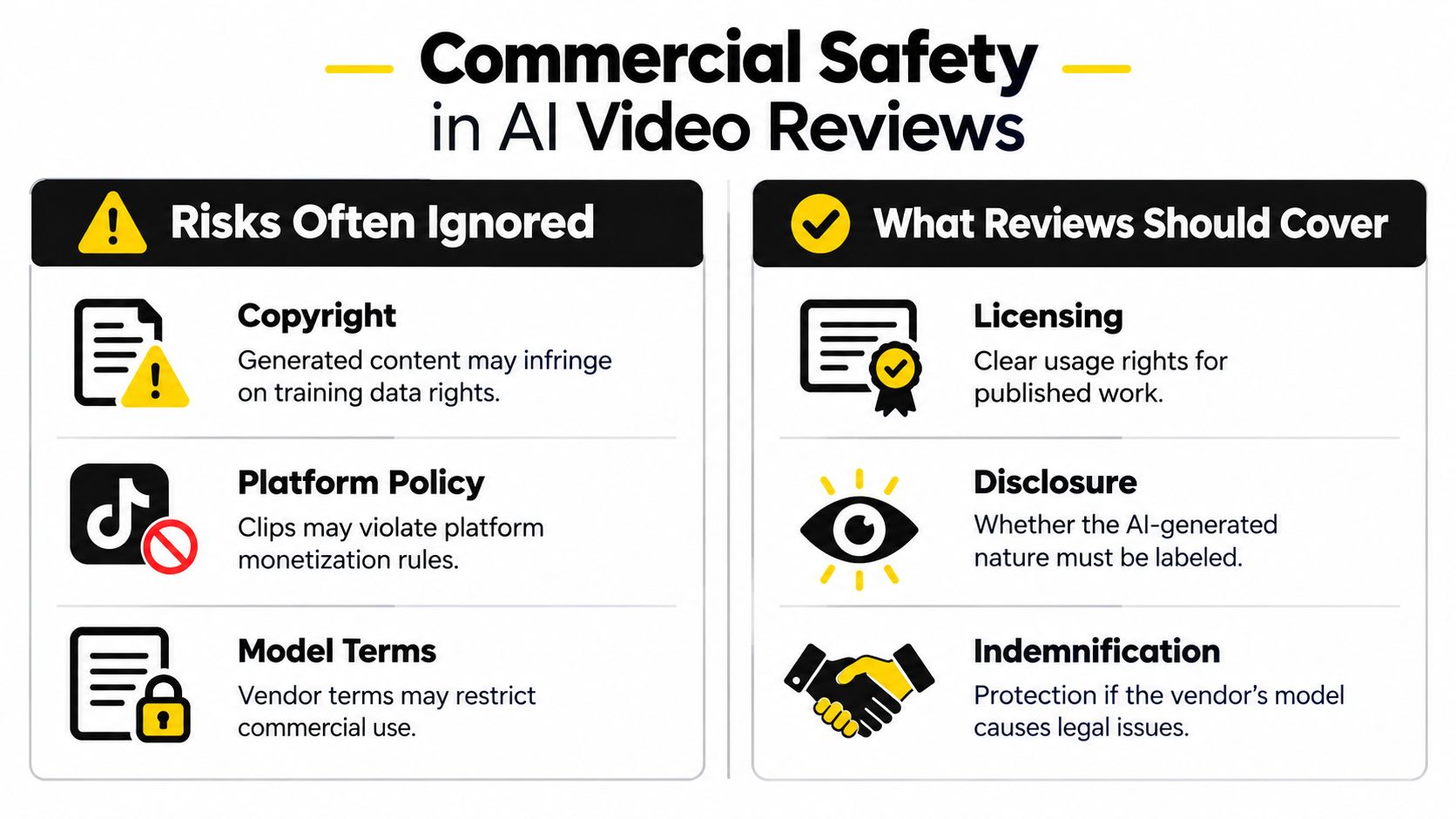
The comparison below separates the risks reviews skip from the coverage you should demand.
The buyer checks that matter
Commercial terms come first. Who owns the output, and does the license cover paid ads, client delivery, and monetized channels? Vague assurances on a pricing page aren't terms. Read the actual commercial-use language before a brand campaign depends on it.
Consent controls come second. If the tool clones voices or faces, as avatar platforms like HeyGen and Synthesia do, verify how consent is captured and whether you can prove it later. Unauthorized likeness use is a recurring complaint category for a reason. If a platform flags your ad or a rights holder challenges a clip, you'll need documentation, not a screenshot of a settings page.
Provenance is not a watermark. A watermark signals something. Content credentials and export metadata attempt to prove origin. Check what metadata survives export, whether disclosure labels are configurable, and how takedown requests are handled.
Support is a safety feature
Test support before you need it. Send a real question during your trial and time the response. Ask whether a human answers, whether billing disputes have a documented path, and whether cancellation stops charges. A generator with excellent footage and weak legal and support infrastructure is a poor choice for advertisers, musicians releasing commercial work, and anyone in a regulated industry. Visual quality is table stakes. Publishability is the product.
How to Build Your Own Multi-Source Review File
Don't outsource your judgment to one roundup. Build a small evidence file per tool and update it before every renewal. It takes less time than one bad subscription costs.
This isn't niche behavior. BrightLocal's 2024 Local Consumer Review Survey found that 75% of consumers always or regularly read online reviews, that 50% trust online reviews as much as personal recommendations, and that Google's share as the most-used review source dropped from 87% in 2023 to 81% in 2024. Buyers already spread their research across platforms. Do it deliberately.
Assign each source a job
- Start with service complaints. Check Trustpilot reviews gathered in one place for billing, cancellation, refund, and support patterns. Ignore individual rants. Log recurring themes with dates.
- Add daily product reality from X. Creators post outages, silent model changes, credit adjustments, and workarounds there long before changelogs admit anything. Capture specifics, not vibes.
- Layer in Product Hunt sentiment. Launch-period comments skew positive, but they reveal which use cases early adopters tried and which features drew questions.
- Attach your own test notes. Same prompt, several runs, reroll count, credits spent, and one publishability verdict per clip.
Turn notes into a decision snapshot
For each tool, keep one short record with the latest complaint clusters, your measured attempts per keeper, current commercial terms, and the date you last verified pricing. When sources disagree, that's signal, not noise. Enthusiastic launch comments plus mounting billing complaints plus your own high retry count describes a tool that's exciting and expensive to operate.
Disagreement between platforms is information. A tool with identical praise everywhere is either perfect or curated, and perfect doesn't exist in this category.
Revisit the file before each renewal because tools change mid-cycle. The generator you subscribed to in January may have different credit math by summer. Your file catches that. A bookmarked roundup won't.
The Five-Question Audit Before You Subscribe
Run this audit on any generator, including the ones your favorite creator swears by. Five answers, written down, before money moves.
- What's my cost per 10 usable seconds? Measured from your own trial, including failures, not copied from a pricing page.
- What do recent complaints cluster around? Output quality, billing, support, or rights. Clusters predict your future problem.
- Who owns the output commercially? Verified in the terms, covering ads, client work, and monetized channels.
- What happens when something breaks? A tested support path, a clear cancellation route, and a refund policy you've read.
- Do reviews from the last three months still recommend it? Current evidence about the current product, not launch nostalgia.
Be honest about the limits, too. Reviews can't tell you how the next model version will behave, whether pricing tiers will change next quarter, or how output will sit inside your specific brand guidelines. Anyone claiming certainty on those points is selling.
One last standard applies to this site as well. It's run by the Revid team, it collects public reviews from multiple platforms and links each one to its original, and it covers complaints alongside strengths. Judge it by the same rubric you'd apply anywhere else. That's the point of having one.
Before your next subscription, spend twenty minutes with the evidence instead of the hype. Revid Reviews collects public reviews of Revid from Trustpilot, X, and Product Hunt, each linked to its original, alongside honest buyer guides on pricing, credits, cancellation, and how creators use these tools. Read the complaints, check the dates, run the five-question audit, and only then decide where your money goes.