The most repeated advice about faceless YouTube automation is that the channel is the easy part. Pick a niche, prompt a tool, post daily, then clone the winners. That framing gets the economics backwards. Automation removes the camera, not the judgment, and the camera was never the part that decided whether anyone watched.
There's also no official scoreboard behind the numbers people quote. YouTube has no channel category called faceless, no public count of how many exist and no figure for what they earn as a group. What you get instead is a mix of modeled estimates, course marketing and self-reported screenshots. The production model is real and increasingly common. The guaranteed return isn't.
What you can control is narrower and more useful: whether each video contains work only you could have made, whether the channel clears monetization review, and whether production costs stay below revenue you can measure. Every section below tests one of those.
Table of Contents
- What Faceless YouTube Automation Actually Means
- The Production Workflow and Where AI Tools Fit
- Benefits, Limits and Risks of a Faceless Channel
- Passing the Monetization Review Without Getting Flagged
- Using Retention Data to Set Length and Structure
- Testing Income Honestly Before You Scale
- Confirm the Workflow Passes Before You Upload
What Faceless YouTube Automation Actually Means
YouTube doesn't classify channels as faceless. There's no checkbox, no tag, and no authoritative count of how many exist or what they earn together. An independent review of faceless YouTube statistics found the available evidence is mostly individual accounts, channels listed for sale and small samples rather than a systematic earnings study. That makes every confident percentage about typical automation income a projection, not a benchmark.
The workable definition is a production model. A faceless channel is one where the person running it doesn't appear on camera, and the work is organized so research, scripting, narration, visuals, editing, thumbnails and publishing run partly or mostly through software, often AI video tools. Think of a director who never steps in front of the lens: the crew and the software operate the cameras and make the cuts, but the director still chooses the story.
Faceless describes presentation, not monetization. A channel without a host earns or loses money under exactly the same rules as one with a host, and those rules examine what's in the video rather than who's in it.
Using AI isn't a differentiator either. YouTube's 2026 report on generative AI and video creativity reported that 72% of surveyed video uploaders aged 14 to 44 used AI on videos or images, so the production method is close to standard practice. What's left as a distinction is authorship.
Three questions separate a business from a hobby here: does each video contain original, useful work; does the channel satisfy monetization policy; and do production costs stay below realistic revenue? None of them depends on whether anyone ever sees your face.
The Production Workflow and Where AI Tools Fit
Every faceless format breaks into the same eight stages, and each stage ends with an output the next one consumes. The table is the map: what software typically handles, what stays with you, and what comes out the other end.
| Stage | What AI tools handle | What the creator must own | Output |
|---|---|---|---|
| Topic and research | Trend and keyword suggestions, outline drafts | Choosing a thesis the creator can defend | Topic brief with one clear promise |
| Scripting | First-draft script from a prompt | Original angle, fact checks, added analysis | Final script with sources noted |
| Voiceover | Text-to-speech narration | Pronunciation, pacing and tone checks | Narration track |
| Visuals and footage | Stock matching, generated clips and images | Licensing, relevance and rights clearance | Shot list with asset sources |
| Editing and captions | Auto captions, cuts and transitions | Removing filler, keeping pace, checking sync | Edited master file |
| Title, thumbnail and description | Draft titles and descriptions | Choosing the variant that matches the video | Upload metadata pack |
| Publishing and scheduling | Scheduled uploads | Review before publishing and any required disclosures | Published video |
| Review and iteration | Analytics summaries | Deciding what to change based on retention | Revised plan for the next batch |
The split holds across every format. Software absorbs volume and repetition: the tenth draft of a script, the fourth thumbnail variant, the caption pass, the upload itself. You keep the thesis, the fact checks, the rights clearance and the final call on whether a video is worth publishing at all.
Software handles volume and speed. The creator owns judgment, originality, rights and audience trust.
Those two columns are the whole discipline in one picture.
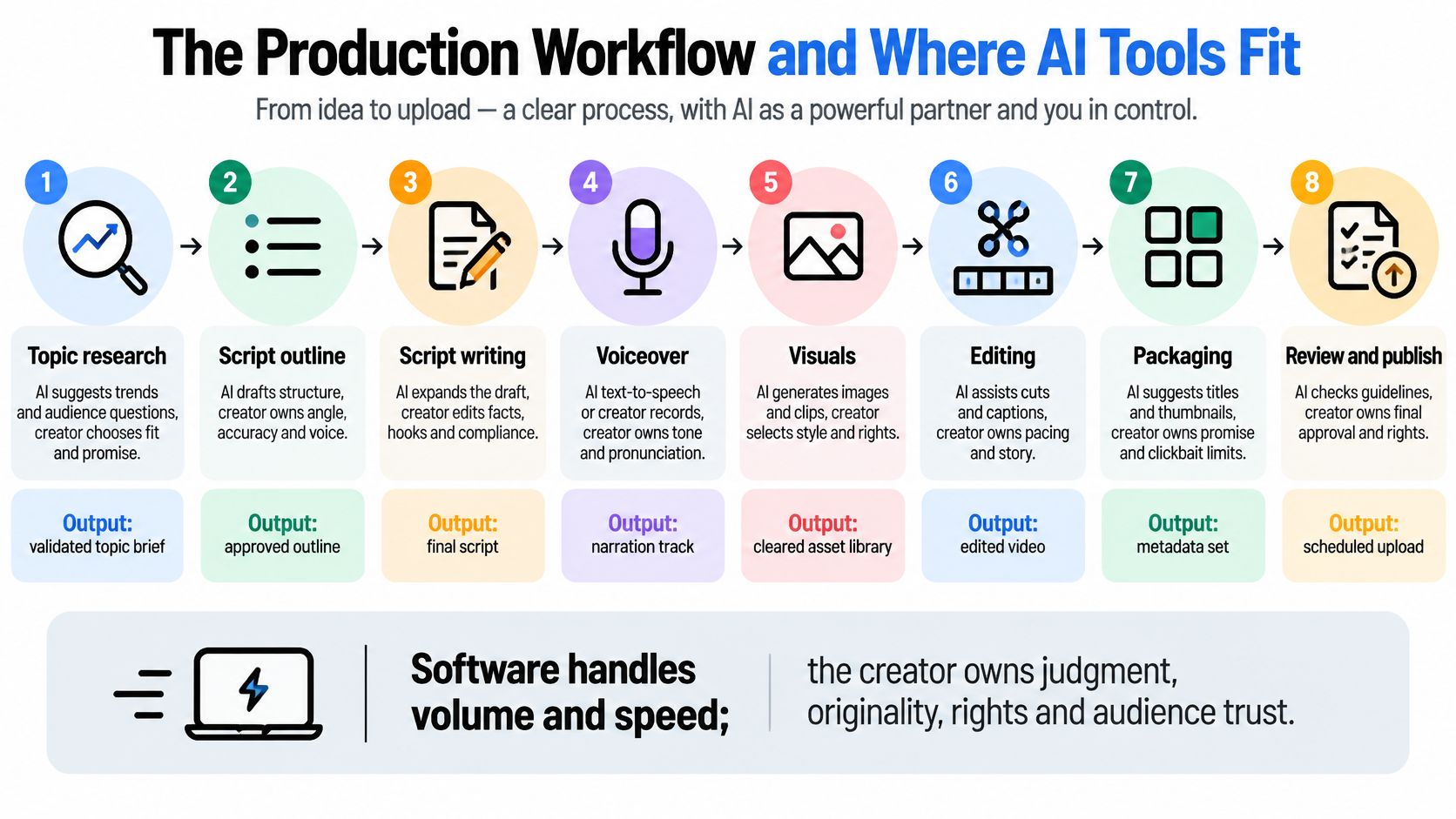
The eight stages in sequence
- Topic and research. Validate the promise first: who is this for, and what will they be able to do after watching.
- Scripting. Let a model draft fast, then rewrite the opening and the analysis yourself. That's where authorship becomes visible.
- Voiceover. Generate narration, then listen end to end for pronunciation and pacing, and fix names and numbers by hand.
- Visuals and footage. Match each shot to the sentence it illustrates, and record the license or generation settings for every asset.
- Editing. Cut for pace, check caption sync, and delete any pause or repeated point the script didn't need.
- Packaging. Write titles and thumbnails that state the same promise as the video, not a bigger one.
- Review and schedule. Watch the finished file before it publishes and confirm disclosures and rights.
- Analytics. Read retention and click-through, then change the next batch rather than the last video.
Three formats and the decision each one keeps
Tips explainer. A checklist format lives or dies on the specificity of its examples. AI drafts the list structure in seconds; you supply the worked examples, the edge cases and the failure you've seen. The decision you keep is the thesis, because a list without one is a search result, not a video.
News digest. Several items per video, stacked in order of consequence. Tools will summarize each item competently and will also confidently get one wrong, so you check every source and write the commentary that explains why the item matters to this audience. The decision you keep is which sources survive scrutiny.
Narrated story. Script over stock or generated footage. Here the tooling is helpful, because one weak shot can be regenerated instead of reshooting a scene. The decision you keep is the order of revelation, which is what makes a story worth 10 minutes instead of 3.
If you want to see the stages run in sequence before building your own chain, this walkthrough is a useful reference point.
What a one-prompt run actually hands you
Revid is one example of a prompt-to-video generator: you type a prompt and it returns a script, visuals and a voice in a single generation, and it's used by more than 3,000,000 creators, with around 59,000 new signups a month. The output is a starting draft, not a finished video. Generated voices and visuals can look polished while missing the specific detail that holds attention, so budget a review pass on the claims in the script and the choice of shots.
Test any tool on two or three videos you'd publish before paying for a year. The Revid Reviews buyer guides cover what different generators produce, which is a faster way to shortlist than trialing everything.
Benefits, Limits and Risks of a Faceless Channel
The economic foundation is old. YouTube's Partner Program began in 2007 and introduced revenue sharing between YouTube and selected creators, which is what made separating an on-camera identity from the production work commercially interesting (YouTube's Partner Program expansion announcement). That infrastructure pays out under the same conditions for everyone. It doesn't promise a return to anyone who automates.
What the model genuinely improves
- No filming schedule. No lights, no retakes, no room booking. A batch of scripts can be recorded in one afternoon.
- Batch production. Write four scripts in a session, generate all four narrations, edit them in sequence. Switching costs drop when the work is files rather than people.
- Faster testing of openings. Produce two or three different first 30 seconds for the same subject and let retention pick the winner.
- Cheaper localization. The same script becomes a second-language track without hiring a second host.
- Lower cost per video. A camera, microphone, lighting and studio time cost more than software credits and stock licenses.
What it costs you
- Generic output. Templated scripts produce videos viewers have already seen, and they leave early.
- More quality control, not less. Every generated line and shot needs a check, which is more reviewing than a shoot ever required.
- Rights work per visual. Each clip and image needs a license you can point to on request.
- Tool dependence. Features and prices change, and a workflow built around one tool's quirk can break in a week.
- Impersonal delivery. A synthetic voice and stock visuals don't build loyalty the way a recognisable presenter does, so the writing has to carry more weight.
- Labor moves rather than disappears. Hours shift from filming to scripting, review and fixing errors.
The honest trade: automation moves work from the camera to the review pass. Channels that skip the review pass are the ones that get flagged.
Four risks concentrate here. A channel-level strike can remove monetization from everything you've published, not just the video that triggered it. Copyright claims can land on stock footage and on generated clips that resemble protected material. Undisclosed synthetic or altered realistic content can put a video outside policy. Tool pricing and features can change without notice and break a workflow you budgeted around. Each is controlled the same way: a per-video record of what you used, where it came from and who approved it.
Automation lowers or redistributes production labor. It doesn't remove the need for audience demand, originality and policy-compliant publishing. We keep a running set of workflow breakdowns on the Revid Reviews blog for the tooling side of that.
Passing the Monetization Review Without Getting Flagged
A faceless channel is judged as a production model, not as a loophole. The review looks at whether the channel adds clear value beyond assembled material, and the standard applies to every upload, including AI-assisted ones. AI narration and stock visuals can fit inside that standard. Mass-produced templates, reused material and videos without meaningful creator input can put monetization at risk across the channel (YouTube's channel monetization policies).
That distinction matters because many new creators treat a license as a shield. It isn't. YouTube's reused content rule focuses on what the viewer receives: commentary, explanation, modification and value added around the material. A clip you legally own can still be reused content if the video mostly repackages it with synthetic voiceover (YouTube's guidance on reused content). Think of the raw clip as lumber. The license lets you use it, but the build is what makes the video yours.
The test before upload: could a viewer describe what you added in one sentence, without mentioning the footage?
A pre-upload audit you can run in ten minutes
- Inventory every reused asset. List each clip, image and audio file, with its source and license.
- Write the thesis in one sentence. If you can't, the video is a compilation.
- Explain each visual. Know why that shot sits under that sentence, beyond decoration.
- Vary the structure to fit the subject. A fixed template applied to forty topics is the pattern the policy targets.
- Mark synthetic or altered realistic content wherever disclosure is required.
- Keep an edit log. Script drafts, voice settings, sources checked and the date you approved the cut.
The policy pages linked above apply to all content, so the same originality and disclosure checks belong in every niche, whether the subject is entertainment, education or business. The practical question is whether a reviewer can see the creator's hand in the finished video. A clear argument, a deliberate visual sequence and a reason for each AI-generated element make that visible. A generic script wrapped around generic footage leaves the reviewer with little to evaluate beyond repetition.
Automation isn't the main risk. Indistinguishable, repetitive output is, and that's an editorial problem you can solve before you ever hit publish.
Using Retention Data to Set Length and Structure
Retention belongs in the production plan, not in a dashboard you glance at on Fridays. A peer-reviewed study of YouTube retention data found that longer video length had a negative and statistically significant association with audience retention, reporting a coefficient of β = -0.6979 with P < 0.001, and that viewers were particularly interested in practical information.
That gives you five steps to run on every upload.
- Name the promised outcome. One sentence before scripting: what will the viewer be able to do or decide afterwards.
- Deliver the first useful insight early. Not the setup, not the channel intro. The first thing that pays off the click.
- Cut at the transcript. Remove pauses, repeated explanations and filler sentences at text level, before they ever reach audio.
- Read the retention graph for the drop. Find the timestamp where the line falls and rewrite that section rather than the whole video.
- Let audience data pick the structure. Generate two or three openings or orderings, publish the strongest, then keep whichever one holds.
Say a 12-minute script holds steady until minute two, falls off sharply, then recovers. That shape points at a slow introduction, not a weak topic. Rework the first 90 seconds and test the same subject again in the next slot.
Length should be justified by information density and progressive reveals. A complex subject can carry depth, and some do. Runtime padded to reach a target is the pattern that loses people, and it's the easiest failure to automate by accident.
One rule applies to every video you publish: each minute should earn the next one.
Testing Income Honestly Before You Scale
The most quoted number in this niche is that 74% of faceless channels earn under US$300 a month. It came from a modeled population, not a survey of 10,000 real channel owners, so it should be read as an estimate rather than measured creator income (ContentGrip's review of faceless YouTube income evidence). The second problem is survivorship. Revenue screenshots come from channels that worked, so they show the visible winners of the model, not the full path through it.
A cohort test answers both problems. Treat faceless as a production system with costs, labor, output and audience response, then run it like a small business experiment. Fix a monthly budget and an upload schedule, run for six to twelve months, and record the same metrics every month. The point is not to find one lucky upload. It is to see whether the system repeats.
| Metric | What it reveals | How to record it |
|---|---|---|
| Total monthly cost | Full production spend per video | Software, voice, stock, freelancers and thumbnails combined |
| Production hours | Real labor per upload | Time including review and fixing errors |
| Upload volume | Output per month | Videos published in each cohort month |
| Impressions and click-through rate | Strength of titles and thumbnails | Impressions and CTR for each upload |
| Average view duration and retention | Whether the script holds attention | Drop-off points on each video's retention graph |
| Returning viewers | Audience loyalty | Share of views from returning viewers |
| Revenue by source | Which income stream works | Monthly totals split into ad, affiliate, sponsorship and service sales |
| Monetization status | Whether the channel stays eligible | Any policy notices or removed monetization, with dates |
Reading the metrics against each other
Rising impressions with falling average view duration means the packaging is winning clicks the video cannot hold. The title and thumbnail did their job, so fix the opening before you make more thumbnails. This is the traffic-light check of the workflow: clicks show interest, retention shows delivery.
Steady retention with flat revenue points at monetization status or the offer, not the content. Confirm the channel is in the program before blaming the videos. If viewers are watching and no income follows, examine the path from attention to revenue, such as the offer, the placement or the channel's eligibility.
Production hours that do not fall as volume rises means the workflow is not automating. It is accumulating. That is the signal to simplify the format rather than add tools. A good automation gain removes repeated decisions, such as where the script goes next or which visual style appears after each section. A weak one adds another dashboard to manage.
Set the decision threshold before the first upload: the monthly cost you will accept, the revenue that covers it, and the result that ends the test. Then report the median video and the failures alongside the best one, because the best one is the number that flatters the workflow. One strong result may come from topic luck. A repeatable result shows up across the middle of the set.
Automation can cut production time while adding editorial and quality-control work. A cheap workflow still fails the economics if retention is weak or the content cannot clear originality review. Scale only after the numbers show that the system earns its keep.
Confirm the Workflow Passes Before You Upload
Run a pilot of six to twelve videos on a single topic before you buy annual subscriptions or hire anyone. Small enough to finish, long enough to show a pattern.
Three checks decide whether you scale.
- Median retention is stable across the cohort. Not one hit video, the middle of the set. If the middle is weak, the format is weak.
- Production hours per video fall without quality dropping. Compare video one with video ten. Flat hours mean you've automated the easy stages only.
- Revenue from at least one source covers total monthly cost. Ads, affiliates, sponsorships or a service, counted separately so you know which one is working.
If the pilot fails a check, change the workflow rather than the volume. More uploads of the same weak video just reach the failure faster.
Revid Reviews is run by the Revid team, so treat it as a vendor-run review hub rather than a neutral watchdog. Each review on the site links back to its original, and that's how it should be read: open the source, read the limitation or complaint in context, and weigh it against the praise. Read the limitations and common complaints before the strengths whenever you're choosing a tool. Then test one trial version on a single pilot video, not on your whole schedule.
Revid Reviews gathers public reviews of Revid, the AI video generator, links each one to its original so you can check it yourself, and pairs them with buyer guides on what the tool costs and how it compares with other AI video generators. The questions this article raises about originality, retention and honest income are the same ones worth asking before you pay for any software. Read the limitations next to the praise, then open Revid Reviews and judge the workflow by what it produces rather than by what a revenue screenshot promises.