
Revid AI pricing starts at $39 per month for 2,000 credits, and the entry-level Base generation rate is 15 credits per five-second unit. That sounds straightforward until you realize the bill changes fast depending on the model, the clip length, and whether you export in higher resolution.
The first time you open the pricing page, it can feel like you're comparing a simple monthly subscription with a hidden metering system. That's the right instinct, because with Revid, the actual cost usually comes from credit burn, not just the headline plan price.
Table of Contents
- What Revid AI Subscription Plans Actually Cost in Credits
- Understanding the Revid Credit System
- Hidden Charges Beyond Video Generation
- Estimating Your Monthly Video Budget
- When to Upgrade or Purchase Boost Packs
- High-Volume Tiers for Agencies and Brands
- Choosing the Right Revid Plan for Your Goals
What Revid AI Subscription Plans Actually Cost in Credits
A pricing page can look simple until a production team starts testing outputs. Revid's plans are not just about the monthly fee. The variable is how fast credits disappear once you choose a model, a clip length, and a resolution.
The three core plans
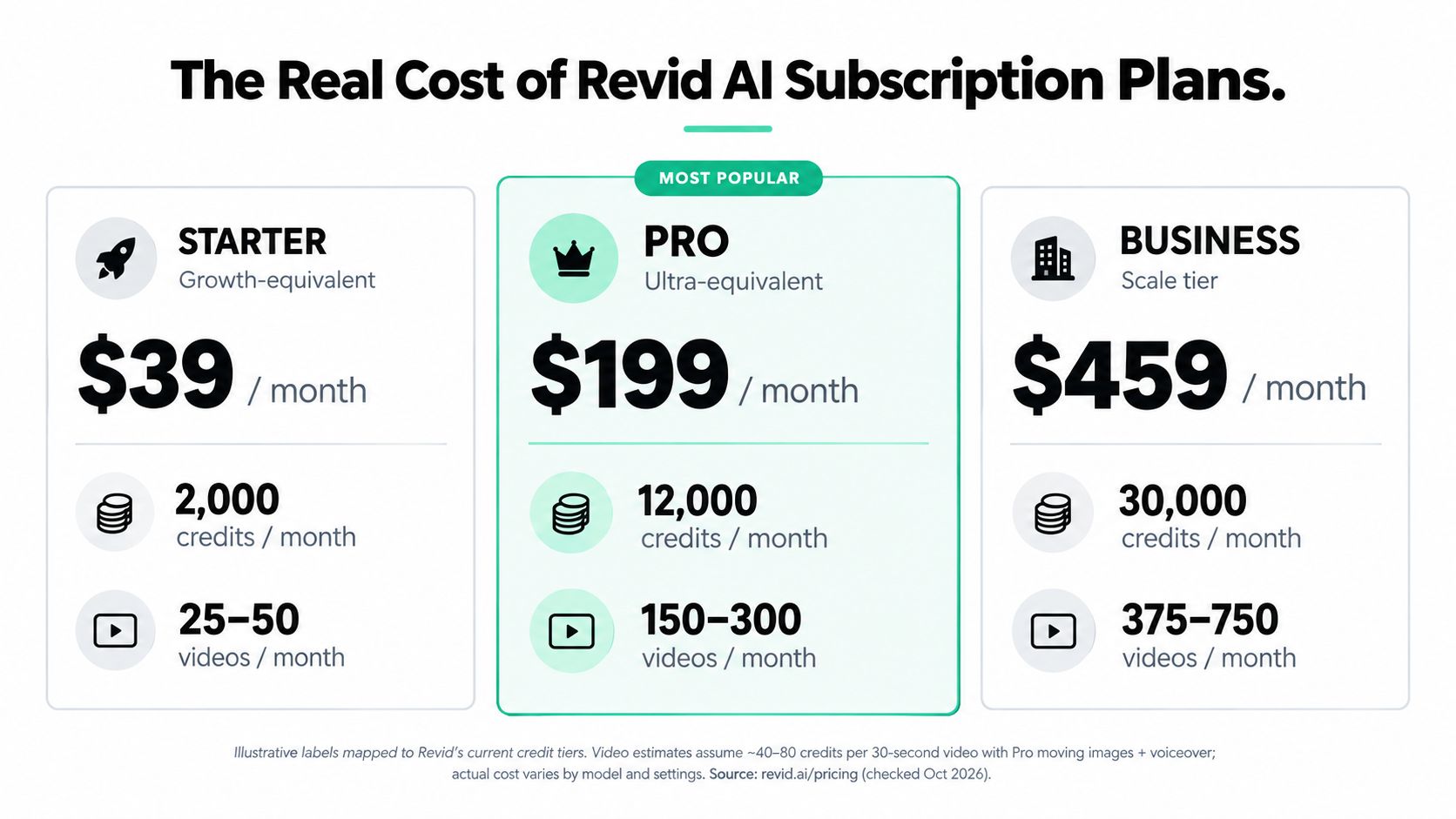
The current structure centers on Growth, Elite, and Ultra. Growth costs $39 per month or $32 per month when billed annually, and it includes 2,000 AI credits. Elite costs $89 per month or $74 per month annually, with 5,000 credits. Ultra costs $199 per month or $166 per month annually, with 12,000 credits. Revid's pricing page shows the monthly range from $39 to $199, and annual billing lowers the effective monthly price compared with paying month to month. Revid pricing details
Those tiers make more sense as spending bands than as fixed output packages. A team producing occasional short clips can probably stay in Growth for a while. A team building a steady content pipeline will care more about how many credits each workflow consumes than about the plan name on the invoice.
What the entry fee buys in practice
The cheapest plan is not always the safest way to test. The gap between 2,000 credits and 12,000 credits changes how freely you can iterate. If you are refining hooks, making cutdowns, and testing alternates, the lower tier can run out faster than expected.
Short experiments are one thing. Repeated generation with different outputs is where the budget starts to shift.
Practical rule: choose the plan that matches your testing volume, not just your publishing volume.
Annual billing helps if your usage stays steady enough to justify the commitment. If your workload swings from week to week, monthly billing keeps your exposure flexible and reduces the risk of overcommitting too early. For a broader buyer perspective, the pricing discussion on Revid Reviews is useful when you want to see what users notice after they start working with the tool, not just before they buy.
Understanding the Revid Credit System
A Revid invoice only makes sense if you track burn rate, not just video count. Two clips with the same runtime can land in very different cost bands once you change the model or resolution, so the question is how fast each workflow spends credits.
Why duration matters more than count
Revid charges video generation per second, using a five-second unit. Base generation costs 15 credits per five seconds, Pro costs 50, Ultra costs 100, Google Veo 3 costs 100, and OpenAI Sora 2 costs 130 credits per five-second unit. 4K Seedance can cost 250 credits at 1080p or 500 credits at 4K for each five-second unit, according to Revid's FAQ. Revid credit and generation rates
The same runtime can produce a very different bill. A 10-second clip at Base costs 30 credits, while the same length at Sora 2 costs 260 credits, an 8.6x difference for identical duration. That gap is why duration alone is not a useful planning metric. Model choice and resolution decide how quickly a project burns through the balance.
Different models, different burn rates
A credit system rewards workflow control. A creator who switches models casually can run through a budget far faster than expected, even if the output volume stays flat.
A 10-second clip rendered on a lighter model may fit a test budget, but the same clip at a premium setting can consume the equivalent of several simpler renders. That matters most when teams iterate on hooks, swap styles late in the process, or push the same scene through multiple versions.
Revid reviews on Revid Reviews can help here, because buyers often notice the cost difference only after they start producing at scale.
The practical takeaway is simple. Track credits by model, duration, and resolution before you greenlight a batch. That is the only way to see whether a project is cheap because it is short, or expensive because the selected setting burns credits quickly.
Hidden Charges Beyond Video Generation
A base clip is only the start of the bill. Once a workflow includes voice, images, avatars, music, or a 4K export, Revid starts drawing from the same credit pool in several places at once.
The add-ons that steadily drain credits
The main items to watch are the ones that scale with usage. Voice generation costs 10 credits per 500 characters, so a 2,000-character script costs 40 credits before any video is rendered. AI images cost 1 to 16 credits, music generation costs 20 credits, avatar generation costs 40 to 200 credits per 500 characters, and 4K export costs 10 credits, according to Revid's FAQ. Revid feature pricing and credit rates
Voice should usually be the first budget line to track. It is easy to underestimate because the price is tied to script length, not scene count, and a long draft can consume credits before generation even starts. Avatars come next for planning purposes, since their range is wide enough to change the economics of a project fast. Images, music, and export settings matter too, but they tend to become expensive only after the workflow is already active.
What usually surprises teams
The surprise is how fast the same account balance gets drained when separate features stack together. A team may price out the core video correctly, then burn through the rest of the month on voiceover, repeated image generation, and 4K exports for each final cut. That risk is higher in shared accounts, where different creators can spend from the same pool without seeing the full picture.
Account hygiene matters here. Treat each add-on as part of the production plan, not as a finishing touch. Map script length, voice needs, avatar use, and export settings before you generate anything. If you want a public sense of how buyers describe the experience, the Revid Reviews Trustpilot page is a useful place to cross-check recurring praise and complaints.
Budgeting habit that pays off
- Track voice first: Long scripts are the easiest place to lose credits.
- Treat avatars as premium production: Their cost range is wide enough to change a budget quickly.
- Count exports last: Final renders still pull from the same account balance.
- Reserve a test buffer: Short experiments reduce the chance of burning credits on the first pass.
Estimating Your Monthly Video Budget
A monthly budget only means something if you can translate it into output. Revid's own estimate helps, because a typical 30-second video with Pro moving images uses roughly 40 to 80 credits. That spread is the clear warning sign. Cost is not tied to a simple per-video price, it changes with the tool, the model, and how long the clip runs.
Turning credits into working capacity
The practical way to budget is to work backward from the format you produce. Short social clips stretch a plan much further than longer edits, because every generation is prorated by duration. The burn rate also shifts by model, so two videos with the same runtime can drain credits very differently.
| Revid Plan Capacity Estimate | |
|---|---|
| Plan | Monthly Cost, Credits, Working Capacity |
| Growth | $39, 2,000 credits, about 66 five-second Base clips at 30 credits each, or about 7 five-second 4K Seedance clips at 500 credits each |
| Elite | $89, 5,000 credits, similar logic applies, but output swings sharply by model and duration |
| Ultra | $199, 12,000 credits, similar logic applies, with output still tied to model choice and clip length |
That example is more useful than a fixed video count. The same 2,000-credit plan can look generous if you stay with lighter generations, or feel tight fast if you move into heavier models and higher-resolution work. That is the hidden variable many pricing comparisons miss.
How to apply the estimate
A creator producing repeatable social assets can usually forecast spend more accurately than a team mixing formats, revisions, and experimental shots. The first version of a video also tends to cost more in practice, because teams often render alternatives, test hooks, and regenerate sequences before they settle on a final cut.
Budget for the workflow, not just the clip. Voiceovers, avatars, and exports all pull from the same pool, so the headline video estimate is only the starting point.
When to Upgrade or Purchase Boost Packs
A plan starts to feel tight the moment a project burns through credits faster than expected. Revid's boost packs give you a one-time top-up when that happens, which is useful if demand spikes and a higher monthly tier would sit idle afterward.
Boost packs versus plan upgrades
Boost packs are sold in 1,000 credits for $49, 4,000 for $99, 10,000 for $199, and 100,000 for $1,900. Revid says they do not expire. Monthly plan credits refill at renewal and do not roll over.
The question is how many seconds those credits buy. A 4,000-credit pack covers about 1,333 seconds of Base generation at 3 credits per second, but only about 153 seconds of Sora 2 at 26 credits per second. The same pack can stretch across a lot of light work or vanish quickly in a heavier model, so the purchase decision should be based on runtime, model choice, and resolution, not just the credit label.
That difference matters most for short-term bursts. If your output is seasonal or campaign-based, a boost pack keeps costs variable. If your usage stays steady, a higher subscription tier usually makes budgeting simpler because the capacity is already baked into the monthly bill.

What makes the packs worth considering
Boost packs make the most sense in irregular production months. An agency may need a burst of assets for one client, then very little the next week. In that case, unused monthly credits are harder to justify than a reserve you can draw from only when the workload shows up.
Use boosts for peaks, not for habit. If you buy them every month, you are probably on the wrong plan.
They also reduce end-of-month pressure. Non-expiring credits let a team wait for the stronger cut instead of spending the balance just to avoid losing it. That can improve decisions in a production workflow, especially when the first version is only a draft and the final render is still changing.
High-Volume Tiers for Agencies and Brands
A team usually reaches this part of Revid when the monthly bill starts to matter less than the burn rate. At higher volumes, the question is not whether you have enough credits on paper, but whether the chosen model and resolution turn those credits into usable output fast enough.
The larger tiers and what they signal
Revid lists 30,000 credits for $459 per month, 50,000 for $749, 100,000 for $1,459, and 200,000 for $2,799. Those tiers point to agency and brand workflows, but the price ladder only makes sense if you also track how quickly each tool setup consumes credits.
At the top end, the economics change fast. On the largest tier, Base generation works out to roughly $0.21 per five seconds, while Sora 2 lands closer to $1.82 per five seconds. That gap is the hidden variable most buyers miss, because two teams can buy the same plan and face very different effective costs depending on how often they use premium models or higher-resolution output.
How to estimate fit
Start with a normal month, not the busiest one. If a lower plan is already getting squeezed by routine production, a larger tier is easier to manage than constant top-ups. If demand spikes around launches or client pushes, boost packs may still be the cleaner choice.
High-resolution and premium-model workflows tighten the math even more. Each test render burns through credits faster, and shared accounts make that easier to overlook because several editors can drain the same pool before approval. The practical check is simple, if your team's output is steady and the burn rate is predictable, a larger subscription can be easier to forecast. If usage swings hard from week to week, a bigger recurring plan can leave you paying for idle capacity.
Who should look at these tiers
- Teams with steady production calendars: recurring output is easier to budget against a larger monthly pool.
- Brands publishing at a constant pace: regular volume reduces the need for frequent refill decisions.
- Groups using premium models or higher-resolution exports often: faster credit burn makes small plans feel tight.
- Shared production teams: one pooled balance is easier to manage than scattered top-ups across several users.
Choosing the Right Revid Plan for Your Goals
The right plan comes down to your workflow, not the label on the pricing page. A creator posting occasional clips can usually stay comfortable on Growth if the clips are short and the iteration count stays low. Once daily Shorts, client revisions, or repeated test renders enter the mix, Elite is the more workable floor. If you need production headroom, Ultra gives you more room before the credit pool runs dry.
A simple decision framework
A few clips a month points to the entry tier. A steady publishing schedule with frequent regenerations pushes you toward the middle tier. Larger teams, or anyone coordinating approvals across several editors, should look harder at Ultra because pooled credits are easier to manage than constant top-ups.
The cutoff is burn rate. A workflow built around expensive models or higher-resolution exports can make a “small” project behave like a much larger one. In practice, that means plan selection should follow expected credit use, not a generic videos-per-month target. If you want a quick comparison of how the tiers are presented, the Product Hunt discussion on Revid Reviews is a useful companion to the official plan overview.
What I'd watch before paying
- Clip length: a few extra seconds can change monthly burn faster than many teams expect.
- Model choice: premium models are where credit use climbs fastest.
- Auxiliary features: voice, avatars, music, and export settings all draw from the same pool.
- Workload volatility: if demand swings, boost packs can be easier to control than a bigger recurring plan.
For a practical rule of thumb, if you expect more than 20 ten-second Sora 2 clips in a month, Elite can get tight fast, and Ultra or a 4,000-credit boost pack becomes the safer buffer. If you stay on Base or Pro with clips under 15 seconds, Growth plus one boost pack often covers testing without forcing a bigger commitment.