YouTube says Shorts averages more than 200 billion views per day, according to YouTube's press page. That's view volume, not unique viewers, and it doesn't tell you what a new account will earn or how often its posts will be seen. The YouTube Shorts vs TikTok decision looks different once you split it into discovery, eligibility, and post-eligibility revenue. A platform can win one stage and lose the next.
Table of Contents
- YouTube Shorts vs TikTok at a Glance
- How Discovery and Reach Differ Between Feeds
- Who Watches Each Feed and Why They Click
- Export Specs and Editing Workflow for Both Feeds
- Monetization Paths From Zero Income to Payouts
- Growth Tactics Built for Each Platform
- Where AI-Generated Videos Fit Each Platform
- Choose Your Platform and Post This Week
YouTube Shorts vs TikTok at a Glance
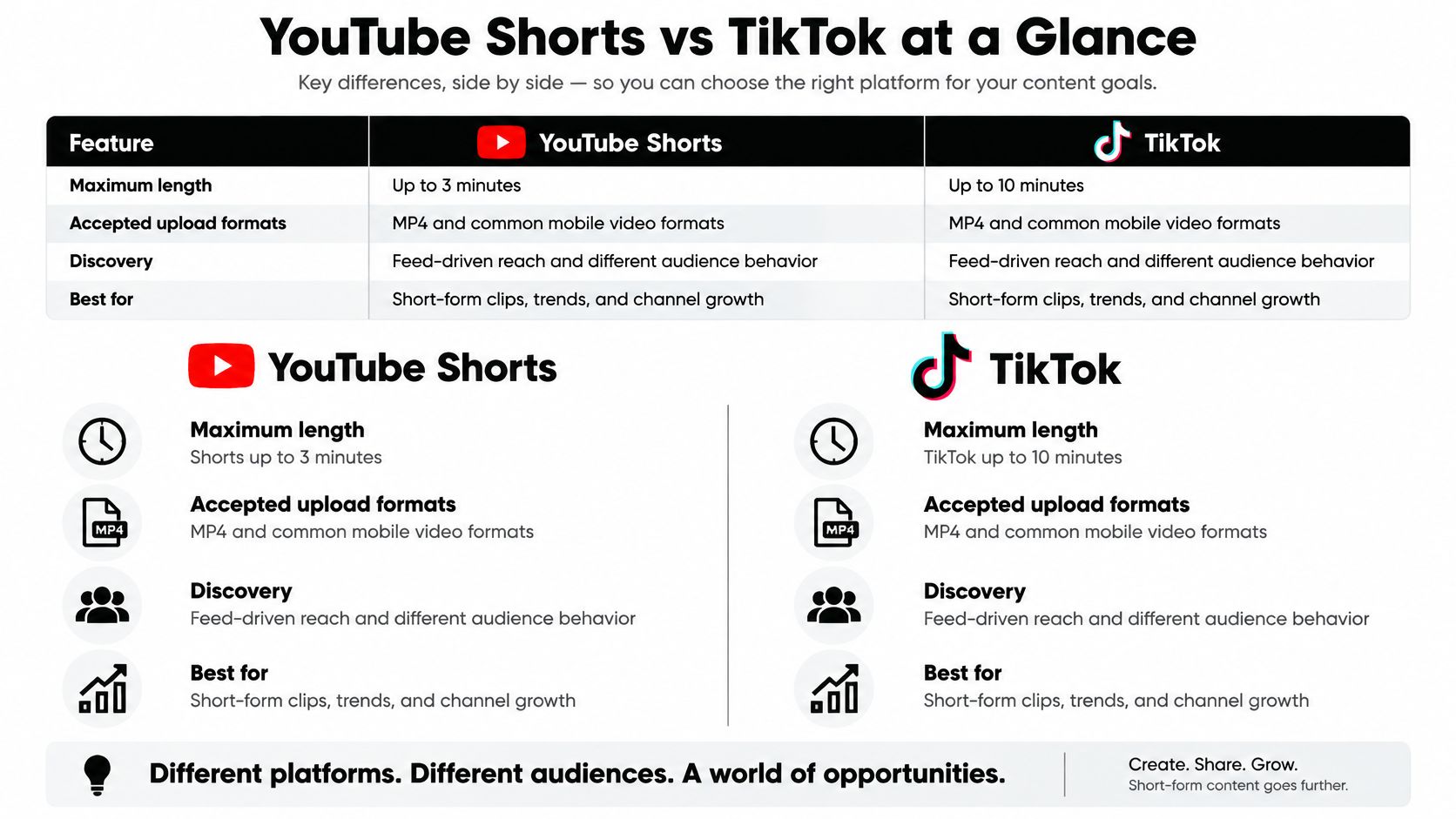
| Criterion | YouTube Shorts | TikTok |
|---|---|---|
| Maximum video length | Up to 3 minutes | Up to 10 minutes |
| Accepted upload formats | MP4 and other common containers | MP4, MOV, WebM |
| Discovery model | Shorts feed inside a full YouTube channel | Standalone For You feed |
| Native creator payout entry | YouTube Partner Program access | 10,000 followers, 100,000 views in previous 30 days, videos over 1 minute |
| Estimated payout per 1,000 qualified views | $0.01–$0.33 | $0.40–$2.00 |
| Path to long-form viewing | Direct link to the channel's long-form videos | Limited, mostly through profile and follows |
What the Rows Mean in Practice
TikTok is a mobile-first discovery network built around one job, serving the next short video to someone who didn't ask for yours specifically. Your follower count matters less at the moment of distribution, and the feed can test a clip with strangers quickly. That design favors speed, trend timing, and a hook that works without context from your channel.
Shorts is a short-video layer on a long-form platform. A clip sits beside subscriptions, search, channel pages, and longer videos, so one view can lead to another kind of viewing. Growth may feel slower at first, but each subscriber joins a channel that can publish more than vertical clips. You're not just chasing a feed placement, you're building a library entry point.
The payout row needs the most caution. Those ranges are industry estimates per 1,000 qualified views, not rates either platform guarantees you, and they apply only after you've cleared the entry row above them. A creator with no followers can't collect either one yet.
Treat this table as a snapshot, not a contract. Check current length, format, and program rules in each app before you publish, because platforms change them without asking creators.
Three decisions determine where you should lead. Which feed gives a new post reach, what file you should export so it survives both interfaces, and where money appears on the way from zero to eligibility.
How Discovery and Reach Differ Between Feeds
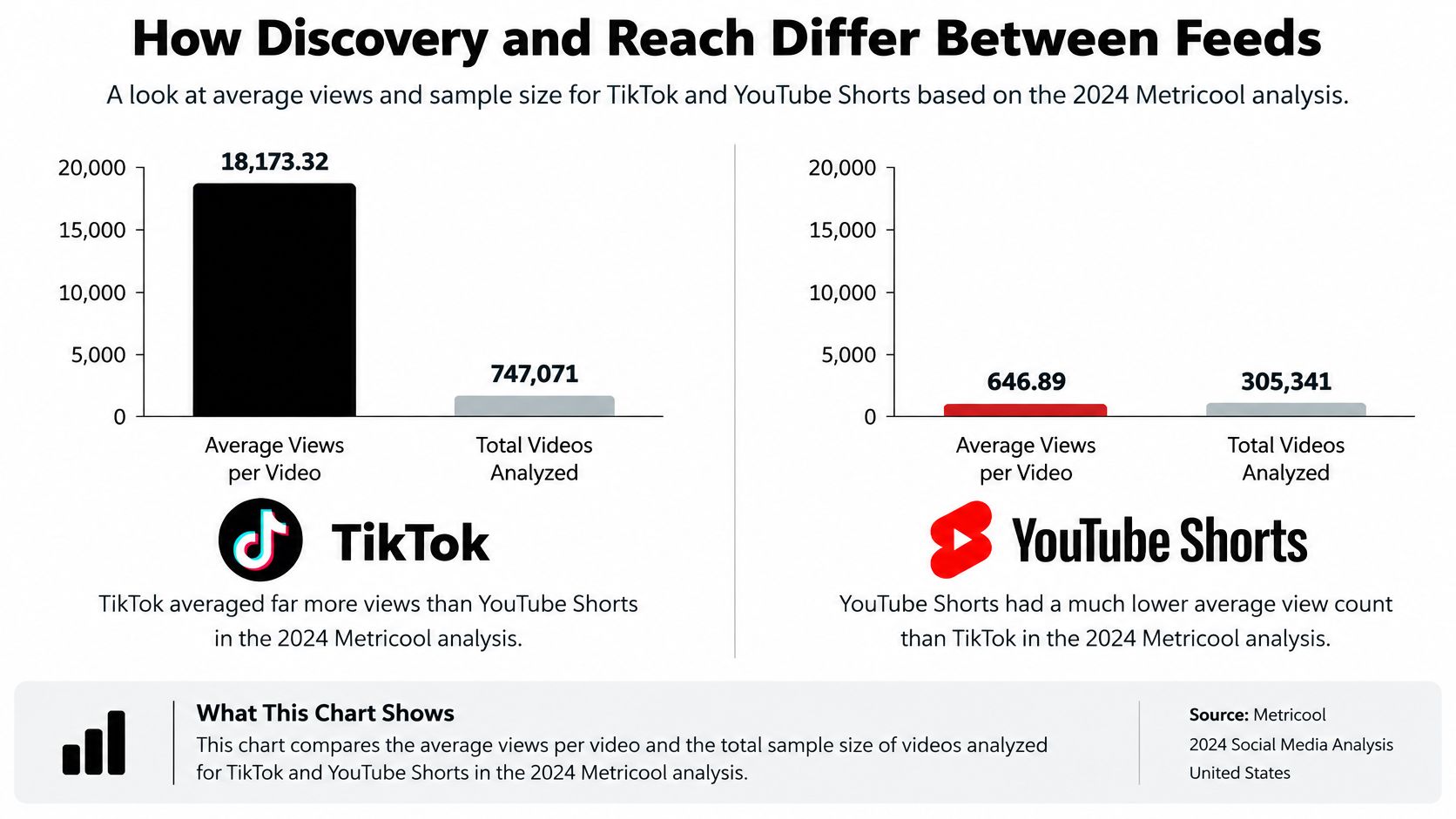
In 2024, TikTok videos averaged 18,173.32 views, compared with 646.89 average views for YouTube Shorts, according to Metricool's short-form video study of 747,071 TikTok videos and 305,341 Shorts. That's a gap of roughly twenty-eight to one on the mean, and it's the single strongest piece of evidence for TikTok as a cold-start discovery engine.
| Measure | TikTok | YouTube Shorts |
|---|---|---|
| Average views per video in 2024 | 18,173.32 | 646.89 |
| Videos analysed in 2024 | 747,071 | 305,341 |
| Average views by creator-account size in Q1 2024 | Higher at every analysed size | Lower at every analysed size |
The pattern isn't only a big-account effect. In Q1 2024, TikTok videos generated more average views than YouTube Shorts across every analyzed creator-account size, according to Statista's short-video platform comparison. Small, mid-sized, and large accounts all showed the same direction.
Why the Average Still Misleads You
A mean is pulled upward by a small number of viral posts, so the typical video on either platform almost certainly sits well below its average. Don't budget your expectations around 18,173.32. Compare medians and per-post ranges in your own analytics, where you can see whether most clips cluster near a few hundred views with occasional spikes.
The mechanism explains the direction, if not the exact size. TikTok's For You feed tests new videos with strangers and can push a small account's post widely within hours if early viewers finish, replay, and share it. Shorts distributes through subscribers, viewers of related long-form videos, and search-driven audiences. A new channel with no subscribers and no search history has fewer of those surfaces working for it, so growth tends to be slower and steadier.
Measure against yourself, not against a national average. Record views at 7 days and 28 days for every post on both platforms, then compare each new clip with your own recent median. A Short that keeps adding views between day 7 and day 28 is behaving like a search asset, and that's a different kind of win than a TikTok spike that ends in 48 hours.
Who Watches Each Feed and Why They Click
In 2025, 40% of YouTube Shorts users were not TikTok users, according to a Morgan Stanley AlphaWise survey cited by Google. Turn that around and about 60% of Shorts users also use TikTok. Cross-posting therefore overlaps with a large share of your audience, but it also reaches a real minority you'd never touch on TikTok alone. Posting on both isn't redundant, and it isn't twice the audience either.
Two Different Reasons to Open the App
TikTok viewers mostly open the app for entertainment, trends, and a feed that keeps moving. They didn't arrive with a question, so they reward fast hooks, participation formats, and clips that feel current this week. If your opening needs ten seconds of setup, the swipe has already happened.
Shorts viewers often arrive from a YouTube search, a subscription, or a recommendation next to a long video. They respond to clear topics and useful answers because many of them were mid-task when your clip appeared. A descriptive title does real work here, since it matches the words someone typed.
Say a tutorial creator posts a 45-second how-to clip on both platforms. On TikTok it earns follows from people who liked the format and want more of the same energy tomorrow. On Shorts the same clip reaches searchers with that exact problem, and some of them click through to her 12-minute full tutorial. Same file, two different assets. The TikTok view is worth a follow, the Shorts view is worth a follow plus twelve minutes of watch time.
A view is not a unit of value. Ask what the viewer does next, because that's where the platforms diverge.
Match your metrics to that intent. On Shorts, watch returning viewers and long-form clicks, because they show whether clips feed the channel. On TikTok, watch follows per view and comments, because they show whether strangers are converting into an audience and a conversation. Judging TikTok on long-form clicks it can't produce, or Shorts on comment volume it rarely produces, makes both look broken.
Export Specs and Editing Workflow for Both Feeds
Start with one master. For cross-platform production, export a 9:16 vertical master at 1080×1920 using MP4, H.264 video, and AAC audio, as set out in Vista Social's video specs and guidelines. TikTok's commonly documented specifications support MP4, MOV, and WebM, 23–60 fps, a 1 GB maximum file size, and videos up to 10 minutes, while YouTube's documentation is summarized as allowing files up to 128 GB or 12 hours, with Shorts limited by short-form duration rules.
| Setting | YouTube Shorts | TikTok | Recommended master |
|---|---|---|---|
| Aspect ratio | 9:16 | 9:16 | 9:16 at 1080×1920 |
| Container | Common MP4 uploads | MP4, MOV, WebM | MP4 |
| Video codec | H.264 accepted | H.264 accepted | H.264 |
| Frame rate | Match source frame rate | 23–60 fps | 30 fps unless source is 60 fps |
| Maximum duration | Short-form limit set by platform | Up to 10 minutes | Match the platform length rule |
| Maximum file size | Platform upload limit | 1 GB | Keep the file under 1 GB for TikTok |
| Audio codec | AAC | AAC | AAC |
A Five-Step Export Workflow
- Render one clean master: Export the 1080×1920 MP4 from your project, never from a file you downloaded off the other platform, so you don't carry over its compression or watermark.
- Keep the project file: Preserve the original edit so a platform-specific cut, a reworded caption, or a trimmed opening stays possible later.
- Protect the safe zone: Place captions and on-screen text away from the bottom and right edges, where buttons, captions, and progress bars cover the frame.
- Upload a private test to each app: Check the bottom third on a phone, since that's where text disappears behind each interface.
- Compare after processing: Listen for audio level shifts and look for softened detail, because each platform compresses the same file differently.
That last step matters more than creators expect. TikTok and Shorts apply different interface overlays, compression, and audio treatment, so an identical upload can look clean in one app and cramped or quiet in the other. Performance differences that look algorithmic sometimes turn out to be a caption hidden behind a button.
If you generate clips with an AI tool, judge it on export control, meaning resolution, frame rate, codec, audio, and caption placement. A tool that produces a vertical clip but won't let you set those values, or burns captions into the lower third where neither interface leaves room, creates rework on every post. The clip is the easy part. Delivering it correctly twice is the job.
Monetization Paths From Zero Income to Payouts
Headline payout rates answer the wrong question for a new creator. A cited industry comparison estimates TikTok Creator Rewards at roughly $0.40–$2.00 per 1,000 qualified views versus approximately $0.01–$0.33 for YouTube Shorts, while TikTok's cited eligibility requires at least 10,000 followers, 100,000 views in the previous 30 days, and videos longer than one minute, according to Fastlane's short-form video benchmarks. TikTok pays more per qualified view. It also lets fewer beginners in.
| Program | Eligibility | Estimated payout | What it excludes or limits |
|---|---|---|---|
| TikTok Creator Rewards | 10,000 followers, 100,000 views in previous 30 days, videos over 1 minute | $0.40–$2.00 per 1,000 qualified views | Paid, fraudulent and very short views |
| YouTube Shorts monetization | YouTube Partner Program access | $0.01–$0.33 per 1,000 qualified views | Depends on the Shorts revenue pool |
| Before program eligibility | Not yet eligible for native payouts | No native payout | Brand deals or links to other income sources |
Model It in Three Stages
Discovery comes first, views and follows with no native income attached. Eligibility is the threshold each program sets, and it's a cliff, not a slope. Post-eligibility revenue is where the per-1,000-view figures finally apply. Comparing stage three numbers while you're standing in stage one produces a confident answer to a question you don't have yet.
Qualified views shrink the math further. Paid, fraudulent, and very short views are excluded, so a viral view count can't be multiplied by a payout range to estimate earnings. A clip that people swipe away from in two seconds may add reach and add nothing to revenue.
Work the zero-start case. A creator with 400 followers posting 45-second clips is ineligible for TikTok Creator Rewards on two counts, follower count and video length, no matter how well a post performs. Her first meaningful income is more likely to come from a brand deal, an affiliate link, or YouTube long-form videos that her Shorts point viewers toward. TikTok's higher rate becomes relevant only after she's built the audience that qualifies her, at which point she'll also have other offers.
Don't ask which platform pays more. Ask which platform pays you first, given where you're starting.
Keep engagement claims at arm's length too. The same benchmark reports average engagement of 2.60% for TikTok versus 0.30% for YouTube Shorts, but those figures aren't interchangeable without confirming whether engagement is calculated against followers, views, or another base. Track views, average watch time, completion rate, shares, follows per 1,000 views, and revenue per 1,000 eligible views separately. Otherwise high reach or high engagement gets mistaken for a business result.
Growth Tactics Built for Each Platform
In 2025, YouTube Shorts generated more than 200 billion daily views, according to figures attributed to YouTube. That's a view-volume measure, not a count of unique viewers, so read it as a sign of scale rather than audience size. A feed that large rewards channels that give it related clips to recommend together.
Tactics That Fit Shorts
- Title for the search phrase: Write the title and first spoken line around words a viewer would type, since search is a real discovery surface here.
- Link the next answer: Pin or link a longer video that answers the follow-up question your clip raises, so the view turns into session time.
- Publish in series: Group related clips on one narrow topic so the feed can recommend them as a set and returning viewers recognize the format.
Tactics That Fit TikTok
Open with a visible hook in the first second, a result, a mistake, or a claim the viewer can judge before deciding to stay. Join trend formats early while the format still carries distribution, but keep your topic recognizable inside it. Reply to comments with new clips, which turns a question into a post and gives the commenter a reason to come back. A repeatable series with a consistent opening line helps strangers identify you across separate feed encounters.
The adaptation rule sits between the two lists. Run the same master on both platforms if you must, but change the hook, runtime, call to action, and captions for each. A TikTok cut that ends by inviting a comment needs a different ending on Shorts, where the useful action is clicking the linked long video. Identical files save an hour and cost you the outcome each platform is good at producing.
Test it rather than arguing about it. Post one master on each platform three times a week for four weeks, change only one variable per week, and log returning viewers, long-form clicks, and follows per post. At the end you'll know which platform moves your goal. Raw view totals alone will almost always crown the wrong winner, because they ignore what happened after the view.
Where AI-Generated Videos Fit Each Platform
Disclosure first. Revid Reviews is run by the Revid team, which means we have an interest in Revid being chosen. Read our product claims as a vendor's claims, check them against the public reviews we link to, and run the test below before paying.
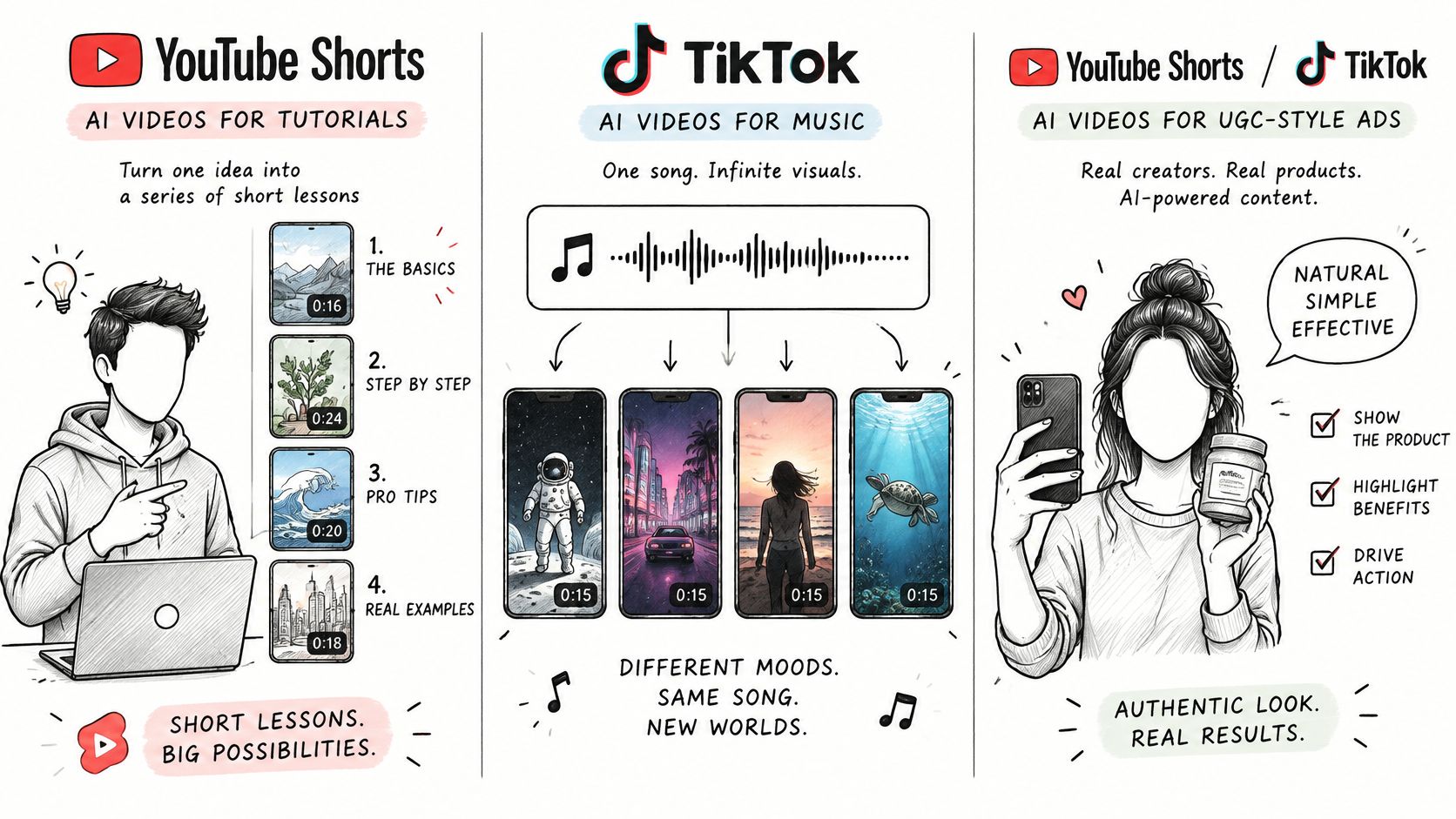
Three use cases fit AI generation well. Faceless tutorial channels need many short, structured clips on searchable topics, which suits Shorts and its long-form funnel. Music videos built from a single song need visuals produced quickly and repeatedly, and they can run on either feed since the song is the hook. Short UGC-style ads need volume and fast variant testing, which suits TikTok's rapid feedback.
Revid focuses on short-form content for TikTok, YouTube Shorts, and Instagram Reels, and it's an AI video generator that lets users type a prompt and get a script, visuals, and voice in one generation. That combination addresses production speed. It doesn't address judgment.
The video below shows the kind of short-form output this workflow produces, so you can judge pacing and caption placement yourself rather than taking a description on faith.
What to Check Before You Pay
AI output needs review for factual errors and brand voice. A generated script can state a wrong step in a tutorial confidently, and a voice that sounds generic across fifty clips gives viewers nothing to recognize. We also can't point you to independent evidence that AI-generated clips outperform filmed ones on either platform, so treat reach claims as unproven until your own posts say otherwise. Common complaints about tools in this category involve limited editing control after generation and captions placed where app interfaces cover them.
Run this test first.
- Generate one clip: Use one prompt that produces a 30-second vertical video on a topic you'd publish.
- Export to spec: Produce a 1080×1920 MP4 with H.264 video and AAC audio.
- Upload to both: Post the same file to YouTube Shorts and TikTok.
- Inspect on a phone: Check the bottom third, caption placement, audio level, and compression in each app.
- Confirm terms: Check current trial and pricing terms on the vendor's page before buying. Revid offers a free trial that requires no credit card to start.
Choose Your Platform and Post This Week
Pick by goal, not by which app feels bigger.
- Fastest growth for a new account: Lead with TikTok, where the 2024 view data and standalone For You testing give unknown creators more exposure per post.
- Long-term search traffic and a library that keeps earning: Lead with Shorts tied to a long-form channel, so clips keep surfacing and feed longer watch sessions.
- First meaningful income before eligibility: Expect it from brand deals or long-form YouTube content, not from either native program, since both pay only after you qualify.
- AI-generated faceless channels: Run both feeds, provided you check each export on a phone before publishing.
The YouTube Shorts vs TikTok answer for a creator starting from zero isn't the platform with the higher rate. It's the platform where your next thirty posts build toward something you can collect on, whether that's eligibility, a subscriber base, or a deal pipeline.
Keep the rule simple for the first 60 days. Choose one primary platform, cross-post the same master to the second with an adapted hook and ending, and don't add formats until you've read four weeks of results. Splitting your attention across different content for each app before you have a baseline tells you nothing.
Do this week. Export one 1080×1920 master, post it to both platforms on the same day, and record 7-day and 28-day views, returning viewers, and follows for each version. Decide your primary platform from those numbers, not from anyone's ranking, including this one.
If you're weighing an AI video tool for Shorts or TikTok, Revid Reviews collects public Revid reviews from Trustpilot, X, and Product Hunt, each linked to its original, alongside buyer guides on pricing, credits, cancellation, and how Revid compares with other generators. Read the complaints as closely as the praise, then run the two-platform export test with the free trial before you commit to a plan.